Starting with 3CX, could use some tips & tricks

jeroentje

Customer
Joined
Mar 3, 2025
Messages
23
Reaction score
9
Hello all,

Nice to meet you all, I just started with 3CX to see if I can switch from FreePBX to 3CX. It doesn't go very well so far :) but I'm sure that's on me!
First I tried to set up the free SMB but the limitations (I have over 25 phones connected and I use trunks who are not supported in this version) of this free version won't work for me.
Then I tried to set up a hosted version on Google. It worked, I could connect a sip trunk and was able to send en receive calls on the softphones. I didn't try IP phones.

It isn't clear to me what Google is going to charge me for this And besides that, I'm not sure if I want to trust Google with this.
So I did an install on a virtual server. Again, I managed to connect a sip trunk but I'm only able to receive calls, I can't make them. Bigger issue is that I can't connect IP phones. Now, I found some info about the need to use a SBC. Unfortunately my phones don't have that function.
The phones are used in separate locations. Mainly at a community center, a few at home and I gave some elderly people in my street phones so they have a cheap phone connection.

Love to read your thoughts and tips. It is very different from FreePBX but I do like to learn and explore!
 
A small miracle happened! The T46G is up and running. Very happy with that.
Next queeste is to get the older phones working. But I gained a bit more confidence this is the way to go
 
Got it working. I'ts a bit more work on the older phones but I guess that's the price for cheap EOL hardware.
 
I hope I can continue asking questions here..
I have a trunk with multiple phone numbers. I can set a default route. But how can I set a different route for a specific phone number?
When calling out it doesn't show the CID. My trunk is set to transparant. So I probably need to dive in some settings.
 
  • Like
Reactions: Evolute IT
I hope I can continue asking questions here..
I have a trunk with multiple phone numbers. I can set a default route. But how can I set a different route for a specific phone number?
When calling out it doesn't show the CID. My trunk is set to transparant. So I probably need to dive in some settings.
Enter your DIDs in the trunk DIDs tab. Then assign them to different destinations by using the Assigned DID in each user/IVR/ring group/department/etc.
 
Alright! And again, I have learned. This is so different to FreePBX. But I like it and made the decision to change complete to 3CX. I will have a enterprise licence. Most of my neighbours are in for changing to the app.
I have a small problem concerning the caller ID for outgoing calls, receiver doesn't see a number. Probably a setting somewhere?

Update: Never mind, found it. It's in the way the number is send to the provider.
 
I even got the older phones provisioning now.
I see I'm still a Trial User on the forum. I upgraded to enterprise, do I need to change something to be a regular user?
 
  • Like
Reactions: Evolute IT
It can take some time to update. Check in a few days.
 
I even got the older phones provisioning now.
I see I'm still a Trial User on the forum. I upgraded to enterprise, do I need to change something to be a regular user?
You can just log out and log back in to the forum and it will refresh your status.
 
  • Like
Reactions: Evolute IT
Great. One of the guys now ;)
I found a small issue with the 3CX phonebook. Everyone can see everyone. I don't want people from a department see extensions/persons from other departments. Any suggestions how to fix/handle this? Or how to shut the 3CX phonebook down completely?
 
Hi, just a quick followup on the thread.

Skimming over this thread, maybe just a few quick comments, in case this could be of any help?

From your initial thread point-of-information:

"I just started with 3CX to see if I can switch from FreePBX to 3CX."
and
"The phones are used in separate locations. Mainly at a community center, a few at home and I gave some elderly people in my street phones so they have a cheap phone connection."

so, I am guessing maybe it could be helpful for you, if not already stated clearly by others, or not yet apparent from the thread (?)

- 3cx has free-loss-leader version of product, but it is - inherently by design - not the full version of the product.
- I think it might be safe to say, part of the intent of 3cx free/loss leader version(s) is to encourage interest / let people 'kick the wheels' and learn about 3cx. And also to give a good and useful tool / for specific scenario / limited use case scenarios (ie, small business office with very few users, straightforward needs, and a desire to not pay much for the PBX).
- if you have ~>25 phone 'extensions' (aka phone devices) at many locations (I think this is the case based on your info given in the top of the thread?) - then possibly 3cx is not going to be a great fit for you - if this is a mandatory requirement. (ie, especially with desire for ~free/super low cost model?)

ie, an assortment of legacy handset phones that worked fine with a different voip PBX (FreePBX?) may not be a great use case scenario for 3cx, especially if low-cost/no-cost is the goal. Or at least things can get complicated and difficult. (And then possibly you end up spending in time and support what you save in dollars. depending on how you like to spend time/ learn and support things, maybe this is good, or maybe not. )

broadly speaking if you are using classic voip phone handset hardware which is not 'newer, modern' then those devices won't have "built in tunnel support' features which permit 3cx<>multiple handsets to 'very easily' communicate well with the PBX.

possibly if you know for certain, you have only a single handset at any location (ie. for each public IP address) then you might be able to do some semi-gross manual config and make things work, but I believe it is technically unsupported by 3cx / and possibly prone to drama around config, call flow, inbound and outbound call reliability, etc.

broadly speaking, the most trivial way to achieve what you want maybe?
- assume all users will only (!) use softphone (ie, 3cx android app / iphone app / web browser client app)
- they may put themselves into "DND/do not disturb' mode if they wish to not have the 3cx phone ring.
- the app takes care of connectivity/tunneling/configuration/provisioning and is 'very easy'. So arguably that is simply a good/best thing.

note a typical 3cx deploy scenario might be
3cx is hosted either by 3cx, on their infrastructure, possibly free-small-version of 3cx; or a paid not-free-not-small version
OR
3cx is hosted by (you or someone else) / possibly someone helps you set it up or you set it up / 'public cloud' hosted in some form
OR possibly an on-prem 3cx (ie, you install 3cx on your own hardware at your home-office-etc). But in this scenario you will also have some fun possibly with firewall config / accessibility / routing / traffic / in order to have 'easy good reliable operation'.

and generally with 'legacy handset voip phones' you need an 3cx SBC gateway device in the same LAN network (for all LAN network locations where phone handsets are deployed) to facilitate the phone<>3cx PBX communications. (this can be either a "Raspberry pi or similar small box running SBC instance, or possibly a 'gateway modern voip handset - some models exist, you will need to read online 3cx handset info for more info).
but generally you - would need a 'gateway' at each physical location where legacy handsets are used (more or less)

Generally for simplicity I am guessing your options are
-- simplest > is to use the free SMB 3cx offer, if that has enough EXT to meet your needs
-- next > is to use the non-free 3cx hosted in a modest sized VM in the cloud. Or you pay 3cx for this service. Or a partner who helps you with setup something like this.
-- there will be license costs for 3cx for all scenario other than the "3cx host the free small pbx for you version of the product"

depending on how you want this to work, 3cx might be a great choice, for an excellent modern PBX
or it might not be the best fit, if your requirements are focused around

very low/no cost
legacy hardware handset voip phones supported / at many physical locations
note that - scattered deployment / multiple locations / maybe more drama for management

not to discourage you from trying and using 3cx, so much as to suggest that - depending on the use case it may not be the perfect fit. OR it might be a great opportunity to transition to something a bit more modern.

I can provide more specific comment if desired, ie, please feel free to ping me back if you have question/comment.

hope this is slightly helpful maybe

-Tim
 
Hi @fortech
Thank you for your thoughts. Let me give you all a small update on how it's going!

With the help of this forum and its users and especially @ConceptsWeb I managed to get it all working. For myself and one neighbour I have bought two router phones. The other neighbours use the softphone app. For the community center, I have a SBC on Raspberry. This all works well.
I have learned that "when something doesn't work, it's probably a firmware issue" ;-) Even the older EOL phones work with the right firmware on it.
I used the CFD to create a nice flow for calling to the community center. Love the features it creates!
Am I completely in love with 3CX now? Almost. There are a few things I don't like. The biggest issue for me is the systemwide phonebook, really hate that! I don't understand why this isn't separated for each department or can be shut off. I can manually delete them in each IP phone on the web interface but that means I can't use the provision from 3CX anymore for that phone because it instantly puts the phonebook back into it. Hope this gets fixed soon.

What's next? I'll continue to discover and learn and maybe I can help others on this forum in the future.
 
Hi @fortech
Thank you for your thoughts. Let me give you all a small update on how it's going!

With the help of this forum and its users and especially @ConceptsWeb I managed to get it all working. For myself and one neighbour I have bought two router phones. The other neighbours use the softphone app. For the community center, I have a SBC on Raspberry. This all works well.
I have learned that "when something doesn't work, it's probably a firmware issue" ;-) Even the older EOL phones work with the right firmware on it.
I used the CFD to create a nice flow for calling to the community center. Love the features it creates!
Am I completely in love with 3CX now? Almost. There are a few things I don't like. The biggest issue for me is the systemwide phonebook, really hate that! I don't understand why this isn't separated for each department or can be shut off. I can manually delete them in each IP phone on the web interface but that means I can't use the provision from 3CX anymore for that phone because it instantly puts the phonebook back into it. Hope this gets fixed soon.

What's next? I'll continue to discover and learn and maybe I can help others on this forum in the future.
Ah, this all sounds lovely. Great to hear things made progress / and for the most part all is well-and-good. Sounds like the "router phones" and the SBC make a lot of sense.
I agree re - older phones - can be sometimes a bit of 'fun' to get working. But in many cases they can work surprisingly well - it is sometimes just a matter of figuring out "how much work will this take" vs "can I get my hands on nicer phones within budget easily to work around this constraint" :-) - but that can be part of the adventure with 'older gear'.

Hopefully someone else can see this thread reply status and might be able to comment on the open topic re: "systemwide phone book" - I would have sort-of thought there is a way to partition the extensions in the system via the "Departments" and then subdivide things that way. But - hopefully - someone who knows with certainty can comment.

anyhoo. Great if things are in a good place! Thank you for the update.

-Tim
 
The biggest issue for me is the systemwide phonebook, really hate that! I don't understand why this isn't separated for each department
This is something that is in the pipeline and should be coming in an upcoming update.
 
  • Like
Reactions: Evolute IT
That's good news @NicholasP_3CX :D
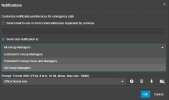
Maybe in the future this can be changed for emergency notifications to? Now I can only set this systemwide. I would prefer to set this per department.
 
That's good news @NicholasP_3CX :D
Maybe in the future this can be changed for emergency notifications to? Now I can only set this systemwide. I would prefer to set this per department.
Chat notifications can be sent to each departments users and/or managers.
 
  • Like
Reactions: Evolute IT
Hi @NicholasP_3CX I ment the notifications on System -> Emergency -> notifications.
I would like to choose per department where notifications/announcement is send to.
 
The emails and call are system wide. The chats however can be department specific

1742790904512.png
 
  • Like
Reactions: Evolute IT
This is something that is in the pipeline and should be coming in an upcoming update.
Glad to hear this is still in the pipeline! I was worried it had been forgotten about.
 

Latest Posts

Forum statistics

Threads
111,964
Messages
590,000
Members
164,869
Latest member
hpgitsupport