- Joined
- Jul 1, 2016
- Messages
- 6,616
- Reaction score
- 2,632
Hi all
Im running 18 update 5 at the moment and i'm seeing features that are hidden but also useful at the same time..
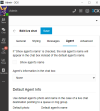
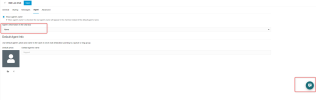
for example, I wanted to be able to access the enhanced live chat customisation to achieve what i wanted with click2talk with queues.
Now, the only way I can get the ability to show Office Settings is to enable MCM. However, doing this prevents groups from calling between each other.
is this avoidable?
I've had to turn off MCM again but obviously it leaves me with office manager rights so I can still access Office Settings - Is this addressed in U6?
Im running 18 update 5 at the moment and i'm seeing features that are hidden but also useful at the same time..
for example, I wanted to be able to access the enhanced live chat customisation to achieve what i wanted with click2talk with queues.
Now, the only way I can get the ability to show Office Settings is to enable MCM. However, doing this prevents groups from calling between each other.
is this avoidable?
I've had to turn off MCM again but obviously it leaves me with office manager rights so I can still access Office Settings - Is this addressed in U6?