Solved Static or Dynamic External IP Address?

Status
Not open for further replies.

Jonners

Free User
Joined
Apr 10, 2019
Messages
62
Reaction score
9
I have used 3CX for many, many years and assumed it has to have a STATIC (fixed) external IP address. To date that hasn't been a problem, but now I want to change ISP and the ISP I want to use does not offer static addresses. Checking the 3CX "Settings" -> "Advanced" -> "Network" it now seems to offer both STATIC and DYNAMIC.

So three questions, I guess:
Is STATIC addressing necessary?
If not then do I use (tick) the DYNAMIC box and will I lose any functionality/what changes will I see IF any?
If STATIC IS required, then how do I overcome the problem of ISPs not offering fixed addresses? I did once look at "No IP" but if I recall it wasn't so simple to apply.

Thank you.
 
3CX prefers you have a static IP, but you can get away with a dynamic ip address. Under Settings -> Advanced- Network set it to dynamic.

If you have a 3CX fqdn , it may take 6 hrs or 6 mins for the record to be updated if the wan IP address changes (Std and Pro is 6 hrs, Ent is 6 mins). During the fqdn record update, remote users will not be able to connect back to the 3CX server


Beware if your sip provider uses IP registration and your IP address changes, and the sip provider restricts access to your wan IP, your sip trunk will be down until you update the details in the sip portal.
 
Be aware as well that if your ISP is a mobile network that offers carrier grade NAT, then you will encounter issues port forwarding so I would ask new ISP if youre able to port forward.
 
  • Like
Reactions: Jonners
OK, so I should be able to get away with it, guys?

You raised one point that I forgot about, though only I use, and that is remote users. I sometimes register a softphone, typically on my mobile. How would I do that if the IP keeps changing?
 
If your wan address changes, as above you need to allow the 3CX fqdn to be updated.

If the fqdn points to the incorrect IP, your 3CX mobile will not be able to connect

This only affects if you are remote, should not affect you connected via WIFI internally to 3CX server
 
  • Like
Reactions: Jonners
If your wan address changes, as above you need to allow the 3CX fqdn to be updated.

If the fqdn points to the incorrect IP, your 3CX mobile will not be able to connect

This only affects if you are remote, should not affect you connected via WIFI internally to 3CX server
Thank you. SO basically, as it's only me and very rare it shouldn't be an issue.

So, ONE small question then. I currently use the IP address in the app to find the 3CX and of course port fwd to the 3CX. As I now will have no IP address, what do I use? What do I put in the soft app on my phone instead of the external IP address?
 
If you use the config file from the welcome email to configure the mobile app, it will contain the 3CX FQDN as the server for external access.
 
  • Like
Reactions: Jonners
If you use the config file from the welcome email to configure the mobile app, it will contain the 3CX FQDN as the server for external access.
I don't recall any welcome email or config file... Where and when is this sent and by whom, please?
 
Hi
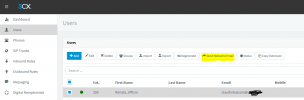
Dashboard->Users->youruser->Send Welcome Email

1647161654475.png
 
  • Like
Reactions: Jonners
Hi
Dashboard->Users->youruser->Send Welcome Email

View attachment 28637
Thanks, Claudio,
I think I found the FQDN in the Dashboard. Interestingly. I tried logging in to the 3CX server via it as admin when I had fixed EXTERNAL IP enabled and it would always fail. Now I have changed to Dynamic IP it works and even within the LAN the IP address fails on some machines... Odd that. I would have thought that via internal LAN (which is fixed) it would still work on all. That being the administration account.

Anyway, so send the welcome email with QR code. DIdn't work at first, seems I had an old version of the softphone. AFter fuffing about I cleared the data and uninstalled the 3CX app and reinstalled and then scanned again and all worked wonderfully. THANK YOU!
 
  • Like
Reactions: ClaudioBassani
  • Like
Reactions: Jonners
  • Like
Reactions: ChrisC_3CX
Thank you. Seems to be fine now. Hope this thread helps others.
I'm sure it will!

Will be closing this thread since everything seems to be in order so please do let us know if anything else comes up!
 
  • Like
Reactions: Jonners
Status
Not open for further replies.

Forum statistics

Threads
111,974
Messages
590,081
Members
164,899
Latest member
mazet