Status inactive

Status
Not open for further replies.

emtexcc

Free User
Joined
Dec 10, 2020
Messages
33
Reaction score
0
Hi all,

I'm testing 3cx-teams integration.
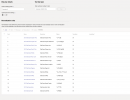
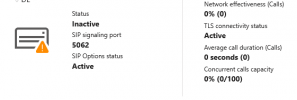
And after I all configured it says:
1649846589676.png

Port 5062 is opened (it is 3cx cloud hosted) and I used Sectigo PostiveSSL (https://sectigostore.com/ssl-certificates/positivessl)

After reading I found that some people had problems with cert. Is there any option to check where is the problem?
 
Hi!

The "Inactive" status is a bit misleading, if you have just set it up now, it might be like that as there has not been any traffic of this integration.

*Usually*, when "SIP Options" and "TLS connectivity status" are "Active", it is OK.

What Certificate and from what CA did you use?
Also, have you tried making any call from the Teams Client to a 3CX Client, or the opposite?
 
Hi,

I didn't make any calls for now because I'm waiting in teams for the dial pad, not showing inside teams. I have Microsoft E5 license (probably it takes some time to show up)

I used Sectigo(Comodo) Positive SSL
 
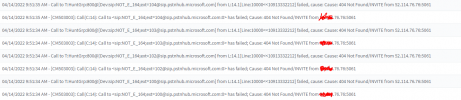
Also from calling 3CX client to Teams I get:

04/14/2022 10:04:34 AM - Call to T:Extn:104@[Dev:sip:NOT_E_164;ext=[email protected]] from L:20.1[Extn:100] failed, cause: Cause: 404 Not Found/INVITE from xx.xx.xxx:5061
 
OK, so right now calls in neither direction work:
  • 3CX --> Teams
  • Teams --> 3CX
Let's start from Teams --> 3CX.

From your Teams client, please try calling: *777
Does the call get established?
 
After calling *777 it starts calling and drops the call without an error (declined or something)

Also it adds +385 to it

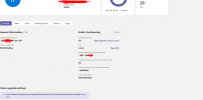
1649924275654.png

In 3CX I dont see any logs in that time 10:15
 
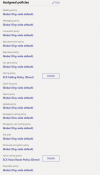
OK, so first of all, this happened because in the Dial Plan that was created hasn't been set for this user:
1649924858979.png

This means that the initial scripts you ran didn't complete correctly.

Also, for the Teams user you tried from, can you specifically check again this here:
https://www.3cx.com/docs/microsoft-teams-integration-faqs/#h.4dm9u5zhjuda
and make sure that the number you have entered is E164 format?
 
Hi @NickD_3CX ,

thanks, it working now just after changing dial plan.

But can't get incoming calls working on teams. On 3cx client it is ringing but on teams not.

Getting same error: Call to T:Extn:104@[Dev:sip:NOT_E_164;ext=[email protected]] from L:20.1[Extn:100] failed, cause: Cause: 404 Not Found/INVITE from xx.xx.xxx:5061
 
Yes it is ok
1649929386342.png

I think the problem is in inbound calls because displayed number is 1091xxxxxxx but it should be +38591xxxxx. That is probably on sip trunk provider side how is he sending the number?
 
Hi @NickD_3CX ,

i think I found the problem. It is in Ring group when users are in the ring group it is not forwarding calls in E164 but after I put inbound rule direct on that user it is working normal.

Also tested with Call Queues it is working but the user who is using teams receives the call and it is ringing , but user on 3cx client receives call and it auto ends the call and after it ends again receives call and ends call
 
What version of 3CX do you currently have installed? In the Dashboard you can check this in the "Information" panel.

Also, please only do tests between extensions for now:
  1. Log into the 3CX WebClient using Ext A
  2. From Ext A, call Ext B that is synced and is using the Teams Client
  3. Does it ring?
Also:
  1. From Ext B that you have sync with Teams, from the Teams client call Ext A
  2. Does Ext A ring?
 
Hi,

first is working I can call from 3cx webclient on teams.
Second one it is not working getting:

Call to T:Line:10000>>385105@[Dev:sip:[email protected]:5060] from L:44.1[Extn:104] failed, cause: Cause: 404 Invalid number: 385105

It is adding 385 front of internal number
 
Last edited:
I also see that 3CX contacts are not visible inside teams or I'm looking on wrong location?
1649941872923.png

Is there any option to set to route internal calls over 3cx ? I is still getting over the trunk when calling from teams -> 3cx internal number

I also see that there are no more Microsoft Phone System (add-on) or Business Voice (add-on) inside MS365 store, there is only Microsoft Teams Phone standard license addon. It is same or?
 
Hi,

first is working I can call from 3cx webclient on teams.
Second one it is not working getting:

Call to T:Line:10000>>385105@[Dev:sip:[email protected]:5060] from L:44.1[Extn:104] failed, cause: Cause: 404 Invalid number: 385105

It is adding 385 front of internal number
I think your dial plan is wrong and that is why this is happening. Generally, things look to have gone wrong when you ran the scripts. The Dial Plan was not assigned, also the dial plan seems to be wrong, so very likely other things are wrong too.

At this point, I think you should deleted everything in your Teams Admin portal that was created by 3CX, then run the scripts from the beginning.


I also see that there are no more Microsoft Phone System (add-on) or Business Voice (add-on) inside MS365 store, there is only Microsoft Teams Phone standard license addon. It is same or?
Yes, I believe that is it. You can confirm if the users have the correct license, just go to the Management Console --> Users, and if in the "Synced with" column it says "MS 365+Teams", then the extensions that are synced with the MS Users have the right license.
 
Status
Not open for further replies.