Hi
You should be able to update all users when logged in as an admin using PWA
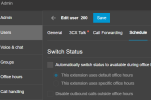
From the Admin icon bottom left > Users > select user to edit > Schedule
Then change settings as required
Hi
You should be able to update all users when logged in as an admin using PWA
From the Admin icon bottom left > Users > select user to edit > Schedule View attachment 35126
Then change settings as required
ah yep. Any idea what can cause the little phone icon in the wordpress plugin to be unresponsive when a user clicks on it? I have it added to my site but when clicking on it, it does nothing. I remember forever ago it used to give the visitor the ability to start a chat with my 3cx users.
*edit* nvm. Found out 3cx released another wordpress plugin instead of simply updating the one they've had released forever. Now it works. ha



 Thanks. Now to figure out what 3cx talk is.


