Solved Stop incoming calls via Hunt Group from ringing Mobile App

Status
Not open for further replies.

David Searles

Forum User
Basic Certified
Joined
Mar 19, 2019
Messages
53
Reaction score
16
Hi all,

I'm pretty sure that isn't possible, but it's actually becoming a question that is being asked more and more with the way companies are working.

I have a few customers that have ring groups that ring all, the question I'm getting is that they don't want to be getting external incoming calls hitting their mobile app when working from home. My argument is that its no different to sitting at your desk - your phone would still ring, but that isn't a valid answer (apparently).

However, just to appease these questions, thought I'd ask if anyone has come up with any kind of solution to this?

Any advice would be appreciated...
 
Just to be clear these users have their IP Phone in the office with their Extension Number, and on the same Extension Number they have configured their Mobile Apps, right?

Ok, I have worked with users enough to understand your frustration.

What exactly is their compaint, that they are receiving calls even after hours, which they don't want?
 
Hahaha - yep, I'm sure you will understand ;)

Yes, the scenario that you have described is correct. They have a Desk IP phone, with their personal ext number, the same extension is assigned to the 3CX app. I have office hours applied, so it's not that the phone will ring in the middle of the night or anything.

Basically, the long and short of it is, that whilst their phone in the office is part of the office Hunt Group, they don't want that to be the case when they are working from home with their 3CX App.

I've explained that they can set their status to stop the calls, but then the question of "I NEED to be able to take internal calls" comes up.

I'm fighting a losing battle, just wanted to ask on the off chance someone has come up with a similar solution?

A simple tick box along the lines of "don't route hunt group calls to the mobile app" is all I need - not too much to ask surely (I was being sarcastic there, in case it never came across in text - hahahaha).
 
There might not be any need for you to lose this battle! ;)

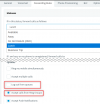
You could configure the "Custom 1" Profile Status and just disable the option to receive calls via Ring Groups and possibly even log out of Queues if you are using them.
1612424736746.png

When they are at home, they switch to this profile. When they are in the office, they must remember to switch back to "Available".
FYI, you can change the name of this rule from Settings --> General.

One more thing, to note about the 2 Profiles that can be customized. When a user has set one of these two, if you have enable the "Auto Switch" profile based on Office Hours, while these statuses are set, the extension will not switch statuses.
You can find some more info on this here: https://www.3cx.com/3cxacademy/videos/intermediate/configuring-extensions/
 
  • Like
Reactions: David Searles
You absolute beauty! :D

I knew I was missing something/overthinking it...

That's exactly what I needed - thanks so much for the push in the right direction.. All tested and working perfectly;)

Thanks again,
 
  • Like
Reactions: NickD_3CX
Status
Not open for further replies.

Forum statistics

Threads
111,974
Messages
590,081
Members
164,899
Latest member
mazet