Storage module warning won't go away

Techops

Customer
Joined
Feb 5, 2018
Messages
45
Reaction score
0
Ever since upgrading to the newest v20 with the Storage tab, getting the warning that the storage needs to be configured. The storage is actually configured and shows the files listed in the target location, but the warning still persists. Anyone having this same issue?

Warning:
Update Remote Storage Configuration.The remote storage module has been updated and now requires reconfiguration. Please review and update your settings using the options below, then save the changes.
 
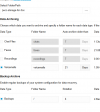
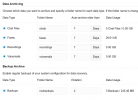
On the Remote Storage configuration page, the system currently displays a large red banner if not all storage categories are enabled (backup, voicemail, chat, fax, etc.). However, the page itself doesn’t explain that all categories must be configured—even those that are not actively used—in order to remove the warning.

This can cause confusion, as administrators may assume that it’s acceptable to leave unused categories unconfigured. A short note or tooltip on the page (e.g., “All categories must be configured to avoid warnings, even if a feature such as Fax or Chat is not used”) would make the requirement clearer and reduce confusion.

Edit:
Just noticed that I am on a Beta - Update 7 Build 1019.
Perhaps this isn't yet in its intended finished form.
 
Last edited:
Another user discovered the 3CX parameter REMOTE_STORAGE_STATUS; setting it to 2 temporarily resolves the issue. This setting also persists after a restart. However, it gets reset back to its default value whenever any changes are made
:(
 
I think maybe my point has been missed, that this banner only shows on one of our 3CX instances, if all data archiving options are not selected. Whereas on all our other instances, we only have recordings archiving to remote storage, the others are left unticked (as unneeded) and no banner persists.

I'll go ahead and put it down to an anomaly then.
 
I'd also like to be added to the list of backups that were running just fine until about 2 weeks ago, and now I have 2 different instances giving the error. I tried all of the above suggestions heck I even went back to the FTP option and still get it.

Crazy thing is my bucket shows the recent back ups are up to date so it appears to still be working despite the error.
 
@Dunblue @grcomm Have you updated all servers to v20u7? Presumably these are u7 if they have the message...
 
This problem still occurs in U7 final.
For on premise users with a professional backup strategy of the 3CX server and plenty of SSD, there is no good reason for remote storage. It doesn't improve 3CX. There is no problem for 3cx pbx whether there are backup-zip, voice messages etc. on the same virtual hard drive, if there is plenty free space. Instead it's more complex if those files are stored on an external storage. in this case there are more possibilities for problems: data transfer, network errors, remote storage location not reachable/offline,...

Please 3CX-Team, let us deactivate this annoying remote storage warning banner!
 
I found if I select all options: Chat down to Voicemail and save, it goes away. This is only for a few instances not sure what makes them special as the are all configured the same.
 
On the Remote Storage configuration page, the system currently displays a large red banner if not all storage categories are enabled (backup, voicemail, chat, fax, etc.). However, the page itself doesn’t explain that all categories must be configured—even those that are not actively used—in order to remove the warning.

This can cause confusion, as administrators may assume that it’s acceptable to leave unused categories unconfigured. A short note or tooltip on the page (e.g., “All categories must be configured to avoid warnings, even if a feature such as Fax or Chat is not used”) would make the requirement clearer and reduce confusion.

Edit:
Just noticed that I am on a Beta - Update 7 Build 1019.
Perhaps this isn't yet in its intended finished form.
Thanks a lot, on I'm final release and the warning was there until I ticked the box to backup the voicemails.

Version 20.0 Update 7 (Build 1057 Release)
 
  • Like
Reactions: Allen_Miller
Had the same issue. Backups were set up and running, but none of the Data Archive items were checked. Set all four of those up and the warning went away. Unfortunately, so does the option to delete faxes and voicemails older than nn days. The system will now archive faxes and voicemails forever.

Purging would delete everything, but it'd be nice if the system would go back to deleting voicemails older than 30 days. Is this possible, and if so, how?
 
I'm having a similar issue with the red banner not going away. We have been using Google Storage for a while, and i can't figure out how to get rid of the banner. We don't use Chat, faxes, or recordings, thus the reason those are unchecked.
 

Attachments

  • Google-Storage-3cx.png
    Google-Storage-3cx.png
    27 KB · Views: 10
I'm having a similar issue with the red banner not going away. We have been using Google Storage for a while, and i can't figure out how to get rid of the banner. We don't use Chat, faxes, or recordings, thus the reason those are unchecked.
whether you use those others or not, check all the boxes and the warnings go away. it'll just created empty folders. doesn't cost anything to have empty folders.
1761149265829.png
 
  • Like
Reactions: JohnWoodCC
@Colorado VoIP and @SteveITS , thanks guys. i went back and selected all check boxes, and the error banner went away.
 
If only we had remote archive rotation...
If I tick all the boxes, my remote storage will inevitably fill up. I will have to manage the remote storage myself, while 3CX system continues to “think” those recordings exist and the database keeps growing.

The stated rationale “to keep the system performant and easily updatable” doesn’t convince me.
Offloading growth to an external share without coordinated retention doesn’t solve the problem.
It moves the bottleneck, degrades search performance over time (more stale entries to sift through), and leaves orphaned database records that require manual cleanup.

On top of that, we now have to explain to clients why there’s a big warning banner on their 3CX dashboard and reassure them that nothing is actually broken. This creates avoidable anxiety and support load for something that’s purely about configuration preference.

That’s just my view, happy to be corrected if there’s a supported workflow I’ve missed.
 
But what if you only want the main backup of the system! Annoying red banner.

Also, remote archive retention, this just grows and grows, anyone got a solution for a retention on the remote archive side.
 
If only we had remote archive rotation...
If I tick all the boxes, my remote storage will inevitably fill up. I will have to manage the remote storage myself, while 3CX system continues to “think” those recordings exist and the database keeps growing.

The stated rationale “to keep the system performant and easily updatable” doesn’t convince me.
Offloading growth to an external share without coordinated retention doesn’t solve the problem.
It moves the bottleneck, degrades search performance over time (more stale entries to sift through), and leaves orphaned database records that require manual cleanup.

On top of that, we now have to explain to clients why there’s a big warning banner on their 3CX dashboard and reassure them that nothing is actually broken. This creates avoidable anxiety and support load for something that’s purely about configuration preference.

That’s just my view, happy to be corrected if there’s a supported workflow I’ve missed.
Couldn't agree more. There needs to be something done about the disconnect between remote storage and retention before remote storage becomes a viable option.
 
  • Like
Reactions: Evolute IT
Surely there are some improvements to come in this space, we manage offsite backsups for our clients but being forced to pay for storing their recordings in order to remove the big red banner doesn't seem right. Most customers are happy with 30 or 60 day retention on recordings so it would be great to be able to set a limit on number of days or file size before the data is overwritten.
 
We have a call center who's calls are recorded. The calls are already being saved to a 2nd drive on the VM.

If I were to enable the Recordings tick box, wouldn't that just duplicate all of my recordings data?
 
We have a call center who's calls are recorded. The calls are already being saved to a 2nd drive on the VM.

If I were to enable the Recordings tick box, wouldn't that just duplicate all of my recordings data?
No - Archiving will move your files from A to B.
 
As a provider, we provide remote storage for backups for our customers. We do not, however, provide storage to archive their chats/voicemails/recordings/faxes. We size the systems, and the quota settings in the systems, to prevent them from filling up their storage with these things. Is the summary of this banner that we are now being told we MUST remove all things older than 30 days from all systems with the alternative being we see a big ugly ERROR when we don't want to?
 

Forum statistics

Threads
112,285
Messages
591,704
Members
165,406
Latest member
ARKC