- Joined
- Jan 17, 2022
- Messages
- 9
- Reaction score
- 1
Hello all
I've got so far with this but have got stuck!
Basically I can connect to the SOAP service for SAP ByD and get the right data returned in the XML, but the XPath I'm using doesn't seem to be working, or I've configured something wrong so outputs aren't returned.
The official error message when I test it is: CRM Integration is working OK but contact number does not exist. Check log for more info or try a different number.
The output from the test is (note I've replaced sensitive data with removed):
Started scenario with empty id
Request text: https://removed.sapbydesign.com/sap/bc/srt/scs/sap/businesspartnerdatamanagement1
Request message: <soapenv:Envelope xmlns:soapenv="http://schemas.xmlsoap.org/soap/envelope/" xmlns:glob="http://sap.com/xi/SAPGlobal20/Global">
<soapenv:Header/>
<soapenv:Body>
<n0:CallingBusinessPartnerByPhoneNumberQuery_sync xmlns:n0="http://sap.com/xi/SAPGlobal20/Global">
<CallingBusinessPartnerSelectionByPhoneNumber>
<NormalisedNumberDescription>+44123456789</NormalisedNumberDescription>
</CallingBusinessPartnerSelectionByPhoneNumber>
</n0:CallingBusinessPartnerByPhoneNumberQuery_sync>
</soapenv:Body>
</soapenv:Envelope>
Response text: <soap-env:Envelope xmlns:soap-env="http://schemas.xmlsoap.org/soap/envelope/"><soap-env:Header/><soap-env:Body><n0:CallingBusinessPartnerByPhoneNumberResponse_sync xmlns:n0="http://sap.com/xi/SAPGlobal20/Global" xmlns rx="urn:sap.comroxy:H9L:/1SAI/TAS5E8D7998593639256065:804"><CallingBusinessPartner><UUID>00163ebe-f917-1edb-baa8-497f0a413e47</UUID><InternalID>8000000012</InternalID><CategoryCode>1</CategoryCode><LifeCycleStatusCode>2</LifeCycleStatusCode><CurrentBusinessCharacters><EmployeeIndicator>true</EmployeeIndicator></CurrentBusinessCharacters><Common><BusinessPartnerFormattedName>Removed Removed</BusinessPartnerFormattedName><Person><GivenName>Removed</GivenName><FamilyName>REmoved</FamilyName></Person></Common><UniformAddress><DefaultMobilePhone><Number><SubscriberID>123456789</SubscriberID><CountryCode>GB</CountryCode><CountryDiallingCode>+44</CountryDiallingCode></Number><FormattedNumberDescription>+44 123456789</FormattedNumberDescription><NormalisedNumberDescription>+44123456789</NormalisedNumberDescription><ValidityPeriod><StartDate>0000-00-00</StartDate><EndDate>0000-00-00</EndDate></ValidityPeriod><MobilePhoneNumberIndicator>true</MobilePhoneNumberIndicator><SMSEnabledIndicator>true</SMSEnabledIndicator></DefaultMobilePhone><AddressHostTypeCode>4</AddressHostTypeCode><DefaultEMail><URI>[email protected]</URI></DefaultEMail></UniformAddress></CallingBusinessPartner></n0:CallingBusinessPartnerByPhoneNumberResponse_sync></soap-env:Body></soap-env:Envelope>
Response finished
Finished scenario with empty id
My XML config file is attached (again with sensitive info removed)
For the variable paths, I've tried both:
/*[local-name() = 'Envelope']/*[local-name() = 'Body']/*[local-name() = 'CallingBusinessPartnerByPhoneNumberResponse_sync']/CallingBusinessPartner[1]/Common/BusinessPartnerFormattedName/text()
and:
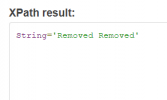
String(/*[local-name() = 'Envelope']/*[local-name() = 'Body']/*[local-name() = 'CallingBusinessPartnerByPhoneNumberResponse_sync']/CallingBusinessPartner[1]/Common/BusinessPartnerFormattedName/text())
This article seems to suggest one of the above should work: https://www.3cx.com/community/threads/help-with-xml-parser.70651/
Would be really of any ideas or help on this please!
Many thanks
Podtris
I've got so far with this but have got stuck!
Basically I can connect to the SOAP service for SAP ByD and get the right data returned in the XML, but the XPath I'm using doesn't seem to be working, or I've configured something wrong so outputs aren't returned.
The official error message when I test it is: CRM Integration is working OK but contact number does not exist. Check log for more info or try a different number.
The output from the test is (note I've replaced sensitive data with removed):
Started scenario with empty id
Request text: https://removed.sapbydesign.com/sap/bc/srt/scs/sap/businesspartnerdatamanagement1
Request message: <soapenv:Envelope xmlns:soapenv="http://schemas.xmlsoap.org/soap/envelope/" xmlns:glob="http://sap.com/xi/SAPGlobal20/Global">
<soapenv:Header/>
<soapenv:Body>
<n0:CallingBusinessPartnerByPhoneNumberQuery_sync xmlns:n0="http://sap.com/xi/SAPGlobal20/Global">
<CallingBusinessPartnerSelectionByPhoneNumber>
<NormalisedNumberDescription>+44123456789</NormalisedNumberDescription>
</CallingBusinessPartnerSelectionByPhoneNumber>
</n0:CallingBusinessPartnerByPhoneNumberQuery_sync>
</soapenv:Body>
</soapenv:Envelope>
Response text: <soap-env:Envelope xmlns:soap-env="http://schemas.xmlsoap.org/soap/envelope/"><soap-env:Header/><soap-env:Body><n0:CallingBusinessPartnerByPhoneNumberResponse_sync xmlns:n0="http://sap.com/xi/SAPGlobal20/Global" xmlns
rx="urn:sap.comroxy:H9L:/1SAI/TAS5E8D7998593639256065:804"><CallingBusinessPartner><UUID>00163ebe-f917-1edb-baa8-497f0a413e47</UUID><InternalID>8000000012</InternalID><CategoryCode>1</CategoryCode><LifeCycleStatusCode>2</LifeCycleStatusCode><CurrentBusinessCharacters><EmployeeIndicator>true</EmployeeIndicator></CurrentBusinessCharacters><Common><BusinessPartnerFormattedName>Removed Removed</BusinessPartnerFormattedName><Person><GivenName>Removed</GivenName><FamilyName>REmoved</FamilyName></Person></Common><UniformAddress><DefaultMobilePhone><Number><SubscriberID>123456789</SubscriberID><CountryCode>GB</CountryCode><CountryDiallingCode>+44</CountryDiallingCode></Number><FormattedNumberDescription>+44 123456789</FormattedNumberDescription><NormalisedNumberDescription>+44123456789</NormalisedNumberDescription><ValidityPeriod><StartDate>0000-00-00</StartDate><EndDate>0000-00-00</EndDate></ValidityPeriod><MobilePhoneNumberIndicator>true</MobilePhoneNumberIndicator><SMSEnabledIndicator>true</SMSEnabledIndicator></DefaultMobilePhone><AddressHostTypeCode>4</AddressHostTypeCode><DefaultEMail><URI>[email protected]</URI></DefaultEMail></UniformAddress></CallingBusinessPartner></n0:CallingBusinessPartnerByPhoneNumberResponse_sync></soap-env:Body></soap-env:Envelope>Response finished
Finished scenario with empty id
My XML config file is attached (again with sensitive info removed)
For the variable paths, I've tried both:
/*[local-name() = 'Envelope']/*[local-name() = 'Body']/*[local-name() = 'CallingBusinessPartnerByPhoneNumberResponse_sync']/CallingBusinessPartner[1]/Common/BusinessPartnerFormattedName/text()
and:
String(/*[local-name() = 'Envelope']/*[local-name() = 'Body']/*[local-name() = 'CallingBusinessPartnerByPhoneNumberResponse_sync']/CallingBusinessPartner[1]/Common/BusinessPartnerFormattedName/text())
This article seems to suggest one of the above should work: https://www.3cx.com/community/threads/help-with-xml-parser.70651/
Would be really of any ideas or help on this please!
Many thanks
Podtris