- Joined
- Nov 28, 2020
- Messages
- 138
- Reaction score
- 30
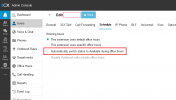
Hi all, I have a customer that would like an extension's status to automatically switch to Away outside of business hours. I have given Department Admin rights to this customer and they claim that they had it setup and working before but something changed. I can't see how... I see where you can set the extension to automatically switch to Available during business hours but I don't see anywhere to set it to Away outside of business hours.
Problem:
Customer needs two different voicemail recordings, a daytime greeting and a nighttime one. When a call comes in during regular business hours and nobody answers it, the caller should hear a greeting letting them know that everyone is busy and that someone will call back soon. When a call comes in after hours, the caller should hear a greeting letting them know that the business is closed and who to call in case of emergencies.
Solution:
(Maybe this isn't the best way to do this but this is how I set it up for them.)
When the call comes in, it rings three extensions in a ring group. If nobody answers, the caller is forwarded to extension 100's voicemail box. If extension 100's status is Available, it plays the (custom) daytime voicemail greeting, if it's status is Away, it plays the (custom) nighttime greeting. Someone has to remember to set extension 100's status to Away when they leave for the day. (<-- This is what they would like to be done automatically and claim was already working at one point.)
Problem:
Customer needs two different voicemail recordings, a daytime greeting and a nighttime one. When a call comes in during regular business hours and nobody answers it, the caller should hear a greeting letting them know that everyone is busy and that someone will call back soon. When a call comes in after hours, the caller should hear a greeting letting them know that the business is closed and who to call in case of emergencies.
Solution:
(Maybe this isn't the best way to do this but this is how I set it up for them.)
When the call comes in, it rings three extensions in a ring group. If nobody answers, the caller is forwarded to extension 100's voicemail box. If extension 100's status is Available, it plays the (custom) daytime voicemail greeting, if it's status is Away, it plays the (custom) nighttime greeting. Someone has to remember to set extension 100's status to Away when they leave for the day. (<-- This is what they would like to be done automatically and claim was already working at one point.)