Sync outlook 365 calendar status

Status
Not open for further replies.

filip24

Free User
Joined
Jul 29, 2020
Messages
4
Reaction score
0
Hello,

We activated the outlook status sync to bring it up in 3CX. For 90% of employees we have no worries ... but for some it does not go back.

In the 3CX logs in the 3cxSystemService.log file, I have the following message:

2021/02/18 09: 14: 33.304 | 651 | 0073 | Erro | Error while Office365SubscriptionManager.UpdateSubscription Create subscription for resource: Users/[email protected]/calendar/events changeTypeExpected: created, updated, deleted Exception: Code: timeout
Message: The request timed out.

Have you any idea?

I have the 16.0.1078.

Thank you
 
Hey @filip24

First of all, just so that we're on the same page, please let me know how exactly you set up the O365 Integration, are you referring to the settings under "Settings >> Microsoft 365 Integration".

If yes:

• Do you get the following message when you navigate to the 365 Integration section:
1613644946234.png


• What are your settings under "Calendar Sync"?

• What do you mean when you say that "for some it does not go back"? Do you mean that the profile status does not switch back to "Available"?
 
What sub does this 365 user have vs one that works?
 
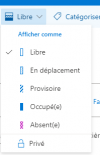
In my case (French version) :
1613652782137.png

On another Outlook calendar :
1613652917288.png

For lot of users it's work fine, but for another the 3CX client is not update.
 
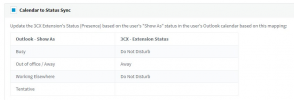
The free/available status is one of the Profile Statuses the Calendar Sync can sync back to on demand:
1613656441135.png


That said, when an O365 Calendar Event is triggered, the Extension's Profile Status will change to the corresponding Profile Status for the configured duration of the event and will switch back to the Available Status once that time has passed.

Edit: You CAN switch back to the free/available status on demand.
 
Last edited:
Yes but this options (Busy, Outofoffice...) does not work with another users
 
Okay, just to clarify, are you creating a O365 Calendar Event that changes the Extensions Profile Status on your PBX when the event starts but does not change back after?

If not, please explain exactly what is happening.
 
Yes your clarify is true;)

The problem is for few users! But its ok for others userso_O
 
I see, well, you could give the following a try:

1. First of all, do make sure that you are running the latest stable version of 3CX which now is 16.0.8.9.

2. Access the Management Console and navigate to "Settings >> Microsoft 365 Integration >> User Sync" and enable it by checking the "Sync Microsoft 365 users with 3CX Extensions". If you do not want to sync all users make sure to use the "Only these users" or "All users except these:" options underneath.

3. Click on OK then go back into Microsoft 365 Integration and in the Configure tab go down to where it says "Sign in to Microsoft 365". Click on it and sign in.

4. Go to "Dashboard >> Services >> Select all services and restart".
Note: I recommend doing this during Out of Office hours as restarting all services will render the 3CX PBX temporarily unavailable and will drop any active calls.

If the issue persists after trying the above, I would highly recommend that you contact a 3CX Partner so that they can help you troubleshoot the issue: https://www.3cx.com/ordering/find-reseller/
 
Status
Not open for further replies.