System phones not changing time after DST

Status
Not open for further replies.
I am in the Eastern time zone as well, about 50 Fanvil X5Gs. What's seems weird is the X5S is not effected. Would love a system fix for this (or phone firmware) rather than a template and reprovision.
 
This is related to Pacific Timezone w/ DST. The phones are one hour early in all cases with Fanvil X4 and X5s phones on multiple PBX instances. All are V15 SP3 with std templates & updates current to 3-12-18.

This has been confirmed and it will be fixed.
 
Mountain time -7 here, 100+ Fanvil X5 phones on latest firmware that are behind an hour.

This is also confirmed on X5g models, X5s models should not be affected
 
am in the Eastern time zone as well, about 50 Fanvil X5Gs. What's seems weird is the X5S is not effected. Would love a system fix for this (or phone firmware) rather than a template and reprovision.

The issue is that older Fanvil phones need manual DST adjusting but the newer phones do Automatic DST. This is why you see the difference between the 2 models. We will fix the issue with X5g phones.
 
Hi Yiannis,

Unfortunately, in our case, we see the problem with X5s phones as well. Maybe a generation issue, but these are recent (2017.5) X5s phones.
 
Unfortunately, in our case, we see the problem with X5s phones as well. Maybe a generation issue, but these are recent (2017.5) X5s phones.
I apologise for any confusion. For your timezone the issue has been confirmed for all devices and will be fixed as mentioned. For other timezones the issue is a bit different as older models are affected but not the newer models. These need different settings.Each scenario is different that is why i am replying differently to each affected person.
 
  • Like
Reactions: DSXVOICE
Hello,

I am using 3CX Professional 15.5.9348.3 with 3 different hardphone vendors: Htek UC912G, Yealink T23G and Fanvil X3S. I confirm this problem also on Fanvil X3S.

Thank you!
 
I am in the Eastern time zone as well, about 50 Fanvil X5Gs. What's seems weird is the X5S is not effected. Would love a system fix for this (or phone firmware) rather than a template and reprovision.

Unfortunately, in our case, we see the problem with X5s phones as well. Maybe a generation issue, but these are recent (2017.5) X5s phones.

I am using 3CX Professional 15.5.9348.3 with 3 different hardphone vendors: Htek UC912G, Yealink T23G and Fanvil X3S. I confirm this problem also on Fanvil X3S.

V15.5 SP4 was released a little while ago and should contain the fix for the Fanvil DST problem. for the people still having it, I would recommend installing SP4, then reprovision all your Fanvil phones that have the issue.

Note: If you will download the template updates without installing SP4 for whatever reason, make sure you:
  1. Download the template updates.
  2. Restart the Management Console service (so that the new templates are immediately parsed)
  3. Reprovision phones
 
V15.5 SP4 was released a little while ago and should contain the fix for the Fanvil DST problem. for the people still having it, I would recommend installing SP4, then reprovision all your Fanvil phones that have the issue.

Note: If you will download the template updates without installing SP4 for whatever reason, make sure you:
  1. Download the template updates.
  2. Restart the Management Console service (so that the new templates are immediately parsed)
  3. Reprovision phones

I installed SP4 with template updates, but Fanvil X3S still has same problem, not update DST. I restarted 3CX services and also the host (Windows 10). I reprovisioned the phone 3 times with software reset and also hardware reset, without succes.
Thank you.
 
I found the problem. I choose +2 Romania (Bucharest). Probably is a problem with (Bucharest), if I choose +2 Riga its working :)

Capture.PNG
 
I found the problem. I choose +2 Romania (Bucharest). Probably is a problem with (Bucharest), if I choose +2 Riga its working :)
I'm glad you found another time zone that changes the phone time correctly.
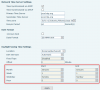
I looked into this and we are currently investigating, but I have a feeling that this may be an issue with the phone because I tried to manually set the country/location to Romania(Bucharest) and I got these greyd-out fields in the interface.
upload_2018-3-29_11-2-20.png

Anyhow, thanks for bringing this up, we will look into this and try to get it addressed.
 
Status
Not open for further replies.

Latest Posts

Forum statistics

Threads
111,884
Messages
589,542
Members
164,743
Latest member
aa1