- Joined
- Nov 8, 2010
- Messages
- 101
- Reaction score
- 28
On an Enterprise 3CX system, I have set a few custom config templates. In this instance, I have pointed a T44W phone to a custom template.
I know the T44W phone IS picking up the custom template, because I added a "screensaver" URL option, and the phone DID download the screensaver background and is currently displaying it. However, the phone will NOT load the WIFI configuration options.
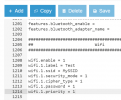
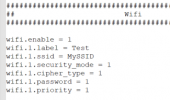
To debug, I have gone into a T44W phone and saved the configuration file as a baseline. Then I only turned WIFI on (Enable) and saved the configuration. I then added a WIFI network and password and saved the configuration a third time. After running a Linux "diff" command, I see THESE as the only changes to the config file:
static.wifi.1.security_mode = WPA/WPA2 PSK
static.wifi.1.ssid = WMAPT-2270
static.wifi.enable = 1
static.wifi.1.password = [REDACTED]
If I add those lines to the custom 3CX template, factory reset the phone, let it reboot, and let it configure itself with the custom template, it appears to have ZERO effect. WIFI is NOT enabled, there is no SSID, and yet the custom screensaver IS loaded. So, again, I know that it is pointing to the custom template for its configuration.
I have even tried adding a "second" phone to the User account that points to the wifi MAC address of the Yealink. Still no change.
What am I missing or doing wrong here?
I know the T44W phone IS picking up the custom template, because I added a "screensaver" URL option, and the phone DID download the screensaver background and is currently displaying it. However, the phone will NOT load the WIFI configuration options.
To debug, I have gone into a T44W phone and saved the configuration file as a baseline. Then I only turned WIFI on (Enable) and saved the configuration. I then added a WIFI network and password and saved the configuration a third time. After running a Linux "diff" command, I see THESE as the only changes to the config file:
static.wifi.1.security_mode = WPA/WPA2 PSK
static.wifi.1.ssid = WMAPT-2270
static.wifi.enable = 1
static.wifi.1.password = [REDACTED]
If I add those lines to the custom 3CX template, factory reset the phone, let it reboot, and let it configure itself with the custom template, it appears to have ZERO effect. WIFI is NOT enabled, there is no SSID, and yet the custom screensaver IS loaded. So, again, I know that it is pointing to the custom template for its configuration.
I have even tried adding a "second" phone to the User account that points to the wifi MAC address of the Yealink. Still no change.
What am I missing or doing wrong here?


 ).
). )
)