T46S will not upgrade

Status
Not open for further replies.

PMadmin

Forum User
Joined
Oct 11, 2022
Messages
7
Reaction score
0
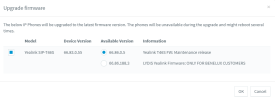
We have this one phone that refuses to upgrade. The phone works fine, can make calls, transfer calls etc, but it won't upgrade. I have factory reset it twice to no avail. I cannot Putty into it, can't access the web interface, I'm not sure what I'm missing. Any ideas?


You are not authorized to access the web interface.

Please contact your support team or try again 12 minutes later.

HTTP 403



1665490995417.png

1665490971810.png
 
Your version is too old (V83 trying to go to V86) and the phone will reject the new firmware.

Please visit the Yealink website to download the versions in between.

You need to upgrade step by step.
 
OK. I can follow that, but the instructions say to open the phone interface using the IP address in a browser, but it only says I am not authorized to access the web interface.
 
Try to factory reset your phone first (hold down the OK button until it gives you the Factory Reset option).

When it comes back, you can try connecting to the web interface again.

It might help if you connect your PC to the Yealink's PC port in case you have a network setup that prevents you from accessing the UI.

Beyond this, I think it would be a good idea to contact Yealink's support via the website and they should be in a better position to help you carry out all the actions you need.
 
Status
Not open for further replies.

Members Online Now

Forum statistics

Threads
111,832
Messages
589,285
Members
164,662
Latest member
DejanMDS