


- Joined
- Jun 29, 2017
- Messages
- 39
- Reaction score
- 15
Not sure if anyone else has lived this but now that I have a 200 phone deployment, the last thing I want to do is manually turn this off. Its an Irritating feature especially when you deploy logos.
This requires a custom Template. 3cx won't support when using custom template so don't go crying to support if you have an issue after without factory resetting phone and using standard template. Disclaimer aside.
I am not sure where exactly you should put this in your template but I did find this worked well for my deployments.
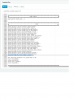
as you can see here I just tossed in next to other settings that started with same name. However I do know it can be located differently. If anyone has any input there I'll take it
but this works perfectly for me.
the setting is phone_setting.idle_clock_display.enable = 0 and I couldn't find that to save my life so I finally just turned it off on the menu, exported the settings and then turned it back on and exported and looked for what was different. bam. there it be
Hope this helps someone else irritated by it.
This requires a custom Template. 3cx won't support when using custom template so don't go crying to support if you have an issue after without factory resetting phone and using standard template. Disclaimer aside.
I am not sure where exactly you should put this in your template but I did find this worked well for my deployments.
as you can see here I just tossed in next to other settings that started with same name. However I do know it can be located differently. If anyone has any input there I'll take it
but this works perfectly for me.
the setting is phone_setting.idle_clock_display.enable = 0 and I couldn't find that to save my life so I finally just turned it off on the menu, exported the settings and then turned it back on and exported and looked for what was different. bam. there it be
Hope this helps someone else irritated by it.


