T57W as a router phone not able too Register

Status
Not open for further replies.

SystemsMD.net

Free User
Basic Certified
Joined
Sep 8, 2022
Messages
20
Reaction score
0
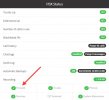
It auto provisioned and pulled all the correct information. In the web interface, I see 'Registering' and nothing happens after that. The green phone line just keeps blinking, and on the phone, it says 'no service,' but it does recognize the extension and the name for the extension, so I know it was able to pull something on the first boot. On the same network, I have the app running on Android, and the web interface up on the PC, and both have no problems, so I don't think it's the network, but who knows. I'm using Unifi for the network (UDM SE). The firmware of the phone is 96.86.0.76. Not sure what else I can provide to help me get this working. Thank you in advance!
 
Hi,

Did you check if the local IP is blacklisted?
 
Please explain blacklisted. On the router? If so, it would not be able to ping out and would not be able to auto provision. So, when it pulls the file the admin password changes to the one on the cloud admin panel. I can also get to it locally and I can use the tool to ping out and it does ping out. If you mean blacklisted somewhere else please explain where I should look for that. Thank you!
 
Update I removed the phone from admin panel and re added it and did a factory default and now it's not pulling anything. Is there a manual on how to register it as a router phone as it's the first one on the network?
 
Please answer these questions:

- Is the PBX hosted or is it physically on-site?

- Are the phones installed on the same local subnet as the PBX?

- Have you verified that the IP is not on 3CX's blacklist?
Link

- Have you performed an Firewall Checker (intrusive test) on the 3CX PBX?
IMG_4669.jpeg
 
Hey, thank you for the update sorry I would think that this question would not come up as the subject line is for T57W as a router. It is a testing account with a free cloud hosted. The phone is not on the same subnet as the PBX is cloud and hosted by 3cx. I can't look at that setting as it seems like the setting is for a local PBX. Please correct me if I'm wrong as I'm trying to learn the interface. Thank you!
 
Update: When I'm in the phone web gui under network ~> Diagnostics I can ping 8.8.8.8 and I can ping yahoo.com so the phone can communicate with the world ip or name. I also went into Yealink RPS and made sure the mac was clean. In the RPS the status is Unbound. I'm going to try option 66 with the custom link in the 3cx cloud admin under user provisioning link as I can find any documentation on manually editing the settings for the phone.
 
Last edited:
Your public IP address might be blacklisted in the 3CX PBX, but if that were the case, you would not be able to connect to the 3CX PBX portal.

Let's check something,
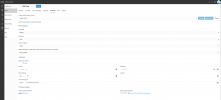
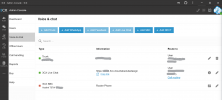
Can you share a screenshot of your configuration in 3CX, in the user section, where the phone is listed?

Then, is it auto-provisioning now (and stays unregistered)? Or does it not configure at all?
 
My phone is running the 3cx app, which can make calls both internally and externally within the same local network using the same extension. The computer I'm using for configuration to be able to make both inbound and outbound calls can make calls in and out and it's on the same local network as well. The T57W initially displayed the extension and name under the line but would not register so it did pull some of the auto provision but would not register. When I accessed the phone GUI, some information matched from the 3cx admin, which I have attached. However, it would do "FB" when off-hook, and the top left corner would show "no service," with the line blinking as it trying to register. After I removed and re-added the phone on the 3cx cloud PBX and performed another factory reset, it no longer retrieved any information and remained in a default state. By the way i did not erase the local IP that field is empty.
 

Attachments

  • Screenshot 2024-02-01 191056.png
    Screenshot 2024-02-01 191056.png
    211.6 KB · Views: 11
Update: When I'm in the phone web gui under network ~> Diagnostics I can ping 8.8.8.8 and I can ping yahoo.com so the phone can communicate with the world ip or name. I also went into Yealink RPS and made sure the mac was clean. In the RPS the status is Unbound. I'm going to try option 66 with the custom link in the 3cx cloud admin under user provisioning link as I can find any documentation on manually editing the settings for the phone.

Download your config manually ;
{Https link}/provisioning/{RandomID}/{MAC}.cfg with your browser
Example ; https://1021.3cx.cloud/provisioning/heb636hsu/0131226482.cfg

Upload manually on your phone ;
Login in your GUI (phone) > Settings > Configuration > Upload config
 
Once done, does the phone remain unregistered?

Make sure you are on the correct firmware (96.86.0.76).

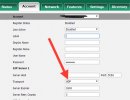
Then, just for diagnostics, try changing your UDP to TCP.

IMG_4670.jpeg

Note that this is not the solution; the goal is to determine if your phone's TCP sessions are able to exit your local network. Compare with UDP
 
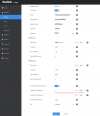
Just did that and it's having the fields populated but I notice that the Outbound Proxy Server is enabled but the field is empty under the account Register because when you try to save it shows up as red. I'm attaching the file. But it is not registering and before I noticed it pulled the 3cx background on the phone now it's not even doing that. I wonder if the old link is somewhere on the cloud with mac attached to it. It would be nice if 3cx cleared out the mac if that is the case. And now it says Register status Disabled
 

Attachments

  • Screenshot 2024-02-01 194825.png
    Screenshot 2024-02-01 194825.png
    229.3 KB · Views: 9
it won't let me change the UDP to TCP becouse the config file I pulled from the cloud has outbound proxy server enabled but has nothing in the filed for server 1
 
firmware number ?
 
firmware is correct
 

Attachments

  • Screenshot 2024-02-01 195349.png
    Screenshot 2024-02-01 195349.png
    16.3 KB · Views: 6
Do you have reboot ?

Send me (private message) your config file you have downloaded.
I will compare with one of mine
 
In your file what do you have for
#Specify the IP address or domain name of the outbound proxy server.
account.1.outbound_proxy.1.address =
?
 
It won't let me attach a file in a private
 
Update I was thinking that the web phone was working but that is getting a fast busy as well only 3cx app is working is 3cx having some kind of outage?
 
Here is what the setup looks like
 

Attachments

  • Screenshot 2024-02-01 211256.png
    Screenshot 2024-02-01 211256.png
    136.1 KB · Views: 18
Status
Not open for further replies.

Members Online Now

Forum statistics

Threads
111,832
Messages
589,280
Members
164,662
Latest member
DejanMDS