Teams Dial plan problems

ezpc

Trainee Partner
Basic Certified
Joined
Jun 1, 2012
Messages
48
Reaction score
2
Hi all,

We have done our first 3CX to Teams integration and it has gone relatively well thanks to resources here, but, I've got one problem that I just can't seem to understand or diagnose where the fault is.

Basically, (We are in the UK) if you take a mobile number of 078xxxxxxxx and dial it, or, 4478xxxxxxxx within teams, both reach 3CX and I can see in a packet capture that 3CX attempts to dial 78xxxxxxxx which gets dropped by upstream as an incomplete number.

If I dial +44078xxxxxxxx (which should be invalid with the 0), the sip packet capture shows 078xxxxxxxx being dialed and the call comes through fine.

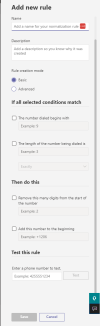
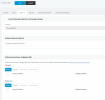
I'm using the default 3CX setup script, and I've tried regex matching, and it all looks correct:
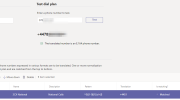
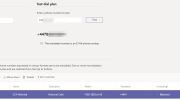
1679488688918.png

I can also see that when I dial 078xxxxxxxx, Teams shows +44 7828252201 and when I dial or +4478xxxxxxxx, the activity log in Teams is showing +4478xxxxxxxx correctly in the history, so, I think Teams is working properly, and I'm unsure at what point the number is being changed.

Thanks to a contact elsewhere, we have managed to put in a temporary fix by having an outbound rule of calls to numbers with a length of 10, prepend 0 - which does seem to work, but, obviously doesn't fix the issue.

At any point, using the 3CX softphone or a SIP headset works without issue dialing 078xxxxxxxx or 4478xxxxxxxx

Firstly, is there any way to see traffic/raw logs of calls coming across the Direct Route in to 3CX? I'm curious if Teams is sending incorrect data to 3CX, or, is 3CX rewriting as I'm not sure what where the problem is right now.

Secondly, anyone else seen this or can anyone offer any advice?

Thanks
 

Attachments
  • 1679488962752.png
    1679488962752.png
    24.9 KB · Views: 9
Last edited:
what are your outbound rules in 3CX?
I believe the outbound rules will still apply, as this allows you to call a 3CX extension from Teams


as for log data, look at the call logs and turn on CDR generation
you can use Call Vitesse and Call Sequitur to turn the CDR's into a more user friendly format.
 
Hi @Sparky Bear - So, I 100% understand about outbound rules in 3CX, but, I believe the issue is either within the 3CX to Teams integration component, or, my hunch is that this is actually a problem within Teams itself - but, I'm not experienced enough to understand why.

Basically, you are right when you say about the outbound rules in 3CX - and they do apply... and that is how I managed to "fix" this, but, it's a sticking plaster fix that doesn't explain or solve the underlining issue.

Basically, if I dial 078xxxxxxxx within Teams, 3CX tries (via packet capture) to ring 78xxx - likewise, if I do 4478xxx within Teams, 3CX dials out to 78xxx which fails. If I dial out to 44078xxx (which is not valid), it reaches 3CX and does an outbound to 078xxx which is valid and connect and works.

All this time, I can use a SIP phone or the 3CX client and make calls without problem.

I fixed this by making an outbound rule that if it is a number as above, it will simply apply a 0 at the start, so, we can now dial 4478xxx or 078xxx from teams fine - BUT, this outbound rule shouldn't be required and I'm 75% thinking it's a Teams config issue rather than 3CX.
 
is your MS teams configured to use 0 to dial out, Most likely Teams is trying to format the number into the E.164 format which should remove the leading 0,
I have a similar issue with CRM intergrations +61xxx becomes 1xxx with connectwise and a mobile number of 04xxxx becomes 4xxx with pipedrive,

There is no issue having a rule to fix the oddities of Teams or CRM (click to dial)

Can you please advise what happens if you dial a E.164 formatted number? eg +44 78xxxx or similar?
 
what settings do you have in the Teams Dial plans?
Try configuring the add numbers to the begining eg. +61 (for AUS) or use 3cx rules
TBH I would rather set Teams to pass every number to 3CX and let 3cx decide


1679607683012.png

Additionally you have the opton to convert the numbers on the SIP trunk

1679607869152.png
 
what settings do you have in the Teams Dial plans?
Try configuring the add numbers to the begining eg. +61 (for AUS) or use 3cx rules
TBH I would rather set Teams to pass every number to 3CX and let 3cx decide


View attachment 34782

Additionally you have the opton to convert the numbers on the SIP trunk

View attachment 34783
The only teams voice rules were created by the script from 3CX. I've confirmed in the tester that it works and converts 078xxx to e164 fine. I didn't want to change these settings in 3CX when sip clients work without issue as I thought I may fix it for teams, but then break it for them.

Responding to your other one...
 
One solution is to tell Teams to add 999 to the start of the number,
Then tell 3cx if a number starts with 999 remove the 999 and pass out the relevant trunk

That way you have a rule for Teams and a rule to local 3cx users
 
is your MS teams configured to use 0 to dial out, Most likely Teams is trying to format the number into the E.164 format which should remove the leading 0,
I have a similar issue with CRM intergrations +61xxx becomes 1xxx with connectwise and a mobile number of 04xxxx becomes 4xxx with pipedrive,

There is no issue having a rule to fix the oddities of Teams or CRM (click to dial)

Can you please advise what happens if you dial a E.164 formatted number? eg +44 78xxxx or similar?


Sorry, thought I was clearer: I cannot 100% confirm this

What I dial in Teams --- What I see in Teams Activity Log --- What I see as outbound from 3CX to SIP in Packet capture:

078xxxx ---- +4478xxxx --- 78xxxx
004478xxxx --- +4478xxxx -- 78xxx
+4478xxx -- +4478xxx -- 78xxx
+44078xxx -- +44078xxx -- 078xxx (Only one that works!).

If I then apply an outbound rule stating "calls to numbers with a length of 10", prepend 0, the first 3 match this rule and it then looks like:

078xxxx ---- +4478xxxx --- 078xxxx - rule match, now works
004478xxxx --- +4478xxxx -- 078xxx- rule match, now works
+4478xxx -- +4478xxx -- 078xxx- rule match, now works
+44078xxx -- +44078xxx -- 078xxx - still works as it isn't 10 digits and it was a valid number.


Again, in the first 3, according to the user it looks fine - but, I'm not sure in what log file I can see what 3CX is receiving from Teams - all I can see is the packet capture from 3CX to the provider that's incorrect.

This can only be happening in two places - Teams is truncating the number when sending to 3CX somehow, or, the Teams to 3CX component is removing a digit for some reason. I have no idea where the problem is.
 
One solution is to tell Teams to add 999 to the start of the number,
Then tell 3cx if a number starts with 999 remove the 999 and pass out the relevant trunk

That way you have a rule for Teams and a rule to local 3cx users
Well, what we have done has fixed it, as would yours... but, as a techie, it doesn't satisfy me that there is a problem somewhere and I would like to get to the bottom of it, even we do have a workaround!
 

Members Online Now

Forum statistics

Threads
111,831
Messages
589,277
Members
164,660
Latest member
RJenkinsROCK