Solved Teams Integration not working

Status
Not open for further replies.

group24admin

New User
Basic Certified
Joined
Oct 7, 2021
Messages
7
Reaction score
0
Hello all,

i wanted to implement the Teams-Integration for our company, since we've already
used 3CX for a few years now.

I have followed instructions and provided documentations step by step, but the
Integration unfortunately still doesn't work for us. In- and outbound calls are
are working perfectly on our softphones, but they don't get "put through" to Teams.

We're using a hosted 3CX-Solution (v18.0.1.214) with a custom FQDN and SBC in Germany.

We always get the following error:

"Unfortunately we could not connect you. Please try again later."

MicrosoftTeams-image.png

What we already troubleshooted:

- Ports are open (shouldn't be a problem with hosted 3CX anyways)
- certificates are correct and from a supported authority
- Teams-FQDN and SBC is set up
- M365 synchronization works fine
- Trunk and numbers are online and working
- 3CX (enterprise) and Microsoft Licenses (Business Premium + Business Voice (without calling plan) are correct and working
- AzureAD settings are correct and permissions set correctly
- 3CX-Dial Plans and User-Scripts have been deployed (multiple times) without an error

I'm working on this for a few weeks now and i'm basically running out of ideas, why
this still doesn't work. I might have a small error somewhere that i haven't seen yet.

I'm sorry for this long novel. I would be more than thankful for any further ideas from you guys.

Many thanks!

Best,

Marcus
 
If you restart services and then directly go to the Activity Log, do you see any errors related to Teams or certificates?
 
Hey Frederick,

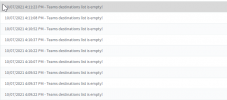
i have restarted services and checked activity logs - the first nine notifications are:

2021-10-07 16_12_43-3CX Phone System Management Console.png

The logs are far longer below those notifications - do you need the full Log?

Thanks for your help!
 
Hey Frederick,

i have restarted services and checked activity logs - the first nine notifications are:

View attachment 24968

The logs are far longer below those notifications - do you need the full Log?

Thanks for your help!
Generate your user script in the Teams Direct Routing tab.

Are there any users in "@users_ids = ()"?
 
Generate your user script in the Teams Direct Routing tab.

Are there any users in "@users_ids = ()"?
User Script has been generated and all users are being shown with the correct number.

Yes, we can see the users e-mail-addresses in there!
 
In admin.teams.microsoft.com, under Direct Routing, does the SBC entry show up without any errors?
1633625200832.png
 
  • Like
Reactions: Evolute IT
If you go to the extensions in 3cx the last column for the synced users state “synced with”?
 
  • Like
Reactions: Evolute IT
If you go to the extensions in 3cx the last column for the synced users state “synced with”?
Hi Stefan,
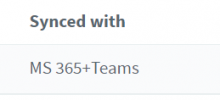
the extensions are synced with MS365+Teams:

2021-10-08 07_42_30-3CX Phone System Management Console.png
 
In admin.teams.microsoft.com, under Direct Routing, does the SBC entry show up without any errors?
View attachment 24979
Hey Nick, here i have some connectivity issues, but i thought that would be normal until i have the first call connection. My TLS connectivity seems to have a problem here too:

2021-10-08 07_35_00-Direct Routing - Microsoft Teams admin center.png
 
@group24admin,

when you would have 10 min right now, PM me and we do a quick TV session.
We need access to the 3CX host and Management Console and MS Global Admin to give it a check.
 
we did an investigation with the customer and awaiting final feedback if it is solved.

I like to point to the FAQ document
https://www.3cx.com/docs/microsoft-teams-integration-faqs/
for the requirement of the SSL Cert Chain and DNS settings which need to be done outside of 3CX.

Thank you
 
this is looking now much metter...

1633686392299.png
 
Hi Stefan,

I also am having some issues and suspect SSL certificate problems but do not see anything in the activity log. The above output you posted seems to be a very firm confirmation that the SSL certificate is OK.

Can you tell me where I can look for this detail?

Johan
 
- My 3CX FQDN is the same as the Teams FQDN and we should be using 5061 as per the documentation
- We are not using a wildcard cert
- The certificate is used for accessing the System Manager as well using https and can confirm it is valid

When trying to dial from Teams I get the "We couldn't connect you" message. I do not see any records in Teams Admin portal or 3CX Manager.

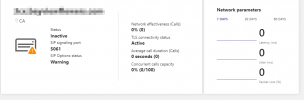
The SIP Options Status is still saying warning (since 16 hours).

1633703022787.png

It is also showing as "Inactive".

1633703095768.png

Secure SIP is enabled on 3CX with the correct certificates. I have followed the guide to the letter and also verified.

Any other ideas?
 
I should mention that incoming calls are ringing into my Teams client.
 
I am now also able to make outgoing calls - maybe I was not patient enough.

Thank you,
Johan
 
  • Like
Reactions: Evolute IT
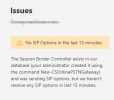
I am still seeing the SIP Options Status warning:
1633711183510.png

Any ideas why this may still be showing?
 
Glad to hear it is finally working! Indeed MS provisioning of Teams can take some time, up to 24h as some have pointed out.

About the SIP Options, by the time it is working I would ignore it for a few days and see how it goes, it may just be one more thing that MS takes a bit of time to set straight.
 
  • Like
Reactions: Evolute IT
we did an investigation with the customer and awaiting final feedback if it is solved.

I like to point to the FAQ document
https://www.3cx.com/docs/microsoft-teams-integration-faqs/
for the requirement of the SSL Cert Chain and DNS settings which need to be done outside of 3CX.

Thank you
Hello,

Inbound Calls are still working, but outbound still aren't.

The certificate has been inserted correctly thanks to @StefanW

Our subdomain ist directing to the IP (IP is reachable) he has provided to us:

A-Record:

teams.group24 a-record.png


I have waited since Friday, but it still doesn't work. i have once again fully read the FAQ for the DNS Record and everything seems to be fine.

Best,

Marcus
 
Status
Not open for further replies.

Latest Posts

Members Online Now

Forum statistics

Threads
111,832
Messages
589,278
Members
164,662
Latest member
DejanMDS