- Joined
- Oct 7, 2021
- Messages
- 7
- Reaction score
- 0
Hello all,
i wanted to implement the Teams-Integration for our company, since we've already
used 3CX for a few years now.
I have followed instructions and provided documentations step by step, but the
Integration unfortunately still doesn't work for us. In- and outbound calls are
are working perfectly on our softphones, but they don't get "put through" to Teams.
We're using a hosted 3CX-Solution (v18.0.1.214) with a custom FQDN and SBC in Germany.
We always get the following error:
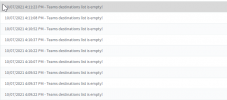
"Unfortunately we could not connect you. Please try again later."

What we already troubleshooted:
- Ports are open (shouldn't be a problem with hosted 3CX anyways)
- certificates are correct and from a supported authority
- Teams-FQDN and SBC is set up
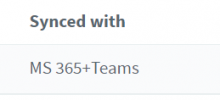
- M365 synchronization works fine
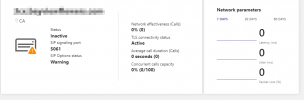
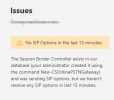
- Trunk and numbers are online and working
- 3CX (enterprise) and Microsoft Licenses (Business Premium + Business Voice (without calling plan) are correct and working
- AzureAD settings are correct and permissions set correctly
- 3CX-Dial Plans and User-Scripts have been deployed (multiple times) without an error
I'm working on this for a few weeks now and i'm basically running out of ideas, why
this still doesn't work. I might have a small error somewhere that i haven't seen yet.
I'm sorry for this long novel. I would be more than thankful for any further ideas from you guys.
Many thanks!
Best,
Marcus
i wanted to implement the Teams-Integration for our company, since we've already
used 3CX for a few years now.
I have followed instructions and provided documentations step by step, but the
Integration unfortunately still doesn't work for us. In- and outbound calls are
are working perfectly on our softphones, but they don't get "put through" to Teams.
We're using a hosted 3CX-Solution (v18.0.1.214) with a custom FQDN and SBC in Germany.
We always get the following error:
"Unfortunately we could not connect you. Please try again later."
What we already troubleshooted:
- Ports are open (shouldn't be a problem with hosted 3CX anyways)
- certificates are correct and from a supported authority
- Teams-FQDN and SBC is set up
- M365 synchronization works fine
- Trunk and numbers are online and working
- 3CX (enterprise) and Microsoft Licenses (Business Premium + Business Voice (without calling plan) are correct and working
- AzureAD settings are correct and permissions set correctly
- 3CX-Dial Plans and User-Scripts have been deployed (multiple times) without an error
I'm working on this for a few weeks now and i'm basically running out of ideas, why
this still doesn't work. I might have a small error somewhere that i haven't seen yet.
I'm sorry for this long novel. I would be more than thankful for any further ideas from you guys.
Many thanks!
Best,
Marcus