Technical Question: CRM Integration with 3CX for Call Tracking

phillytky

Silver Partner
Basic Certified
Joined
Mar 30, 2020
Messages
31
Reaction score
27
I'm working with a customer who needs to pass both the caller's phone number AND the inbound DID (trunk) to their CRM via custom integration. Currently, I only see callernumber and callerdisplayname as available variables. Does anyone know:
  1. Are there other supported variables that would include the trunk/DID information?
  2. Is it possible to modify the callerdisplayname variable in the inbound trunk parameters?

Any workarounds or solutions would be greatly appreciated. This information is needed to properly route, and track calls in the customer's service department CRM considering they now have acquired another company and are using multiple tenants within their CRM hence the need to ID by DID called.

Other Info: Customer is still on V18 but will be moved to V20 over next few months.


1745243762998.png
 
Call scripts only, in v20.
 
At least 2 options are visible. Either pull variables through CFD, or third-party developments such as Webhook generator

JSON:
{
    "event": "ringing",
    "callerid": "381629759787",
    "user": "809",
    "usertype": "other",
    "did": "Landline 0213220030",
    "id": "250303102017_9-0",
    "chid": "bdc7048c2c0c0000_9",
    "inbound_did": "381213220030",
    "sip_displayname": "381629759787",
    "phonebook": "Lastname, Firstname"
}
 
At least 2 options are visible. Either pull variables through CFD, or third-party developments such as Webhook generator

JSON:
{
    "event": "ringing",
    "callerid": "381629759787",
    "user": "809",
    "usertype": "other",
    "did": "Landline 0213220030",
    "id": "250303102017_9-0",
    "chid": "bdc7048c2c0c0000_9",
    "inbound_did": "381213220030",
    "sip_displayname": "381629759787",
    "phonebook": "Lastname, Firstname"
}
I'm currently implementing this exact integration. My approach utilizes the CFD method with Azure Functions App and the server-side CRM integration. This solution appears compatible with V18, though V20 would offer a more streamlined implementation. Given the complexity of the customer's environment, we've mutually agreed to postpone the V20 upgrade for the time being.
 
I’m troubleshooting an issue with my server-side CRM integration on the 3CX Web Client and would appreciate some help. The integration works as expected in the "Test CRM Integration" interface under Settings > CRM Integration, where the ContactUrl is returned correctly, and the request successfully hits my Azure Function (confirmed via Azure Live Metrics). However, during a real call flow in the 3CX Web Client with server-side integration enabled, the ContactUrl does not pop up, and I don’t see the expected GET request in Azure Function Live Analytics.

Issue Details:​

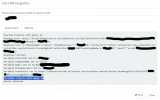
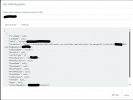
  • CRM Test Success: In the "Test CRM Integration" interface, entering the phone number 1231231234 returns a valid JSON response, including a ContactUrl (e.g., https://enterprise-hub-callcenter.s...llerId=1231231234&forwardingNumber=2701234567). Screenshots of the "Search result" and "CRM log" tabs confirm this (see attachments).
  • Web Client Failure: During a test call in the 3CX Web Client with server-side integration enabled, the ContactUrl does not open in a new tab or pop up as expected. Azure Live Metrics shows no activity for the GetContact endpoint during the call flow, indicating the integration isn’t triggering properly.
  • Implementation: I’m using a custom CRM template (KnightsV5.xml) to integrate with an Azure Function that returns contact data, including the ContactUrl. The updated getcontact.cs code constructs the response with fields like CompanyName, PhoneBusiness, ContactUrl, and email (e.g. statically set in crm database upon storing won't be needed but required, ([email protected]).

Steps Taken:​

  • Verified the ContactUrl mapping in KnightsV5.xml and confirmed it aligns with the Azure Function response.
  • Checked browser settings to ensure pop-ups aren’t blocked in the Web Client.
  • Reviewed Azure telemetry logs, which show successful GetContact execution (e.g., 45ms duration) during manual tests, but no activity during live calls.
  • Tested with various scenarios in the CRM interface, noting occasional errors like "BadRequest - Caller number or email is required" when inputs were incomplete, and "InternalServerError" in some cases, though the successful test case is my focus.

Can anyone advise why the ContactUrl isn’t popping up in the Web Client during a live call, despite working in the tester? Could this be related to a specific 3CX Management Console setting for URL handling with server-side integration, or might it involve the call flow configuration? Any insights would be greatly appreciated—thank you!
 

Attachments

  • KnightsV5.xml
    KnightsV5.xml
    2.8 KB · Views: 0
  • Screenshot 2025-04-24 224315.png
    Screenshot 2025-04-24 224315.png
    54.1 KB · Views: 3
  • Screenshot 2025-04-24 224152.png
    Screenshot 2025-04-24 224152.png
    40 KB · Views: 3
I’m troubleshooting an issue with my server-side CRM integration on the 3CX Web Client and would appreciate some help. The integration works as expected in the "Test CRM Integration" interface under Settings > CRM Integration, where the ContactUrl is returned correctly, and the request successfully hits my Azure Function (confirmed via Azure Live Metrics). However, during a real call flow in the 3CX Web Client with server-side integration enabled, the ContactUrl does not pop up, and I don’t see the expected GET request in Azure Function Live Analytics.

Issue Details:​

  • CRM Test Success: In the "Test CRM Integration" interface, entering the phone number 1231231234 returns a valid JSON response, including a ContactUrl (e.g., https://enterprise-hub-callcenter.s...llerId=1231231234&forwardingNumber=2701234567). Screenshots of the "Search result" and "CRM log" tabs confirm this (see attachments).
  • Web Client Failure: During a test call in the 3CX Web Client with server-side integration enabled, the ContactUrl does not open in a new tab or pop up as expected. Azure Live Metrics shows no activity for the GetContact endpoint during the call flow, indicating the integration isn’t triggering properly.
  • Implementation: I’m using a custom CRM template (KnightsV5.xml) to integrate with an Azure Function that returns contact data, including the ContactUrl. The updated getcontact.cs code constructs the response with fields like CompanyName, PhoneBusiness, ContactUrl, and email (e.g. statically set in crm database upon storing won't be needed but required, ([email protected]).

Steps Taken:​

  • Verified the ContactUrl mapping in KnightsV5.xml and confirmed it aligns with the Azure Function response.
  • Checked browser settings to ensure pop-ups aren’t blocked in the Web Client.
  • Reviewed Azure telemetry logs, which show successful GetContact execution (e.g., 45ms duration) during manual tests, but no activity during live calls.
  • Tested with various scenarios in the CRM interface, noting occasional errors like "BadRequest - Caller number or email is required" when inputs were incomplete, and "InternalServerError" in some cases, though the successful test case is my focus.

Can anyone advise why the ContactUrl isn’t popping up in the Web Client during a live call, despite working in the tester? Could this be related to a specific 3CX Management Console setting for URL handling with server-side integration, or might it involve the call flow configuration? Any insights would be greatly appreciated—thank you!
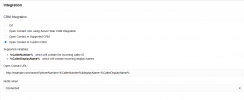
I figured out the issue. I didn't have contact matching turned on. All is working now!
 
  • Like
Reactions: Evolute IT