Solved Telstra Business SIP - Anonymous calls

Status
Not open for further replies.

whiteym

Gold Partner
Advanced Certified
Joined
Apr 16, 2020
Messages
23
Reaction score
9
Hi All,
I have a couple of customers using Telstra Business SIP with a OneAccess NTU. I have found that when trying to make an anonymous call from 3CX, using the *5 dial code (or changing it to anything else), the callerid is still passed through.
They are all using the default template for Business SIP.
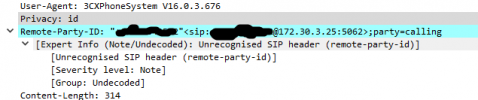
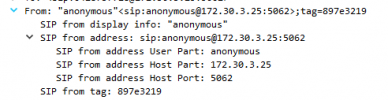
When I do a packet capture from the server I see the outgoing call with the following information;
1621491674845.png
1621491713914.png

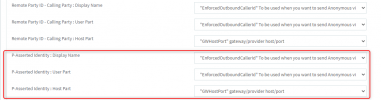
I suspect the issue is that the Remote party ID contains the callerID which is being passed through, the template has the following settings, indicating that PAI should be used but is maybe being ignored resulting in the callerID being displayed.

1621491799254.png

Has anyone else seen this?
 
Hello @whiteym

The remote party id must contain a valid caller ID for the call to be processed by Telstra even if the call is Anonymous. Our configuration guide states that the *5 dial code must be changed through the PBX settings so it does not conflict with the Telstra dial code for Malicious call trace.
Make sure that in the Invite from 3CX to Telstra the privacy: id header is included as well as the From header being Anonymous. If everything looks correct then i would suggest asking Telstra why this does not work in your case.
 
Hi @YiannisH_3CX, as mentioned in my original post changing the dial code to anything else has the same effect. Ours is currently set to *9*. You can see in the second screenshot that the privacy: id header exists and in the first screenshot the call is from anonymous.

I was hoping someone here had seen this before as I'd rather not spend the rest of my life on hold with Telstra.
 
As a test can you in your trunks outbound parameters and configure the P-Asserted-Identity to also send the caller Id like the screenshot? Leave everything else as is.

1621584723267.png


Try a call and let me know if that works for you.
 
Hi @YiannisH_3CX, that resolved the issue. Looks like the template for Telstra Business SIP needs to be updated to include these settings as the default is set to 'Leave Default Value'.
 
Glad to see that the issue has been resolved. Can you run the trunk with the new settings and let me know if you encounter any issues? I just want to be sure that the change will not impact functionality.
 
Hi @YiannisH_3CX, I've left the settings in place since Monday. Haven't had any reports from staff that stuff is broken so I think it's all OK with those changes.
 
  • Like
Reactions: YiannisH_3CX
Thank you for the feedback. We will then update the template and push an update as soon as possible.
 
Status
Not open for further replies.

Latest Posts

Forum statistics

Threads
112,324
Messages
591,897
Members
165,475
Latest member
lastshadow