Temporary deviation from office hours / holiday schedule

Status
Not open for further replies.

iamtheari

Customer
Joined
Apr 3, 2020
Messages
35
Reaction score
6
We have 3CX set up with a defined office hours / holiday schedule. Sometimes we close the office early on short notice. We want to be able to push a button to put the 3CX system into out-of-office mode until the schedule tells it to go back to in-office mode. For example, push the button at 4:00 p.m. on Friday and the phones will stop ringing until 8:00 a.m. on Monday without further intervention. Is that possible?
 
Hi @iamtheari,

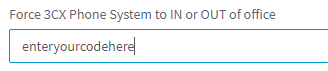
You could use Dial Codes to force the system out of office, and it'll stay that way until your force it back in office. You can go to Settings >> Dial Codes in the Management Console, enter your code.

1647525541781.png

Once done you can use the code only to reset the hours to default, 1 and 2 to change the system in or out of office (but remember that these are permanent until you switch it manually).
 
  • Like
Reactions: VasilisV_3CX
Thanks for those replies. That requires manual intervention to put the system back on normal hours. I'm hoping for an option that would not require that manual intervention. The reason is simple: If we close early on Friday, it's most likely because all the people in charge of answering phones aren't here. So on Monday morning, we have to rely on someone who was not here to set the system to out-of-office mode on Friday afternoon to remember to set the system back to normal hours. That's a lot to ask on a Monday morning.
 
Why not make the code, add it to the receptionist BLF and name it "OPEN" or something?
 
On auto option using these dial codes to put the system back into default.

Another option, change the opening hours for that one day (Friday), and change it back on Monday
 
Status
Not open for further replies.

Forum statistics

Threads
111,974
Messages
590,083
Members
164,901
Latest member
Silent_Guru