Terminated by rule

Status
Not open for further replies.

RuntyCardinal

Free User
Joined
Mar 18, 2019
Messages
26
Reaction score
5
Hello,

I have been experiencing some issues with 3CX. We have 9 lines open to receive calls, and 3cx supports 8 sim calls. However, when some clients are calling in the call doesn't go through. In the call reports it is reported as "Terminated by Rule". What exactly does that imply?

We are using a call queue.

Thanks
 
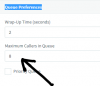
did you give maximum callers in Queue in advanced Q options ?
10340
 
Currently we have that set to 0. I believe the default is unlimited, however Ill change it to 4 and see if that will make a difference.
 
Also in your SC settings in trunk is it set at your max?
10347
 
Yeah, its at 8 and we have 8 phone numbers that are tied to the CQ.
I also have a few of these in the Event Log: "Lost Call in Queue CQ Main (806) from Caller ID '#12345678' Queue: 806 [CQ Main] caller #12345678"
 
In the call reports it is reported as "Terminated by Rule". What exactly does that imply?
This shows up in the call log if your trunk or inbound rule or even the destination if no answer of the queue is set to "End Call" and the call was forwarded there for whatever reason. It could be out of office hours were triggered or the callers reached the destination if no answer of the queue etc.
I also have a few of these in the Event Log: "Lost Call in Queue CQ Main (806) from Caller ID '#12345678' Queue: 806 [CQ Main] caller #12345678"
This means that there was a lost call in the queue because either the caller hang up before an agent answered the call or the call was transferred outside the queue.
 
Thanks for the information, that clears up quite a bit of my questions. I found that some of the inbound rules were set to end a call if they were called instead of going to the CQ.

I am still having some issues with calls randomly going to voicemail instead of going through. As in someone will call and it will skip straight past the CQ and play the voicemail prompt. Voicemail is disabled for the entire company and I haven't been able to track this one down. It seems to only happen 3 or 4 times a week out of hundreds of calls. I've been chasing this bug for a few months now.

The only other issue I have been having is with 3 handsets the sound quality is poor. This may just be due to them being Htek 923U's. I've been running a constant ping on them using PTRG and the latency is usually at 2ms and will spike to 50ms but never above that. We have tried different cables, reprovisioning the phones, my next step was going to be plugging the phone directly into the switch to see if that can narrow down a faulty wall jack. Do you guys have any suggestions on what I could try and troubleshoot this with?
 
in extensions , which audio codec do you use for Htek UC923 ? if audio is poor, is it same for internal calls for example between two htek? or is it only with external calls
 
Internal calls sound great, its the external that are the issue.

I didn't realize you could change the codecs on each line individually. I had the SIP trunk using G.711 U-law, G.711 A-law, and G729. On the extension itself it has PCMU, PCMA, G722, G729A/B. It looks like all my extensions with HTek' s are using those codecs. I also have a couple YeaLink's that are using the PCMU, PCMA, G722, and G729 codecs.
 
Audio quality for external calls is poor only with HTEKs?
I'm using PCMA on my pbx and audio is good, but no htek to test with only Snom, Yealink.

Do you have checked pbx deliver audio to see if major difference?
 
I believe that I have used the PBX deliver audio before on another extension that was having issues and it didn't seem to work. I actually found that the issue is with the cable that was sent out with the phones. We tested the audio using the speaker phone which sounded great. Once I replaced the cable the issue seemed to stop.

The straight to voicemail bug is still happening occasionally.
 
Glad to see you were able to solve the audio issue. For the voicemail issue, you will need to enable verbose logging on the PBX and check the activity log when the issue is observed. That should tell you why the call is directed to voicemail. For more details you can also use the bin log viewer.
 
Status
Not open for further replies.

Forum statistics

Threads
111,923
Messages
589,752
Members
164,796
Latest member
Dame24