Solved testing 3CX SIP Server... failed

Status
Not open for further replies.

Indika

Customer
Joined
Dec 8, 2017
Messages
10
Reaction score
1
I got this issue when i run the Firewall Check
Code:
resolving 'stun-eu.3cx.com'... done
resolving 'stun2.3cx.com'... done
resolving 'stun3.3cx.com'... done
resolving 'sip-alg-detector.3cx.com'... done
testing 3CX SIP Server... failed (How to resolve?)
stopping service... done
detecting SIP ALG... not detected
testing port 5060... full cone test failed (How to resolve?)
starting service... done
testing 3CX Tunneling Proxy... done
stopping service... done
testing port 5090... done
starting service... done
testing 3CX Media Server... done
stopping service... done
testing ports [9000..9255]... done

I'm using a ZTE F66 router and i have forward all the port in '''https://www.3cx.com/docs/3cx-phone-system-v14-ports/ " and i disable all the firewalls in my windows PC and the router firewall to check this but nothing work. can you help me with this issues ?
 
Hello @Indika

Please make sure that the port forwarding has been done correctly for both TCP and UDP and that no other device is blocking you (a firewall or a router). Also the following article can help you troubleshoot your issue.
https://www.3cx.com/docs/firewall-checker/
 
Plz check the wireshark report link below.


my server ip is 192.168.2.3
 
Last edited by a moderator:
I have removed the link as wireshark capture contain sensitive information. I will take a look at the capture and report back
 
I have removed the link as wireshark capture contain sensitive information. I will take a look at the capture and report back

ok thank you very much
 
Hi

can you tell what is the issue for these errors?

  • 12/08/2017 5:45:12 PM - [CM503003]: Call(C:3): Call to <sip:[email protected]:5060> has failed; Cause: 487 Request Terminated/INVITE from 192.168.2.102:59294
  • 12/08/2017 5:39:39 PM - Failed to add outbound CID reformating rule for DN:10000: <Rules />
  • 12/08/2017 5:39:39 PM - STUN discovery of public IP is disabled

 
Based on the guide i sent you earlier the test for 5060 passed the first test but fails on the second test. There is no reply received when the firewall checker requests a response from a different IP and port.

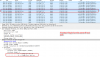
This is the first test for port 5090 that succeeded: The response was made from port 5090 and there was no request for an ip and port change. As you can see the binding response directly under the request came from the same IP and the same port the request was sent to.

2017-12-08_14h21_07.png

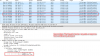
On the second test the firewall requested an IP and port change for the reply and as you can see in the binding response the IP and port changed. The request was sent to 151.80.125.93 and port 3478 and the response came from 151.80.125.95 port 3479.

2017-12-08_14h25_36.png

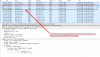
This is a successful test as both scenarios succeeded but this is not the case for port 5060. The first test passes but there is no response for the second test:

2017-12-08_14h32_13.png
So something is blocking port 5060 from receiving responses. This is where you need to troubleshoot your network and see how you can resolve this.
 
  • Like
Reactions: Indika
Based on the guide i sent you earlier the test for 5060 passed the first test but fails on the second test. There is no reply received when the firewall checker requests a response from a different IP and port.

This is the first test for port 5090 that succeeded: The response was made from port 5090 and there was no request for an ip and port change. As you can see the binding response directly under the request came from the same IP and the same port the request was sent to.

View attachment 6649

On the second test the firewall requested an IP and port change for the reply and as you can see in the binding response the IP and port changed. The request was sent to 151.80.125.93 and port 3478 and the response came from 151.80.125.95 port 3479.

View attachment 6650

This is a successful test as both scenarios succeeded but this is not the case for port 5060. The first test passes but there is no response for the second test:

View attachment 6651
So something is blocking port 5060 from receiving responses. This is where you need to troubleshoot your network and see how you can resolve this.
Thank you very much for your help i'll check my network again. but the thing is locally i configure a ip phone using that port 5060 and it is working fine. And i can take calls from it other extensions phone is planet VIP-1010PT.
 
You did not mention the system on which 3cx is running. If WIndows, then try turning off the Windows firewall and see.

Additionally, if using traditional settings, you only need:
5060UDP (SIP)
9000-XXXX UDP (depends on what you have set for external RTP ports
5000-5001 TCP (provisioning)
5090 TCP/UDP (tunnel)

If there are no external devices planned, then no need for the tunnel or provisioning.

You should also check and disable any SIP ALG or SIP Helpers in the router

There are other settings in the SIP Trunk that may help as well,but check the above first.

When you used the Planet phone, did you port forward to the phone or merely program it up and use?
 
i did turn off my windows firewall and disable SIP ALG on my router.. I install 3CX phone system in windows 7 professional machine if i install windows server 2012 r2 will it help ? i have already running a elastix 2.5 pbx and it work outgoing and incoming calls are working perfectly. I'll check for SIP Helpers in the router now
 
You did not mention the system on which 3cx is running. If WIndows, then try turning off the Windows firewall and see.

Additionally, if using traditional settings, you only need:
5060UDP (SIP)
9000-XXXX UDP (depends on what you have set for external RTP ports
5000-5001 TCP (provisioning)
5090 TCP/UDP (tunnel)

If there are no external devices planned, then no need for the tunnel or provisioning.

You should also check and disable any SIP ALG or SIP Helpers in the router

There are other settings in the SIP Trunk that may help as well,but check the above first.

When you used the Planet phone, did you port forward to the phone or merely program it up and use?

i did not port forward for the planet phone it register when i gave the username and password
 
3CX should have ports forwarded in the router such that the ports I mentioned point to the local 3CX IP,
There should be no other SIP enabled devices behind the firewall that are using the same ports and contacting services on the outside. Your FQDN should resolve to your public IP, For the moment, you should disable any firewall that is running in the machine where 3CX is installed. While you mentioned that the Windows firewall is disabled, I guess I should have expanded the explanation to include any firewall like those that come bundled with some anti-virus/threat software.

I suspected as much about the phone as the phone likely had keep alives enabled and possibly rports. The reason for only having 3CX communicating on the needed ports and with forwarding is that the router has to maintain a table of both the IP and the ports that are traversing the LAN to WAN and back so as to insure that the proper devices are getting the correct responses.

I assume the phone was tested for both inbound and outbound calling and worked fine. This keep alive caused a pin-hole in the firewall which allowed the traffic to flow. The keep alive sent a packet every so often to maintain the pin-hole. While 3CX also has a function that will cause this, port forwarding is the preferred method.

Your SIP provider, are they using peer or register trunks, and if register, does the system show the trunks as being registered?

There is no fundamental reason to move to a server class system unless the demands anticipated will exceed the PCs capability, be it the number of simultaneous calls, recordings, etc, that tax the hardware or you want a RAID that the PC cannot support.
 
  • Like
Reactions: Indika
What also came up in PM conversation, if your router also has a RJ-11 ports, it implies that is also has a mini SIP Client/Server inside which may be hard-coded to using port 5060, so even if you forward that with rules, it still won't be allowed through as it will be used be the router itself.
If this is the case, your options are:
- Change the SIP Port your router is listening on (not always an easy task)
or
- Change the SIP Port 3CX is listening on.
or
- Change the router with one that doesn't have a SIP module binding port 5060

(thanks @leejor)
 
  • Like
Reactions: Indika
3CX should have ports forwarded in the router such that the ports I mentioned point to the local 3CX IP,
There should be no other SIP enabled devices behind the firewall that are using the same ports and contacting services on the outside. Your FQDN should resolve to your public IP, For the moment, you should disable any firewall that is running in the machine where 3CX is installed. While you mentioned that the Windows firewall is disabled, I guess I should have expanded the explanation to include any firewall like those that come bundled with some anti-virus/threat software.

I suspected as much about the phone as the phone likely had keep alives enabled and possibly rports. The reason for only having 3CX communicating on the needed ports and with forwarding is that the router has to maintain a table of both the IP and the ports that are traversing the LAN to WAN and back so as to insure that the proper devices are getting the correct responses.

I assume the phone was tested for both inbound and outbound calling and worked fine. This keep alive caused a pin-hole in the firewall which allowed the traffic to flow. The keep alive sent a packet every so often to maintain the pin-hole. While 3CX also has a function that will cause this, port forwarding is the preferred method.

Your SIP provider, are they using peer or register trunks, and if register, does the system show the trunks as being registered?

There is no fundamental reason to move to a server class system unless the demands anticipated will exceed the PCs capability, be it the number of simultaneous calls, recordings, etc, that tax the hardware or you want a RAID that the PC cannot support.


We are using peer sip trunk and can you check the link below.
https://www.mediafire.com/file/rsd7097z3k49y48/sip.zip
Elastix pbx is the current pbx system we are using
 
Sorry, but the screenshots do not relate to anything that we have been trying to convey or confirm. The entire thread has been about the firewall failing and the ports not being open or set correctly, which do not relate to inbound or outbound rules nor Elastix at this point .

Until you can confirm that the ports in the router are forwarded to 3CX and that there are no other SIP servers running simultaneously behind the firewall, and that the SIP port inbound has been changed (post from NICK_D) if needed, there is not much we can do.

I am familiar with Elastix as well and if it functions, then there is no reason that 3CX will not, but we need a clean playing field to start so that we know there is nothing else interfering.
 
its FIXED NOW and RESOLVED
I called him through 3cx windows app and he replied to me without any problem.

DONE
 
Status
Not open for further replies.

Latest Posts

Forum statistics

Threads
111,884
Messages
589,543
Members
164,743
Latest member
aa1