testing 3CX SIP Server... failed

Status
Not open for further replies.

END-USER

Forum User
Advanced Certified
Joined
Sep 22, 2021
Messages
8
Reaction score
0
Morning team, I really hope I get assistance, I have been battling with my firewall team with this issue, we are using Sophos hosted firewall and they have confirmed that SIP ALG has been disabled and all ports have been forwarded accordingly and 3CX Firewall checker passes all the services and ports except for these 3 below :

testing 3CX SIP Server... failed (How to resolve?)
3cx2.png
3cx.png
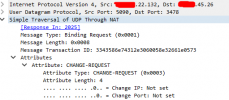
I have attached the wireshark results I ran.

I'm using static IP address

I'd appreciate some assistance
 
Hi!

You can see how the Firewall Checker works exactly here:
https://www.3cx.com/docs/firewall-checker/

The truth is that the Firewall Checker uses such a simple logic to determine what is going on, that it is rarely wrong (I can't remember the last time that was...).
Have a look at the document, I see you are already somewhat familiar with Wireshark, do the manual check yourself on the ports that fail.

What you can do?
  1. Open the Management Console in 2 tabs, tab A and tab B
  2. In tab A, go to Dashboard --> Activity Log and here press the "Capture" button. Do not close tab A.
  3. In tab B, go to Dashboard --> Firewall and start running the Firewall Checker and wait until ti finishes.
  4. Once finished, switch to tab A, stop the capture and download it and open.
  5. Check the ports that failed, then use various filters to limit what you can see like:
    Code:
    udp.port==5060
 
I'd be tempted to ask for a copy / paste of the relevant rules from the firewall team so you can validate against 3CX documentation.
 
udp.port==5060
Hello NickD, I thank you for the reply.

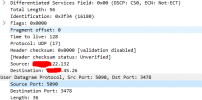
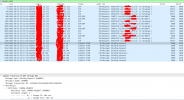
this is what I can see from the wireshark, hope it gives us an idea of what needs to be fixed3cx3.png3cx3.png3cx4.png3cx4.png
 
You just proved yourself that port 506 is indeed not configured properly!

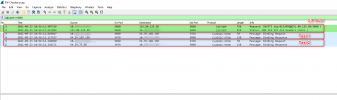
This is what a successful capture should look like:
1632384254686.png

First off, SIP ALG, as you can see the INVITE message being sent, but there is no reply coming back in your screenshot.

Test 1, 3CX sends a STUN request to the STUN Server on IP A, and expects an answer back from IP A.
In your case, this looks successful, from your screenshot, you are sending a packet from xx.xx.22.132:5060 to xx.xx.20.144:3478 and receiving a reply from xx.xx.20.144:3478 to xx.xx.22.132:5060.

Test 2, 3CX sends a STUN request to the STUN Server on IP A, but now expects an answer back from the STUN Server from IP B.
In my screenshots you can clearly see this. In your screenshot, you see 3CX sending 3 request but none coming back.


So, from what I can tell, Firewall Checker is correct.

[EDIT]
Ignore the fact that the STUN Server IPs might be different in your case, we have multiple around the world and different ones are used depending on location...
 
  • Like
Reactions: ChrisC_3CX
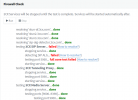
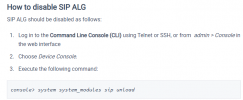
Hello, and thanks once again, I'm also suspecting the SIP ALG on our Sophos XG firewall. Firewall Checker keeps on failing with detecting SIP ALG!!!!!! even though we have disabled it following the steps below:

Anyone with Sophos firewall, are these the only steps needed to disable SIP ALG on the Sophos firewall?


1632390923907.png
 
I think the issue here is not so much that there exists an enabled SIP ALG but that the 3CX PBX is not receiving any replies for the SIP ALG test, that is why the SIP ALG just says "failed" as opposed to "detected". You can also see this from the packet capture as a response to the SIP INVITE sent by the 3CX PBX is never received.

Same goes for the SIP PORT 5060 test, the first test for PORT 5060 that does not require a port or ip change passes, however the second test that requires these to change fails as a response is never received by the PBX. That is the reason it reads "Full cone test failed" as opposed to just "failed".

That said I think you should check the firewall in order to determine if this traffic is indeed reaching it, and if yes, figure out why it is dropping it or not forwarding it to the correct destination.
 
I think the issue here is not so much that there exists an enabled SIP ALG but that the 3CX PBX is not receiving any replies for the SIP ALG test, that is why the SIP ALG just says "failed" as opposed to "detected". You can also see this from the packet capture as a response to the SIP INVITE sent by the 3CX PBX is never received.

Same goes for the SIP PORT 5060 test, the first test for PORT 5060 that does not require a port or ip change passes, however the second test that requires these to change fails as a response is never received by the PBX. That is the reason it reads "Full cone test failed" as opposed to just "failed".

That said I think you should check the firewall in order to determine if this traffic is indeed reaching it, and if yes, figure out why it is dropping it or not forwarding it to the correct destination.
thanks a lot Chris the firewall team is asking for a 3CX flow diagram, does anybody have?
 
thanks a lot Chris the firewall team is asking for a 3CX flow diagram, does anybody have?
There's no "Flow Diagram" per se but the guide my colleague linked to initially should contain all the information required for determining the necessary firewall configuration.
 
Status
Not open for further replies.

Forum statistics

Threads
111,977
Messages
590,096
Members
164,906
Latest member
Nari