TextToSpeech folder fast growing

Status
Not open for further replies.

Trestill

Platinum Distributor
Advanced Certified
Joined
Jan 22, 2015
Messages
61
Reaction score
6
Hi,

another easy question about VAD. I have a system that heavy depends on TTS and I noticed that every invoke of the engine generates a wav file. It would be OK but this files stays there. In few hours I had 0,5GB of wav files.

How to automatically delete this files after they are played? Or at least once every few hours?

Best Regards,
 
Hi @Trestill,

You're right, every time you use TTS from the VAD, a WAV file is created an played. That file will stay on the disk until you manually delete it.

There is no way to automatically delete those files. You need to do it manually, or run a script to do it, and schedule a task to run it once an hour for example.

Kind regards.
 
Thank you @edossantos
I'll do that.
But those files actually showed me that there is another strange thing (at least for me).
The voice quality in those files is good but when in call it's poor. I changed codecs but there is no difference in prompts quality.
I even installed wireshark on the 3CX server and captured test call. quality wasn't good. So it's not problem with provider.

Any suggestions?

Regards
 
I would suggest that you check if the system resources (CPU, memory, disk) is enough for your application usage.

Do you have the same issue with audio quality if the call comes from the PSTN or if you call from an internal extension?
 
I checked them and system is OK. I checked generated wav files in TextToSpeech folder and they are very good quality, so TTS engine is working fine. When I got connected from PSTN to employee extension quality also is OK.
 
So the problem is only when you call internally? In that case, you should check the codecs used in that call, or the devices involved in the call with poor audio quality.
 
I wasn't clear in my previous posts. I have problem only with audio generated by PromptPlayback Component that should use TTS engine to read text from files.
1. In my opinion volume property isn't working (there is no noticeable difference in volume between values 100 an 50)
2. Audio in calls is generally OK (internal and external)
3. Only quality issue is when call (inbound or internal) is made to call flow with PromptPlayback Component.
3.1 System isn't overloaded during playback
3.2 wav files generated by component is good quality
3.3 audio transmitted to caller is not so good.
I used the same headsets to listen to wav and to make call (via 3cxphone) so hardware isn't an issue here.
Any suggestions?

How do you think: if files was in SSML format could it make the audio better?
 
Last edited:
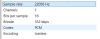
Can you check if the WAV files generated have the properties we need to avoid transcoding? That is:
Format: WAV
Channel: Mono
Bit rate: 8 kHz
Sample: 16 bit

You can see that if you check the file properties.

I don't think that using SSML instead of text will make any difference.
 
It seems that's the reason. How to change VAD TTS settings to generate correct files?
upload_2017-4-18_15-3-27.png

Regarads,
 
OK, then you will need to make manual changes to the generated output. Unfortunately this is something you will have to do every time the VAD outputs the build result...

The good thing is that this is included in a single file, and it's always the same (not depending on your project), so you can have the fixed file, and copy it to the server after deploying a new version. This is what you need to do:
1) Open the file "ConvertTTS.aspx" from the deployment folder in a text editor.
2) Look for the line having:
speaker.SetOutputToWaveFile(destinationFileName);
3) Change it as follows:
speaker.SetOutputToWaveFile(destinationFileName, new System.Speech.AudioFormat.SpeechAudioFormatInfo(8000, System.Speech.AudioFormat.AudioBitsPerSample.Sixteen, System.Speech.AudioFormat.AudioChannel.Mono));
4) Save the file.

You can save the updated file "ConvertTTS.aspx" somewhere, so you use it to replace the generated file after you deploy any project that uses TTS.

Kind regards.
 
Ernesto, thank you very much. It worked.
 
Status
Not open for further replies.

Forum statistics

Threads
112,322
Messages
591,889
Members
165,470
Latest member
Robert Lee