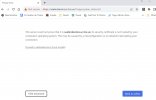
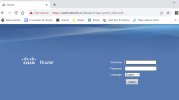
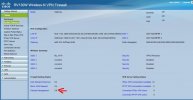
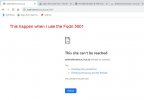
the 3cx console is opening my router page

Status
Not open for further replies.

carlos123

Bronze Partner
Joined
Oct 25, 2016
Messages
25
Reaction score
3
HI all,

I'am having issues connection to the 3CX Management Console from the other computers deferent to the server, When I clicked desktop shortcut, It opens up a web page with my router page.

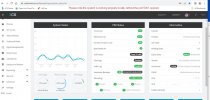
In the server everything is working very well, but outside of the server is no working, also I run the Firewall checker and say is ok on all the ports. the local extension connected are working and I'm able to do outgoing and receive any incoming calls, but those extensions located outside of the office are not working.


  • 3CX Version, Standard Annual 18. update 8 Build 939
  • Server OS, Windows 10 22H2 os build 1945.3448
  • Is the 3CX Server Hosted and where? On-premises
  • IP Phone Make/Model/Firmware version, Yealink T46s version 66.86.0.5
  • Provisioning Method: Local / VPN / STUN
  • Trunk Provider or VoIP Gateway Make/Model, VOIP.MS SIP-Trunk
  • Has the Firewall Checker passed: YES
  • Are custom Phone Templates being used: NO


Any assistance to help resolve this will be much appreciated.
 

Attachments

  • Seabrokers3cxErrror.jpg
    Seabrokers3cxErrror.jpg
    170.1 KB · Views: 23
  • error2.jpg
    error2.jpg
    163.4 KB · Views: 23
  • error3.jpg
    error3.jpg
    125.8 KB · Views: 23
Which is your https port? I think you missed the right port.
 
The HTTPS port is 5001
when I run the port forwarding tested on this or any port related to 3CX

Closed Port 5001 is closed on 68.115.2xxx

Use Connected to monitor this port.
 
Last edited:
You need NAT reflection enabled for that port if you are using your public IP from inside the LAN. Otherwise if your router is configured to allow LAN to get “anywhere” then its WAN IP is allowed. Interesting it listens on 5001 though.

Or use split DNS.

https://www.3cx.com/docs/creating-fqdn-split-dns/
 
  • Like
Reactions: N_G
You need do to portforwarding and use the port in the browser. Fqdn:5001
 
  • Like
Reactions: bitn2
You need do to portforwarding and use the port in the browser. Fqdn:5001
I have 3 Installations with the same router, but this one when I use the fqdn:5001 say "This site can’t be reached" but works without it.
 
I have 3 Installations with the same router, but this one when I use the fqdn:5001 say "This site can’t be reached" but works without it.
As i said, you need to do portforwarding. What do you mean with 3 installations on the same router? All with the same https port? That wont work.
 
  • Like
Reactions: Alejandro_3CX
I have 3 Installations with the same router, but this one when I use the fqdn:5001 say "This site can’t be reached" but works without it.
Did you port forward 5001 to 5001 or did you port forward 5001 to 443?
 
@bitn2 I had to read his post a couple of times...I suspect he meant three different offices that happen to use the same model router.

OP did say the firewall checker passes, above, so presumably the router has the ports forwarded? (I didn't scroll back up last night)

Overall, the images posted above are not using port 5001, and if 3CX is using 5001, it is expected the browser can't connect, even if NAT reflection is enabled.

OP needs:
  • correct port forwarded
  • browser using correct port
  • NAT reflection or split DNS
 
As i said, you need to do portforwarding. What do you mean with 3 installations on the same router? All with the same https port? That wont work.
sorry Yes, I do have 3 offices using the same model of router.
 
Than try to use the port in the url to reach the 3cx.
 
If your management port is 5001 then why havent you stuck that on the end of your URL?

the fact that you're getting your router GUI is that you've got remote management enabled for the router on port 443.

I dont think you're using 5001. Therefore, turn off the remote management for your router or change the port it uses.
 
  • Like
Reactions: bitn2
@bitn2 I had to read his post a couple of times...I suspect he meant three different offices that happen to use the same model router.

OP did say the firewall checker passes, above, so presumably the router has the ports forwarded? (I didn't scroll back up last night)

Overall, the images posted above are not using port 5001, and if 3CX is using 5001, it is expected the browser can't connect, even if NAT reflection is enabled.

OP needs:
  • correct port forwarded
  • browser using correct port
  • NAT reflection or split DNS
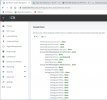
First of all, thank you for your help, let me explain why I am frustrated, I was thinking it was a problem with the router so I bought a new one (cisco RV130W) I did the process of opening the ports again, but my surprise was when I checked the ports they are still closed, so I made an even more drastic decision, I moved the server to another office of the same company and installed the router (Cisco RV130W) which I reset and started from scratch, connect the server, configure it and check the ports and nothing, they are still closed, I also called the ISP and asked them to open the ports on the modem and guess what? The ports remain closed. I seriously don't know what's going on? please if you have any other ideas you can give me I really appreciated , I really need help.

Sorry I forgot to mention the system works perfectly locally, but I can't use it outside of the office
 

Attachments

  • sea6.jpg
    sea6.jpg
    52.7 KB · Views: 12
  • sea5.jpg
    sea5.jpg
    78.4 KB · Views: 11
If your management port is 5001 then why havent you stuck that on the end of your URL?

the fact that you're getting your router GUI is that you've got remote management enabled for the router on port 443.

I dont think you're using 5001. Therefore, turn off the remote management for your router or change the port it uses.
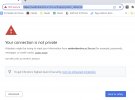
I don't have the remote management on, and the reason I don't use the 5001 at the end of my URL is because it don't work in that way, I desperately asking for help.
 

Attachments

  • sea7.jpg
    sea7.jpg
    59.7 KB · Views: 8
You need do to portforwarding and use the port in the browser. Fqdn:5001
I did and this happen when I use Fqdn:5001
 

Attachments

  • sea8.jpg
    sea8.jpg
    27.7 KB · Views: 14
Drop me a DM
 
Also please verify you are really using 5001 as https port on your 3cx. Internally you are reaching the pbx over 443 (as your screenshot).
 
Status
Not open for further replies.

Members Online Now

Forum statistics

Threads
111,831
Messages
589,277
Members
164,660
Latest member
RJenkinsROCK