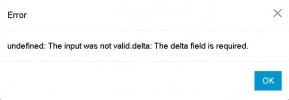
The delta field is required

Status
Not open for further replies.

SB2021

Bronze Partner
Basic Certified
Joined
Jun 3, 2021
Messages
14
Reaction score
2
Hi

Upgraded to V20, system owner extension has space in mobile, says "Mobile number cannot contain braces, spaces and hyphens while used in forwarding"

Removed space and tried to save but just get "3cx undefined: The input was not valid delta: The delta field is required"
Tried removing mobile number and forwarding to mobile but still same error.

How to resolve?

Thanks
 
Tried removing mobile number and forwarding to mobile but still same error.

How to resolve?

Thanks

Hi !
Have you checked all statuses and exception rules? If not, and the problem concerns only an extension, delete and recreate it.

Be mindful of the consequences:
- Reconfigure IVRs if any were pointing to the extension.
- Re-add to call groups.
- Re-add to queues.
- Re-add to the correct departments.
- Voice mails and chat/SMS conversations will be deleted.
- Custom messages and non-presentation messages will be deleted.
- Reconfigure mobile devices, desktops, and PC/Mac.
- Reassociate DID if applicable.
- The user will lose access to their past call history.
- Personal settings will be lost.

If deleting and recreating is not a viable solution, try replacing the mobile number with ‘0000’ (just the digits). Use the digit ‘0’ four times.

If the error continues, please share a screenshot.

It’s highly likely that further investigation is warranted. Write to me privately, and we could arrange a remote assistance session. I can connect to your systems under your supervision for analysis.

It’s possible that 3CX has already planned a fix in RC3, which should logically be released this week (Based on a hunch, I don’t have any official confirmation.).
 
Checked rules, removed any forwarding to mobile, nothing in exception. Dont think the mobile field is the issue, just cant change and save it cause getting: Screenshot_1.jpg
Was hoping not to recreate as its the system owner account I am logged on with, no such errors making changes to other extensions. May wait till RC3 and if still no joy will confirm here and try recreating.
 
Checked rules, removed any forwarding to mobile, nothing in exception. Dont think the mobile field is the issue, just cant change and save it cause getting: View attachment 39413
Was hoping not to recreate as its the system owner account I am logged on with, no such errors making changes to other extensions. May wait till RC3 and if still no joy will confirm here and try recreating.

So, is an owner trying to modify another owner's profile, or is a user(owner) attempting to edit their own profile while logged in?


Try ;

Please follow these steps to capture this information using Google Chrome’s Developer Tools:

1. Open the 3CX WebClient, go to edit user.
2. Open Developer Tools: Right-click anywhere on the page and select ‘Inspect’ from the context menu. Alternatively, you can press Ctrl+Shift+I (or Cmd+Option+I on Mac) to open Developer Tools.
3. Go to the ‘Network’ Tab: In the Developer Tools panel, click on the ‘Network’ tab. This tab tracks all network activity on the page.
4. Prepare to Submit the 3CX changes (Don’t save now, only edit) : Make sure the Developer Tools are open and the Network tab is active. Fill out “the form” as you normally would, but do not submit it yet.
5. Enable ‘Preserve Log’: In the Network tab, check the box for ‘Preserve log’. This ensures that the network data is not cleared upon form submission.
6. Submit the changes (form): Now, submit the form by clicking the save button.
7. Review Network Activity: After submitting, look for the form submission in the Network tab. It usually appears as a new file named after your form submission endpoint.
8. Find Form Data (3CX Data): Click on the relevant network request. In the panel that opens, click on the ‘Headers’ tab. Scroll down to the ‘Request Payload’ or ‘Form Data’ section. This section shows the data that was sent with your form submission.
9. Take a Screenshot: Please capture a screenshot of the ‘Request Payload’ or ‘Form Data’ section.
10. Send here the Screenshot: Before proceeding, make sure it doesn't contain any confidential information such as a mobile number.

Alternatively, you could wait for the release of RC3 to see if the issue has been resolved.

In any case, could you clarify how the process is being carried out? Is one owner being modified by another owner, or is an owner attempting to modify their own details?
 
  • Like
Reactions: Evolute IT
Hi @SB2021

What V20 version are you running? Also do you have any BLF buttons on that extension?
 
Status
Not open for further replies.

Forum statistics

Threads
111,974
Messages
590,081
Members
164,899
Latest member
mazet