The integration 3CX-Freshdesk not running

Status
Not open for further replies.

Expressoft

Forum User
Joined
Dec 18, 2023
Messages
9
Reaction score
0
Hello,
I have done all the setup as 3CX documentation specify, but no pop-up for ticket open in any circumstances, inbound, outbound. Is there anything to be done? The 3CX webclient is open, users emails are the same in both systems, everything is seems fine, but no new ticket open when a call is received.

Thank you,
Andrei
 
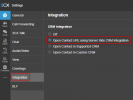
Does each user have this option enabled on their own web client?

1713869198468.png

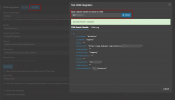
You can also do a test with a known number in the CRM configuration page

1713869297425.png
 
Thank you for your quick response! I did what you show me, the test is OK, but still no new ticket open. Any idea?
Regards,
Andrei
 
Since the pop-up is not working this indicates that there is no matching returned from the CRM.
Does the number match exactly the CRM contact?
 
Hello,
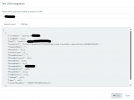
I have used the same phone number as in test page. Maybe is something wrong into the test response. See below.
1713949436003.png
 
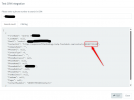
Are you typing the number in this format?
1713950010841.png
 
  • Like
Reactions: Evolute IT
Hello,
That I presume is a contact ID from Freshdesk, is not the phone number. I saw that the phone number for local calls appears in 3CX incoming calls without country ID, like 077xxx and the same are test contacts in Freshdesk.

Thank you very much for your support,
Andrei
 
You need to ensure first that under Dashboard<<Advanced<<Contacts<<Options<<you have selected to Match Exactly.
Then you also need to check that the incoming caller id is exact the same with the number that is stored in the CRM.
If this is not the case then you might need to configure the caller id reformatting to ensure this.
 
Hello,
Both checked, all as you described, still no pop-up.

Regards,
Andrei
 
Any pop-up blocker on your browser?
Do you allow notifications?
 
Hello,
I'll check on this on Monday.

Thank you,
Andrei
 
Let us know the outcome ;)
 
Status
Not open for further replies.