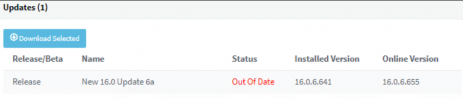
Solved the update from 16.0.5.622 to 16.0.6.641 never seems to start (Windows 10)

Status
Not open for further replies.

Manos Val

SOHO User
Joined
Sep 1, 2017
Messages
32
Reaction score
3
I have 3CX runing in Windows 10 pro, version 16.0.5.622.
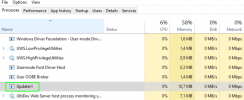
Two days before I updated 3CX from version 16.0.5.5619 to 16.0.5.622 without problem. I am trying now to update to version 16.0.6.641 but it seems that the update never start. I see in Windows Task Manager a process named Updater1 but nothing happens.
I have tried sever times and I have made windows resart also sever times. Also, I didn't receive any failure email. My Windows 10 runs as VM in Windows Server 2012 R2 Hyper-V and it's full updated.
 

Attachments

  • 2022-01-27_17-46.png
    2022-01-27_17-46.png
    152.4 KB · Views: 3
Since Hyper-V running on Windows Server 2012R2 is no longer a supported virtualization platform, what I would recommend you do is, not waste time investigating and troubleshooting why the upgrade fails, but instead take a backup and use it to restore on a new 3CX v18 installation on another machine that complies with our specification requirements. You would have to use the latest v18 installation file which can be downloaded from the 3CX portal, run it and use the backup you take of v16 during installation to restore the config.
 
I just received an email with error and 3 attachments. The first attachment writes:
2022/01/25 17:40:39.411|0001| Cleaning folder C:\ProgramData\3CX\Data\Updates
2022/01/25 17:40:39.433|0001| SP link: https://downloads-eu.3cx.com/downloads/v160/sp150/PatchX23_64.zip
2022/01/25 17:40:40.075|0007| Downloading new version...
2022/01/26 17:21:55.017|0001| Cleaning folder C:\ProgramData\3CX\Data\Updates
2022/01/26 17:21:55.041|0001| SP link: https://downloads-eu.3cx.com/downloads/v160/sp150/PatchX23_64.zip
2022/01/26 17:21:55.614|0007| Downloading new version...
2022/01/26 17:22:25.294|0009| Done
2022/01/26 17:22:25.331|0009| Unzipping service pack...
2022/01/26 17:22:42.868|0014| Starting updater2.exe
2022/01/26 17:27:11.019|0001| Cleaning folder C:\ProgramData\3CX\Data\Updates
2022/01/26 17:27:12.075|0001| SP link: https://downloads-eu.3cx.com/downloads/v160/sp150/PatchX26_64.zip
2022/01/26 17:27:12.716|0007| Downloading new version...
2022/01/26 19:18:15.426|0001| Cleaning folder C:\ProgramData\3CX\Data\Updates
2022/01/26 19:18:15.449|0001| SP link: https://downloads-eu.3cx.com/downloads/v160/sp150/PatchX26_64.zip
2022/01/26 19:18:15.786|0007| Downloading new version...
2022/01/26 19:18:44.318|0010| Done
2022/01/26 19:18:44.376|0010| Unzipping service pack...
2022/01/26 19:19:04.728|0017| Starting updater2.exe
2022/01/26 19:32:23.831|0001| Cleaning folder C:\ProgramData\3CX\Data\Updates
2022/01/26 19:32:25.910|0001| SP link: https://downloads-eu.3cx.com/downloads/v160/sp150/PatchX28_64.zip
2022/01/26 19:32:26.828|0007| Downloading new version...
2022/01/26 19:46:43.467|0001| Cleaning folder C:\ProgramData\3CX\Data\Updates
2022/01/26 19:46:43.494|0001| SP link: https://downloads-eu.3cx.com/downloads/v160/sp150/PatchX28_64.zip
2022/01/26 19:46:43.817|0007| Downloading new version...
2022/01/26 21:19:03.438|0001| Cleaning folder C:\ProgramData\3CX\Data\Updates
2022/01/26 21:19:03.466|0001| SP link: https://downloads-eu.3cx.com/downloads/v160/sp150/PatchX28_64.zip
2022/01/26 21:19:03.772|0007| Downloading new version...
2022/01/27 17:21:43.285|0001| Cleaning folder C:\ProgramData\3CX\Data\Updates
2022/01/27 17:21:43.314|0001| SP link: https://downloads-eu.3cx.com/downloads/v160/sp150/PatchX28_64.zip
2022/01/27 17:21:43.878|0007| Downloading new version...
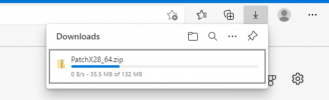
It looks that the https://downloads-eu.3cx.com/downloads/v160/sp150/PatchX28_64.zip could not downloaded. I tried to download manually from Windows 10 VM (which 3CX runs) and it stuck in 20%. Is there any problem with 3CX Server?
 

Attachments

  • 3cx patchX28.png
    3cx patchX28.png
    28.2 KB · Views: 0
I have download the file in question without any issues,
 
  • Like
Reactions: Manos Val
Since Hyper-V running on Windows Server 2012R2 is no longer a supported virtualization platform, what I would recommend you do is, not waste time investigating and troubleshooting why the upgrade fails, but instead take a backup and use it to restore on a new 3CX v18 installation on another machine that complies with our specification requirements. You would have to use the latest v18 installation file which can be downloaded from the 3CX portal, run it and use the backup you take of v16 during installation to restore the config.
Thank you Chris for your suggestion, but I don't have Windows Server 2016 or higher available now.
I can not understand how hyper-v affects the operation of 3CX running on Windows 10 as a VM but it never mind.
I have download the file in question without any issues,
Yes... that was the problem!!!
I changed the gateway in Windows 10 VM and the update completed successfully!
It looks that one of my internet provider blocks the access to 3CX update server.
Thank you fror help.
1643300803144.png
 
  • Like
Reactions: ChrisC_3CX
Glad to see you managed to get the update through!

I'd still recommend you start migration planning to keep the 3CX Instance in a 3CX Supported environment but that of course is entirely up to you.

Please let us know if you need anything else by starting a new thread.
 
Status
Not open for further replies.

Forum statistics

Threads
111,974
Messages
590,081
Members
164,899
Latest member
mazet