- Joined
- Jun 17, 2015
- Messages
- 84
- Reaction score
- 21
Hello everyone,
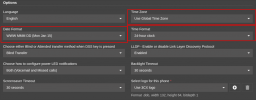
I am having an issue and can't seem to find a fix in 3cx system or the phone. There is an increasing number of users with different models of Yealink phones ranging from new models to older models that are having issues with the time and date settings. The T&D will either show March 20th 2026 or it will get the correct date but be AM time or show 12AM the next day instead of the current day. I have looked at the configuration for every user and ensured the correct NTP settings. I have even tried setting the T&D manually and it still does not fix the issue, I have also tried completely deleting the user affected from 3cx and rebuilding their profile to no avail. I have swapped their phone for new models and the result stays the same. I have ensued the NTP server is not the issue as well. Firmware on phones is up to date as well as 3cx server. I am not sure where else to look in regard to this issue so I am hoping someone can assist. Thankis in advance.
I am having an issue and can't seem to find a fix in 3cx system or the phone. There is an increasing number of users with different models of Yealink phones ranging from new models to older models that are having issues with the time and date settings. The T&D will either show March 20th 2026 or it will get the correct date but be AM time or show 12AM the next day instead of the current day. I have looked at the configuration for every user and ensured the correct NTP settings. I have even tried setting the T&D manually and it still does not fix the issue, I have also tried completely deleting the user affected from 3cx and rebuilding their profile to no avail. I have swapped their phone for new models and the result stays the same. I have ensued the NTP server is not the issue as well. Firmware on phones is up to date as well as 3cx server. I am not sure where else to look in regard to this issue so I am hoping someone can assist. Thankis in advance.