• We do not provide troubleshooting help for unsupported phones. Please try with a supported phone.
  • V20 Update 10 Alpha 2 Learn more

TLS/SRTP with hosted V18

Status
Not open for further replies.

mattdarnell

Gold Partner
Basic Certified
Joined
Sep 8, 2021
Messages
36
Reaction score
5
Aloha,

We are looking to encrypt calls between the handset and the hosted PBX. In the past we used the VPN module with FreePBX.

We do this for security and to stop the internet provider from 'messing' with the SIP signalling - although they swear SIP ALG is off. With the SIP traffic encrypted we can drop a phone almost anywhere and don't care what the carrier is doing.

We were able to get TLS/SRTP working very quickly on a Yealink T42S, the issue is the Certificate we uploaded expires in less than four months - standard for a Let's Encrypt cert.

How are you folks doing this type of provisioning, do you re-upload the cert every time it changes?

-Matt
 

Attachments
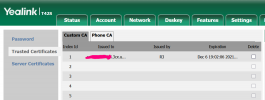
  • cert.png
    cert.png
    41.9 KB · Views: 6
Last edited:
Aloha,

We are looking to encrypt calls between the handset and the hosted PBX. In the past we used the VPN module with FreePBX.

We do this for security and to stop the internet provider from 'messing' with the SIP signalling - although they swear SIP ALG is off. With the SIP traffic encrypted we can drop a phone almost anywhere and don't care what the carrier is doing.

We were able to get TLS/SRTP working very quickly on a Yealink T42S, the issue is the Certificate we uploaded expires in less than four months - standard for a Let's Encrypt cert.

How are you folks doing this type of provisioning, do you re-upload the cert every time it changes?

-Matt
You shouldn't have to upload any certificate. If the phone is on the supported firmware, it should already have the root certificate in it so it will accept it. If provisioning works, the cert is not the issue.

How are you configuring the TLS and SRTP?
 
  • Like
Reactions: JohnS_3CX
Aloha Frederick,

You are correct! The cert is not needed, I deleted it and was able to make a call using TLS.

Trying to find how to have the phones use TLS & Port 5061, might have to make a custom config for that to happen.

-Matt
 
Aloha Frederick,

You are correct! The cert is not needed, I deleted it and was able to make a call using TLS.

Trying to find how to have the phones use TLS & Port 5061, might have to make a custom config for that to happen.

-Matt
You will indeed need a custom template for to enable TLS and set the port to 5061. As for SRTP, you can either set it in that same template or set it directly on the phone. I don't think it is a provisioned parameter but a quick test will tell you that.
 
The server port is provisioned by 3CX to use whatever your PBX is using (5060 by default).

So if you want to auto-provision the phone on 5061 and with SRTP, you will have to create custom templates that will instruct the phone to do so accordingly.

You will also have to edit the extension settings under "3CX app" but you must already know that since you have succeeded already.

The LE certs used by 3CX are already accepted by Yealink so like Frederick said, you won't need to install any certs.

Keep in mind that custom certs will need to be developed, tested, updated/maintained, and supported manually by yourself as 3CX will not provide you with any support for that.
https://www.3cx.com/docs/custom-ip-phone-templates/#h.lbdvgcnoj4wf

An alternative and much simpler solution is to remove the provisioning link, and simply make the changes manually on your phone without editing templates. The settings will remain as is.


We highly recommend using a 3CX SBC whenever possible, this removes the need to do any manual work, it encrypts traffic, it bypasses any SIP ALG entirely, and can run on something as small as a Raspberry Pi
 
Status
Not open for further replies.

Forum statistics

Threads
112,149
Messages
590,964
Members
165,170
Latest member
SupportRock