Transcription / AI stopped working

Sully

Silver Partner
Basic Certified
Joined
Mar 19, 2019
Messages
20
Reaction score
7
Good Morning,

We have had a system deployed for a little over a month now. Version 20.07.890 Enterprise. Everything worked fine with Transcription & AI until we recently found out they stopped working. Transcription & Summary are greyed out. Not seeing anything obvious in the event / activity logs that's telling me there is an issue.

- We checked Integrations & OpenAI Whisper is still setup.
- Transcription for users is still set to transcribe recordings & voicemails.
- Not seeing any errors or alerts in OpenAI dashboard. But at the same time there is no useage, like they stopped talking to each other. Last activity was July 24th.

Thanks!
 
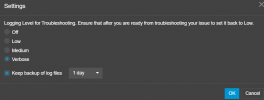
Hi @Sully please refresh the license key, then check under the department that the transcription is enabled, after that set the pbx logs to VERBOSE, try to make a call, record it, wait some minutes, then get a support info ---- check the LOGS folder and see if there is any error or exception for the transcription in the systemservice.log
 
Last edited:
  • Like
Reactions: Evolute IT
Thanks @Alejandro_3CX

- Checked Department Settings, that looks good.
- Refreshed License, that looks good.
- Made a test call, verified there is a recording.
- Looked at the log and didn't see anything sticking out as far as errors or warning.
 
ok how long was the call, make sure it has a duration at least 2-3 minutes. Also validate that your settings with Open AI are as the document listed here https://www.3cx.com/docs/openai-transcription/

Restart the 3cx database server, make sure to enable the logs in verbose mode from the activity log

1755192665408.png

Make a new test and check again the logs for systemservice.log and also the managementconsole.log
 
Looks like restarting the database server got it. It's transcribing now. Is there something we can monitor proactively monitor or get notifications when transcription stops working? I did see in the event log this: 1755193588725.png
 
Hi @Sully leave the logs in verbose mode monitoring the system for some days just in case.
 
This also just happened to my system. Everything was working correctly thru the end of business yesterday. About an hour after our first phone call this morning we noticed that no calls were being transcribed. There were 10 separate phone calls in that time frame to different users from different departments, both inbound and outbound. No changes were made to the system between when it was working and when it stopped. I followed the instructions above and restarted the database service and it is now working again. I looked and I don't see anything in the logs between when it was working and when it stopped working.

We are on Version 20.0 Update 6 (Build 724 Release) Enterprise self hosted on Windows Server 2019 Standard Edition using 3CX as the Transcription Engine.
 
Last edited:
Hi @thegrs ,

Unless the logs were in Verbose is't likely nothing relevant got logged. If you can put the logs to Verbose for a few days, it might be good to see if it catches any detail in case it does happen again.

Best,
KS.
 
@Sully ,

Just looping back to check if you have seen any issue over this last week, or the Transcription service has been working OK for you.
 
@KyriacosS_3CX This just happened again this morning. Calls before 9:15 am US Eastern Time worked. The next call at 9:28 US Easter Time didn't work and none of the calls after this worked.

I just enabled Verbose Logging in the settings and restarted the Database Service. I am currently on a phone call and I will see if this transcribes once I am done.
 
Same thing here, I manage several customers with hosted 3CX instances, and on all of them the transcription service suddenly stopped working—either around 7:15 AM yesterday or 8:00 AM today. I have already refreshed the licenses, restarted the database, and rebooted the operating systems, but these steps did not resolve the issue.
 
Mine is no longer working at all as well. I have refreshed my license and restarted the database service twice today and it didn't fix it for me either. I also turned transcription off and clicked save and then set it back to 3CX and clicked save to see if that would help but it didn't. I do have the Verbose logging enabled but I don't know what I am supposed to be looking for.
 
Same here, our internal 3CX and multiple customer 3CX instances are no longer transcribing email. Has anyone determined the cause and a solution?
 
Same issue. Refreshed the license, restarted the server, disabled and enabled 3CX Transcription. I just turned on Verbose logging, so I will give it a little time to log, then look through it.
 
I am running 3CX V20 Update 6 and started experiencing issues across 15+ of our clients Systems starting as of 2 days ago. Some are running On-Prem and others are cloud hosted in Azure. All are using the 3CX Builtin Transcription. The licensing is good and I have rebooted the systems. I am still not getting recored calls or voicemails transcribed
 
Something was fixed overnight, all of our customer transcriptions are working again.
 
I've had issues with call transcription cutting in and out for a while now (Our system, Enterprise license + OpenAI).
I put in a ticket with 3CX support, however they weren't able to pinpoint the issue.

Seems that voicemail transcription also quit on me a few days ago.

Restarting the database service just now fixed my issue.
 
Last edited:
@glassen I found your ticket and the engineer edvised to keep the PBX in Verbose mode and when this happens, before you restart the services to provide us the support files to check them and advise.
Up to now this did not happen.
Leave the PBX in Verbose mode, keep backup logs for 5 days and when this happens, send us the files before you restart the services to check them.
Waiting for your reply in the ticket.
 
@glassen I found your ticket and the engineer edvised to keep the PBX in Verbose mode and when this happens, before you restart the services to provide us the support files to check them and advise.
Up to now this did not happen.
Leave the PBX in Verbose mode, keep backup logs for 5 days and when this happens, send us the files before you restart the services to check them.
Waiting for your reply in the ticket.
Hello there, you're right - I'm sorry I have not been able to perform this for you.
The issue has been very sporadic, and I have not left the system in Verbose logging mode for an extended period in fear of having the machine run out of space or become unstable.
 

Forum statistics

Threads
111,956
Messages
589,927
Members
164,858
Latest member
MichaelRussell3