Transcription with OpenAI sometimes fails

BradRDE

Silver Partner
Joined
Jun 8, 2025
Messages
4
Reaction score
1
We have had a bunch of calls recently that do not get a transcription from OpenAI. We have double checked all forms of limits on OpenAI side and they are very relaxed.
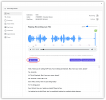
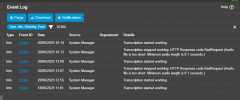
What I have found is "Transcription stopped working: HTTP Response code BadRequest ()" then starts working again anything from a few seconds to over 1 hour.
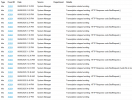
1749413262122.png
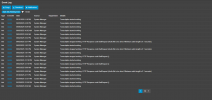
And the system log
1749413332925.png

Is there something on the 3CX server that needs to be adjusted ?
 
  • Like
Reactions: nathan0707
Same issue here following
 
Hello, what version of PBX do you have?
Also, do you see any correlation of the failed transcription with some specific person in the calls?
 
Hi Ivan,

Version 20.0 Update 6 (Build 700 Beta) but the same was happening on the previous version.

This is happening randomly across the board. I was the only person in the office on Sunday the 8th so the server was quiet however the transcript still failed. This is reflected in the screenshots I provided.
 
Could you locate the recording for 12:03PM which states error code "Audio file is too.."?
What exact size in bytes is it, what duration? Can it be played back w/o an issue?

Also, could you reproduce this with Verbose logs and share 3CXSystemService.log with me?
 
Last edited:
I have enabled Verbose logs waiting for it to happen again so we can look at the logs during that time frame
 
Could you locate the recording for 12:03PM which states error code "Audio file is too.."?
What exact size in bytes is it, what duration? Can it be played back w/o an issue?

Also, could you reproduce this with Verbose logs and share 3CXSystemService.log with me?
I have the log and sample audio that failed to transcribe, I sent it in a DM
 
Last edited:
Initially I thought to myself "There are rate limits with OpenAI". Sounds like you checked this, but it certainly acts you are hitting some type of limit. Otherwise why would it magically start working again with no changes? The bad request error could be an indication that OpenAI rejected your request due to non-payment, or exceeding some rate limits? It looks like maybe @ivank may have some other ideas about the cause.

On the other hand, some of the errors do seem to complain about parsing json "System.Text.Json.JsonRederException: 'e' is an invalid start of a value.". Perhaps this has nothing to do with your OpenAI account and something outside your control.
 
Its not the openai account. We have issues when its not busy and all settings on openai have been confirmed
 
I've studied the logs from nathan0707 around the time for the failed transcription and found 2 timed out requests to OpenAI.
One failed after 900 seconds with error 504, the other failed after 300 seconds with error 500.
In such cases gateways return non-json data that the library we're using does not expect and cannot parse, thus the error message is empty and the response code becomes a bad request (which is not).
 
  • Like
Reactions: Evolute IT
Thanks Ivan,

Nathan0707 is my Colleague. Is there a way to set the timeout or a possible retry ?
 
No, we don't control the timeouts of gateways.
Currently there are no retry attempts in the code. We will consider introducing retry policy for SP7.
 
  • Like
Reactions: Evolute IT
500 Internal Server Error indicates a generic server-side OpenAI problem, while 507 Insufficient Storage indicates a problem with the server's ability to store the requested data.

This sounds like a problem at OpenAI, not a problem with 3CX. Even if 3CX was passing incorrect data you should NEVER get a 500 error, rather the OpenAI API should return 400 "Bad Request". These intermittent errors are not something 3CX can fix.

Maybe, 3CX could cache the request and try again later, or how about offer a "retry" button. That's what we do in our 3CX Recording Manager tool:

1749751436639.png
 
I was thinking along the same lines of a retry button.
 
We'll add the ability to transcribe/retry selected recordings in SP7.
 
Could 3CX possibly also build in an auto-retry on delayed intervals, up to 3 times for example? If all retries fail, an admin could try later for a manual retry if needed on that recording.
 
  • Like
Reactions: Evolute IT
For our tool, we are going to put all the new recordings into a queue and process the recordings one at a time. That should reduce the bandwidth requirements and make it easy to automatically retry.
 
  • Like
Reactions: Evolute IT
Following as we're having the same issue (can't log a support request because it's on our own NFR-licensed server). All updates installed etc, firewall tests passed, no issues with API limits; Transcribing just randomly stops working - tends to be around 9am most days, then all calls after that aren't transcribed. The only thing that resolves it is restarting the server (even a firewall test/restarting all services doesn't get it working again), but it then reoccurs the next day.

I can't see any event logs etc to indicate it's failing; we get the same "16384" events, but the last one on our server is from 3 days ago to indicate it started working again - since then, we've had to restart the server twice due to this issue. Any troubleshooting suggestions?
 

Attachments

  • EventLog.png
    EventLog.png
    27.1 KB · Views: 7
I am also having the same issue, it randomly stops working and only a server restart will fix it. But then suddenly will stop working.
I wish there was an ability to restart transcription service without having to fully restart 3cx itself. Adding a retry button would help, ultimately there seems to be a problem with the transcription service.

1751033559918.png
 
Please install SP6 and provide feedback regarding the problem
 

Forum statistics

Threads
112,293
Messages
591,750
Members
165,420
Latest member
x1515