Transfer call failed message

Status
Not open for further replies.

Giuseppe Toommasone

Free User
Joined
Oct 23, 2021
Messages
8
Reaction score
0
I have just installed V18 in order to use phone calls directly form my CRM. I installed also on my Android phone Xiaomi 8 Pro. When I try a call on PC is ringing with screen make a call and same on my smartphone. After couple of seconds voice message says " Transfer call failed". What shall I do? Thanks in advance for any comment.
Giuseppe
 
Hi @Guiseppe Toomasone,

Is this happening for one or all of your extensions? If it only happens on one extension, try to create another and call from that one.

Do you have an Outbound rules set up that allows you to call where you're trying to call?

Can you create 2 normal extensions, not business with the CRM and see if it does it works without transfer call failed?
 
Last edited:
I have no outbound rules...
Hi @Guiseppe Toomasone,

Is this happening for one or all of your extensions? If it only happens on one extension, try to create another and call from that one.

Do you have an Outbound rules set up that allows you to call where you're trying to call?

Can you create 2 normal extensions, not business with the CRM and see if it does it works without transfer call failed?
 
Hi @Giuseppe Toommasone,

Do you have a registered SIP Trunk added to the system?

Add an outbound rule that is a "catch all" for testing, in the "Calls to numbers starting with prefix" add +,0-9 exactly how I put it, and route it through your SIP Trunk.

Test again, can you make a call?
 
Hi @Giuseppe Toommasone,

Do you have a registered SIP Trunk added to the system?

Add an outbound rule that is a "catch all" for testing, in the "Calls to numbers starting with prefix" add +,0-9 exactly how I put it, and route it through your SIP Trunk.

Test again, can you make a call?
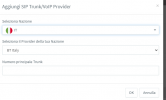
I added +,0-9 but when I try to input SIP Trunk system is asking for number
 

Attachments

  • Screenshot_18.png
    Screenshot_18.png
    11 KB · Views: 2
Hi @Giuseppe Toommasone,

Do you have a registered SIP Trunk added to the system?

Add an outbound rule that is a "catch all" for testing, in the "Calls to numbers starting with prefix" add +,0-9 exactly how I put it, and route it through your SIP Trunk.

Test again, can you make a call?
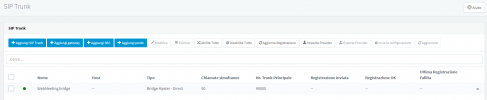
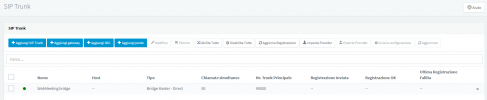
I have no registered SIP Trunk. On page is mentioned Webmeeting Bridge only..
 

Attachments

  • Screenshot_19.png
    Screenshot_19.png
    23.1 KB · Views: 0
Hi @Giuseppe Toommasone,

Let's start again.

Create 2 extensions: Extension A and Extension B.

Call Extension B from Extension A, does it work?
 
Hi @Giuseppe Toommasone,

Do you have a registered SIP Trunk added to the system?

Add an outbound rule that is a "catch all" for testing, in the "Calls to numbers starting with prefix" add +,0-9 exactly how I put it, and route it through your SIP Trunk.

Test again, can you make a call?
In panel page SIP Trunk is active...
 

Attachments

  • Screenshot_19.png
    Screenshot_19.png
    23.1 KB · Views: 0
In the Management Console >> Users >> Add.
 
In the Management Console >> Users >> Add.
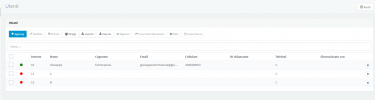
I did, but with red color. If I call from my Extension A or B is asking for eaving voice message
 

Attachments

  • Screenshot_21.png
    Screenshot_21.png
    21 KB · Views: 2
Alright, you would need to log in to extensions by clicking on each one and logging (Web Authentication link) in with the correct credentials (you can change the password), so that they are both logged in on the Web Client. Then try the call.

3.png

I'm going to suggest you call a 3CX Partner for further assistance in this regard.

You can also feel free to go through the 3CX Training, on our 3CX Academy pages.
 
Alright, you would need to log in to extensions by clicking on each one and logging (Web Authentication link) in with the correct credentials (you can change the password), so that they are both logged in on the Web Client. Then try the call.

View attachment 25411

I'm going to suggest you call a 3CX Partner for further assistance in this regard.

You can also feel free to go through the 3CX Training, on our 3CX Academy pages.
I have logged in with extension A & B. If I call with my estension 10 to A or B is working the call. NOw I would like to call external numbers...
 
Status
Not open for further replies.

Forum statistics

Threads
112,349
Messages
592,027
Members
165,513
Latest member
megalmazan