Transfer call from Trunk to Trunk

FG Admin

Customer
Joined
Jun 21, 2021
Messages
18
Reaction score
5
Hi everyone,

I have a situation where I need to supply a CRM platform with a number for inbound and outbound calls. The number is provisioned to 3CX via a trunk from a physical VOIP GSM gateway. The platform uses SIP URIs, and after reading some discussions here, I managed to make it work with 3CX for inbound calls (to the SIM card) as follows:

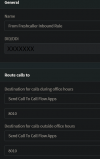
When the inbound call reaches the GSM gateway, it is transferred to 3CX via the trunk. The trunk settings are configured to route (forward to an outside number): AAAAA. An outbound rule with the prefix "AAAAA" is set to make outbound calls on the platform's trunk.

The platform's trunk is set with the domain part of the SIP URI as the "Registrar/Server/Gateway Hostname or IP," and the Type of Authentication is set to "IP Based." In the outbound parameters, some values were adjusted to make a SIP invite with the right values in the SIP fields that the CRM platform expects (some of these include the "Remote Party ID - Calling Party" fields).

This inbound routing is working successfully.

The issue arises with outbound calls:

The CRM dialer is used to make a call to "BBBBB." This call reaches 3CX on the platform's trunk, which is configured to route to (forward to outside number): CCCCC. An outbound rule with the prefix "CCCCC" is set to make outbound calls on the GSM gateway's trunk. However, here's where the problem occurs.

According to the SIP invitation sent from 3CX to the GSM gateway, the called number is "CCCCC" and no longer "BBBBB," so the actual called number doesn't reach the gateway.

Is there any way to achieve this using a CFD or C# code? Perhaps something that uses the "ActiveConnection.ExternalParty Property," for example?
 
From what I understand, what you're trying to do resembles an unsecured DISA.
I don't recommend this because anyone could send a call to your trunk and route it externally instead of directing it to a 3CX DN.

The issue is that 3CX is a PBX, and you're trying to use it as a softswitch.
Don't try to make a dog meow; dogs are meant to bark.

I know at least three solutions, not supported by 3CX, that could achieve this, but they would compromise your configuration and expose it to hacking risks, which wouldn't be beneficial.

I have an idea: why don't you start by explaining the goal behind all of this?
Then we can suggest solutions rather than trying to find a "solutions" for your "solution".
 
I want to use a SIM we own in a CRM that can't provide numbers in the country of origin of said SIM (maybe they can but for an obscene amount of money "and it's a maybe").
 
Alright, so far, so good.
Why does the CRM need to route the call through 3CX only to exit immediately without any interaction?
Isn't the CRM supposed to call directly through the SIM gateway ?

What's the name of the CRM?
 
The better question is what is the name of the gateway ?
Yeastar TG800 (which sadly doesn't know what a SIP URI is).
The CRM that is using a SIP URI is Freshworks.
3CX stands between them to sort of "translate" (since it's our main and only PBX, I thought well why not ?).
 
Instead of using the SIP URI function in Freshworks, use the Click2Call API Edge/Chrome extension.

This way, agents can dial directly from their 3CX application by clicking on the phone number in Freshworks.
There's no need to route a call into 3CX only to send it back out immediately.
Not only would this occupy two simultaneous calls from your license, but it's also not designed for that.
The phone application should be 3CX, not Freshworks.

This way, you'll be able to make outbound calls on the trunk of your choice without losing the suffix (the number to be dialed).


  • Click to Call – Launch calls straight from Freshworks CRM via 3CX, using the 3CX Click2Call Browser extensions for Google Chrome and Microsoft Edge.


Currently, newer versions of Google Chrome and Microsoft Edge show an additional pop-up notification before showing the 3CX dial pad. 3CX have created a simple method to restore single click calling, to streamline the user experience ;
https://www.3cx.com/blog/releases/1-click-dial/
 
Not only would this occupy two simultaneous calls from your license
That I know.
But they wanted the journaling and agents reports inside Freshworks and the relevant department is using a different Freshworks account than the one currently occupying my CRM integration in 3CX so no call journaling, and we are not big enough for a multi tenancy supported licence (we are currently on an 8 SC pro licence).
 
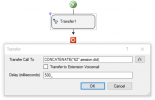
If you still want to do this, no matter all the risks explained by Guillaume, you can route inbound calls to a CFD app, and this app can take the called number from the session.did variable, and then route the call to a SIP Trunk again using the Transfer component.
 
  • Like
Reactions: Guillaume Bourgeois
1729530068717.png
 
The problem with that method as I understood it when I read about in the forums is that the session.did will only be populated when there is an inbound DID Rule, and I can't make such a rule because what will I set the Route to ?
 
That was a stupid question, I guessxD, I will try it out and get back.
 
Code:
Leg L:1988.2[Unk?:8010] is terminated: Cause: BYE from local
[CM505003]: Provider:[From Freshcaller Trunk] Device info: Device Not Identified: User Agent not matched; Capabilities:[reinvite, replaces, able-no-sdp, recvonly] UserAgent: [] PBX contact: [sip:[email protected]:5060]
[CM503014]: Call(C:1988): No known route from Line:10031<<XXXXXXX to target: <sip:[email protected]:5060/UDP>
Call(C:1988): from Line:10031<<XXXXXXX to 62 doesn't match any outbound rule. No outbound rule could be selected.
[Flow] Target endpoint for 62 can not be built!
[CM503010]: Call(C:1988): Making route(s) from Line:10031<<XXXXXXX to <sip:[email protected]:5060/UDP>

I got the following, the 62 is the prefix I use to direct towards the relevant Outbound rule. (I redacted 3CX FQDN, IP
and Number)

1729536109529.png1729535936495.png
 
[CM503014]: Call(C:1988): No known route from Line:10031<<XXXXXXX to target: <sip:62@3cx.com:5060/UDP>

Did you remove the phonenumber after 62, or was it never added?
 
It was never added.
 
What does your SIP URI look like?
 
It looks like you don't have the session.did variable populated. You need to ensure that you have an inbound did rule in place for these calls. Something you can do in order to have it populated for all calls is creating an inbound CID rule matching the wildcard *, so all the calls match.
 
Last edited:
It looks like you don't have the session.did variable populated. You need to ensure that you have an inbound did rule in place for these calls. Something you can do in order to have it populated for all calls is creating an inbound CID rule matching the wildcard *, so all the calls match.
Alright the CID did something and now the called number appear in the log but for some reason I can't get the call to match any outbound rule and instead I get this:
Code:
10/22/2024 08:11:45 AM - Leg L:1997.2[Unk?:8010] is terminated: Cause: BYE from local
10/22/2024 08:11:40 AM - [CM505003]: Provider:[From Freshcaller Trunk] Device info: Device Not Identified: User Agent not matched; Capabilities:[reinvite, replaces, able-no-sdp, recvonly] UserAgent: [] PBX contact: [sip:[email protected]:5060]
10/22/2024 08:11:40 AM - [CM503014]: Call(C:1997): No known route from Line:10031<<callerNumber to target: <sip:[email protected]:5060/UDP>
10/22/2024 08:11:40 AM - Call(C:1997): from Line:10031<<callerNumber to 62+callednumber doesn't match any outbound rule. No outbound rule could be selected.
10/22/2024 08:11:40 AM - [Flow] Target endpoint for 62+callednumber can not be built!
10/22/2024 08:11:40 AM - [CM503010]: Call(C:1997): Making route(s) from Line:10031<<callerNumber to <sip:[email protected]:5060/UDP>
I tried to add the CFD's Ext to the appropriate outbound rule but it didn't help.
1729581636177.png
Weirdly enough, If I copied 62+callednumber and dialled it from the web dialler, the call goes through normally.
 
Last edited:
I enabled verbose and got this in the Activity log:
Code:
10/22/2024 1:53:13 PM - Call(C:2065): from Line:10031<<callerNumber to 62+calledNumber doesn't match any outbound rule. No outbound rule could be selected.
10/22/2024 1:53:13 PM - [Flow] Target endpoint for 62+calledNumber can not be built!
10/22/2024 1:53:13 PM - Caller 'callerNumber' is not found in the list of allowed extensions: 8010-8010
10/22/2024 1:53:13 PM - Selected prefix: 62
10/22/2024 1:53:13 PM - Looking for outbound rule: dialed = [62+calledNumber], processed: [62+calledNumber]; from-ext:
10/22/2024 1:53:13 PM - [Flow] Building target endpoint to 62+calledNumber from "callerNumber:From Freshcaller CID Rule" <sip:[email protected]:5060>
The issue seems to be that the caller extension is being used as the callerNumber instead of the CFD extension. This callerNumber isn't included in the list of allowed extensions, which currently consists of only 8010. When I try to add the callerNumber as an allowed extension in the outbound rule, I get an "Invalid value" error.

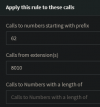
When I remove the existing extension groups that are allowed to make calls using this prefix, Leaving the rule blank, except for the prefix and route, the issue is resolved but on the other hand would allow any user to use this prefix to make calls.

So, Is there any solution to this predicament?
 
Last edited: