Solved Trouble making international calls

Status
Not open for further replies.

amannick

Gold Partner
Joined
Feb 26, 2021
Messages
102
Reaction score
13
I am facing trouble international calls for example I am trying to call France so I have to put 01133Number to complete the call. In fact I have to add 011 before every country code to dial respective number. I have enabled allowed countries still no luck.

USA just works fine as I just dial the number number with area code but issue is with international calls.


is there a way I can avoid 011and country code to dial the number


Thanks
 
  • Like
Reactions: amannick
@amannick

I'd recommend disabling E164 processing altogether and just manage outbound calls via the Outbound Rules. If your SIP provider requires the 011 prefix to route calls to international numbers, you can configure your outbound rule used for international calls to match these calls and then simply prepend 011 before it gets sent out to the SIP Provider.

You could check the link Saqqara provided and our training material here for more information on configuring Outbound Rules.
 
  • Like
Reactions: amannick
Dear @ChrisC_3CX and @Saqqara


Thank you for giving me the solution. In some cases where I have country as United States I removed E164 and it worked like a charm.

But my other client is from Mauritius and I removed E164 for him and then he can't even dial out call. But when I enable and dial call using 01133(France)(Number) it works for example

if E164 is enabled I dial out 01133156529600 like this and it connects

But if I disable E164 and try +33156529600 it won't even let me dial.

log says - 06/26/2021 12:20:24 AM - [Flow] Target endpoint for 33156529600 can not be built!

Please guide what am I missing ?


Thank you
 
If you are going to dial numbers using a leading +, and want the correct prefix, for each type of call to be prepended, then using E164 might be the way to go.
 
If you want to omit using E164 processing though, you could configure your Outbound Rules to match numbers starting with the + sign and just reformat them by stripping it and prepending 00.

How is your outbound rule for international calls currently configured?
 
  • Like
Reactions: amannick
Hey @leejor and @ChrisC_3CX


Thank you for prompt response and I regret the delay at my end.

I don't think I understood what is E164 is and how it works? Can you share an example of Outbound rule I should create in my situation ...

"
if E164 is enabled I dial out 01133156529600 like this and it connects

But if I disable E164 and try +33156529600 it won't even let me dial.

log says - 06/26/2021 12:20:24 AM - [Flow] Target endpoint for 33156529600 can not be built!
"

Seems I tried creating outbound rules and it didn't work out well. I am sure I am making a silly mistake.


Thanks
Aman
 
E.164 Processing will essentially take numbers dialed in E164 formatting and will convert them to a more compatible format containing only digits. Due to the fact that the configuration you require is not that straight forward, I recommend disabling it altogether and only using Outbound Rules to reformat your dialed numbers.

For numbers containing the + sign, you could have you Outbound rule strip it and prepend 00 as mentioned in my previous response.
 
  • Like
Reactions: amannick
E.164 Processing will essentially take numbers dialed in E164 formatting and will convert them to a more compatible format containing only digits. Due to the fact that the configuration you require is not that straight forward, I recommend disabling it altogether and only using Outbound Rules to reformat your dialed numbers.

For numbers containing the + sign, you could have you Outbound rule strip it and prepend 00 as mentioned in my previous response.
Hey Chris

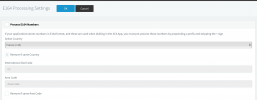
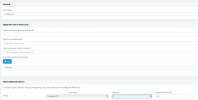
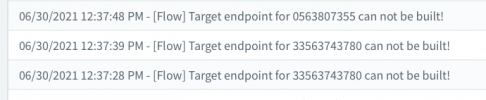
I made following changes but no luck can you check the screenshot and confirm? What Am I doing wrong ? PS E164 is disabled.


E164 Disabled

1625037016355.png

Outbound Rule

1625036765445.png


Error Log - Not able to make outbound


1625036904316.png
 
The Outbound Rule fields seem out of place, what browser are you using and what version of 3CX?

Also, what exactly did you dial and what do you need to be sent out to the provider?
 
  • Like
Reactions: amannick
Hey @ChrisC_3CX

I am using google chrome.

here is the version details

1625049151042.png


ProductProfessional Annual
Version Number16.0.9


My Outbound rule looks like

1625049295015.png


1625049324177.png


I am trying to dial French number for example - +33156529600

When I had E164 Enabled I was able to dial out as 01133156529600

but since I disabled E164 not able to call out.


Thanks
 
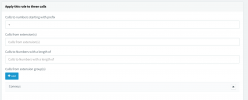
In that case, try the following configuration for the Outbound Rule that matches the + prefix:

1625052492891.png


Let me know how it goes.
 
  • Like
Reactions: amannick
  • Like
Reactions: ChrisC_3CX
It worked thanks man.
Glad to hear that!

On your previous question regarding prefixes, do note that since this Outbound Rule is stripping one digit and then prepending 011, I don't think you would be able to use it for any other prefixes.

However, you might need to create additional Outbound Rules to match other cases as well. It all depends on how the users of this PBX are dialing numbers.

For instance, consider number 01133156529600. If users trying to reach use any of the following formats:

+33156529600
0033156529600
01133156529600

Depending on what the provider accepts, you would have to reformat the number accordingly. In your case, you mention your provider requires the following format: 01133156529600
This means that you would need an Outbound rule for each of the three possible number formats shown above.

1. +33156529600
Here, you'd need an Outbound Rule to match the + sign, strip it and then prepend 011. This is the rule you already created.

2. 0033156529600
Here you need:
Prefix: 00
Strip: 2
Prepend: 011

3. 01133156529600
The number here is already in the correct format so you do not to strip anything nor prepend.


You might want to consider also using the "Digit Length" field to further control which Outbound Rule gets matched based on the number dialed. Always remember that Outbound Rules are checked from top to bottom. If the checked one fails to match, it will check the next one and so on.

Hope this helps!
 
  • Like
Reactions: amannick
And all of this is why the E164 options exist.

When someone dials a number beginning with a +. It could be a local call, a national call, or an international call, each requiring a different prefix depending on the destination. The E164 rules that you customize, let 3CX know exactly what prefix to change the + sign to, depending on the type of call. The outbound rules then deal with the "new" number, that now has the correct prefix, rather than a leading +.

The same outbound rules will also deal with numbers dialled in the "normal" way, using the correct numerical prefix.
 
Last edited:
  • Like
Reactions: amannick
Glad to hear that!

On your previous question regarding prefixes, do note that since this Outbound Rule is stripping one digit and then prepending 011, I don't think you would be able to use it for any other prefixes.

However, you might need to create additional Outbound Rules to match other cases as well. It all depends on how the users of this PBX are dialing numbers.

For instance, consider number 01133156529600. If users trying to reach use any of the following formats:

+33156529600
0033156529600
01133156529600

Depending on what the provider accepts, you would have to reformat the number accordingly. In your case, you mention your provider requires the following format: 01133156529600
This means that you would need an Outbound rule for each of the three possible number formats shown above.

1. +33156529600
Here, you'd need an Outbound Rule to match the + sign, strip it and then prepend 011. This is the rule you already created.

2. 0033156529600
Here you need:
Prefix: 00
Strip: 2
Prepend: 011

3. 01133156529600
The number here is already in the correct format so you do not to strip anything nor prepend.


You might want to consider also using the "Digit Length" field to further control which Outbound Rule gets matched based on the number dialed. Always remember that Outbound Rules are checked from top to bottom. If the checked one fails to match, it will check the next one and so on.

Hope this helps!
This is perfect thanks @ChrisC_3CX


Thank you once again!!
 
  • Like
Reactions: ChrisC_3CX
You're very welcome!

Please feel free to start a new thread should you require additional information or assistance!
 
Status
Not open for further replies.

Forum statistics

Threads
111,974
Messages
590,081
Members
164,899
Latest member
mazet