Troubleshooting Fanvil i32V No Video Issue

Status
Not open for further replies.

3CXfan

Customer
Joined
Sep 14, 2020
Messages
47
Reaction score
2
  • 3CX Version, Standard Annual 16.0.7.1078
  • Server OS, Windos 10
  • Is the 3CX Server Hosted and where? On-Prem
  • IP Phone Make/Model/Firmware: Fanvil i32V v2.8.0.6949 (Up To Date)
  • Provisioning Method: Local / VPN / STUN / SBC: Local
  • Trunk Provider or Gateway Make/Model: UniFi Dream Machine Pro
  • Has the Firewall Checker passed: YES
  • Are custom Phone Templates being used: NO
Fanvil i32V is not on 3CX supported IP phone list but based on Fanvil's datasheet saying it is compatible with 3CX, I bought it and received a "custom template xml" file that allowed me 3CX to provision the i32V so this part was successful.

But just like this 3CX forum post, my 3CX is not showing/routing the video stream from i32V to a compatible device such as Fanvil X210 that I have. The post starter did not get an answer but I intend to get to the bottom of this.

Additionally, the i32V video stream is also not showing up on the 3CX mobile app on my iPhone so this issue is not receiving device specific.

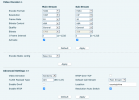
I have passed all Firewall tests so I don't think it's Firewall issue. I am thinking at this point there could be some Video settings that 3CX needs in order for streams to be sent/communicated properly over the 3CX network. Attached here is a screenshot of the i32V video settings configuration page. Does anyone see anything here that should be changed or updated to match protocols (bit rate, framrate, and codec etc) that are supported by 3CX?
 

Attachments

  • Screen Shot 2021-01-20 at 12.24.25 PM.png
    Screen Shot 2021-01-20 at 12.24.25 PM.png
    61.8 KB · Views: 92
3cx applications only support vp8 video codex , not h264 this is why it does not work on your iPhone

Using the webclient, this supports h264 codex - does this work ?

Log into the fanvil web gui and check the video settings

To get video, both devices have to support the same video codex - double check your settings.

There are no video settings for within 3cx as the handling of the video is done by the end devices
 
Last edited:
  • Like
Reactions: 3CXfan
Hi @Saqqara I have tried the webclient but unfortunately there is still no video.

About the 3cx app, how long has it been like this, that it doesn't support h.264? Isn't something this quite fundamental?
 
  • Like
Reactions: 3CXfan
As both devices are Fanvil, maybe reach out to their support team
 
  • Like
Reactions: 3CXfan
I have a similar setup i32v and i16v and I'm able to view video on my X7 handsets and last time I checked via a small window on the web client which I wish was much bigger. As others have said due to the h264 codec mobile device video isn't possible. There was a glimmer of hope on one of last years roadmaps saying "Extended support to many more Door phone devices" and that Fanvil is now listed as the preferred IP phone provider but there is now a new roadmap and this seems to have dropped off the list again. You mentioned a custom template, I just created an extension in 3cx and then entered those details in the SIP account detail settings on the i32V and it just worked.
 
  • Like
Reactions: 3CXfan
I have taken a look at my settings and compared to yours and I have: -

H.264 Payload Type - 117
Enable Onvif - ticked
RTSP Over TCP - ticked

I don't remember changing the H.264 Payload Type, I feel this was default.

I enabled Onvif and RTSP over TCP so that I could view the video on a different subnet and potentially use it with a CCTV system. I can't remember trying it before I made these changes so whether it makes a difference I can't tell you but it can't really do any harm trying. Remember to take a backup of the config first.
 
  • Like
Reactions: 3CXfan

Hi @ChrisC_3CX thanks for the link to the post where a definitive answer was given.

Disappointing to say the least, because it's not just my i32V that is unsupported, but also all other Fanvil video phones on 3CX's "Supported IP Phnes" page.

Why is the lack of support for H264 not explicitly stated on this support page? I bought Fanvil i32V specifically under the impression that 3CX would support video calls, but now it's too late for me to return.
 
As both devices are Fanvil, maybe reach out to their support team
I did, and they promptly provided several troubleshooting steps to get the video working between Fanvil i32V and their H264 compatible IP phones like X210 that I have.

The issue now is, with remote working almost mandatory right now, having the video from the intercome natively on the 3CX app is crucial.

So frustrating that I have to look for alternatives like Linphone etc because I can't stay natively on the 3CX platform. I don't even know at this point what other gotchas there are when using these other apps, if it's even possible.
 
There was a glimmer of hope on one of last years roadmaps saying "Extended support to many more Door phone devices" and that Fanvil is now listed as the preferred IP phone provider but there is now a new roadmap and this seems to have dropped off the list again.
Sigh sigh sigh.. why why why 3CX?
 
H264 works on the Webclient and IP Phones that work with it. Over the SBC or not.

The mobile apps and Windows client only support VP8.

I know, it's stupid. We all know.
 
Based on everyone's feedback so far, the only way to get H264 calls to Fanvil i32V and other intercoms is by using an external SIP app.

But I have issues registering these SIP apps to 3CX. So far I have tried Linphone and Castel but they are both stuck on "Connection in progress" and "Registration in progress" respectivvely and eventually registration would fail.

For example, Linphone would pop up message: "Cannot reach server: either it is an invalid address or it may be temporary down."

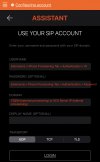
I really didn't think it would be this hard to link a SIP app to 3CX so attached here is a screenshot of Linphone's setup page for SIP account, can anyone notice what I am doing wrong here?

I have already unchecked in Extension > Options"
  • Extensions > Options Tab > Disallow use of extension outside the LAN
  • Extensions > Options Tab > Block Remote Tunnel Connections
What else could be wrong? My 3CX native app works fine inside or outside network so I don't think it's my firewall
 

Attachments

  • IMG_4B59FDB4B9FF-1.jpeg
    IMG_4B59FDB4B9FF-1.jpeg
    491.8 KB · Views: 46
Status
Not open for further replies.