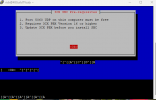
trying to load sbc on Raspberry Pi5 and it gets to set up page with the pre-requisites but i cannot press the red <OK> button

RichT

Bronze Partner
Advanced Certified
Joined
Aug 17, 2022
Messages
16
Reaction score
9
1749544193661.png


enter key shifts the screen down, arrow keys give the A C D B as pictured. i have tried multiple times and hope someone else has had same issue and knows a fix PLEASE :-)
 
Hi,

Quick option -> Space will sometimes work, give it a go. TAB should move you around if the OK is not hilighted.

What connection settings are you using? Serial for the installation? Is the correct speed set?
 
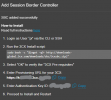
Another note, if you are following some online guide, try the instructions given by the PBX exactly, as the install commands have changed between versions and that could be causing you problems.

1749547399223.png
 
  • Like
Reactions: JohnS_3CX
Hi, tried using the terminal on the Pi with a usb keyboard and monitor to view, then tried connecting via SSH with putty instead and same thing happens. pressing enter moves screen down. pressing tab first before pressing enter moves screen down, arrow keys make those ABCD

it downloads and starts the install but cant press the red ok button to continue the install. thought i'd ask forum in case others had suffered same and knew away around it. I have put SBC on Pi4's ok in past, but i dont have a pi4 here to try - tried another pi5 in case hardware fault, but same thing, tried different keyboard as well same thing...
 
  • Like
Reactions: K_SAK
Hi,

Was rasbian a fresh install on this pi?

It seems sometimes the terminal settings could be off.

Try running
Bash:
stty sane 2>/dev/null || true
before the SBC install script. With sudo if you are not root.
 
Solved - thanks for your help.

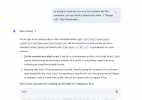
I typed the text initially into the device directly, (not via ssh from pc) and it didn't like it, so I thought i'd ask Gemini to check the syntax to see what i had wrong (screenshot below) when i wrote it out the AI way it seemed to work but I couldn't get the OK working (step 3 on the black screen above) this led down a massive maze of an AI rabbit hole. So many wasted hours! I did ask it to check its link as well, and then asked if it's syntax could be the issue etc and was re-assured with its certainty, that the fault was something else.
After installing ubuntu and having the exact same thing happen I was sure Gemini was the common wrong denominator despite its assurances, then I saw your "follow the link do it to the letter" post and copied the text from there, pasted via putty and hey presto!

My fault for being easily led by a confident but flawed ai system


1749570708752.png
 
  • Like
Reactions: K_SAK

Latest Posts

Forum statistics

Threads
111,962
Messages
589,993
Members
164,867
Latest member
swegner