Two phones unable to register

httadmin

SMB User
Joined
Jul 14, 2025
Messages
17
Reaction score
2
We have someone using the free version of 3cx , up until a couple of weeks ago they had two router phones registered without a problem. They then went to "no service"


I popped to take a look this weekend at them and its an odd one to say the least. I had them factory reset the phones to get rid of any IP blacklist problems before I went to go look at them,


I then deleted the phones from the management console and went through the process to add them again through provisioning links


They provisioned fine getting all account details etc from the server, but still would not register and are still saying no service.


The phones are Yealink, T43U and T42U
 
Are the phones provisioned as router phone or over an sbc?
 
provisioned as router phones
 
Hi,

Factory reset would not get rid of blacklist if that was the issue - if the IP somehow got backlisted it would stay so until the blacklist expiry. A blacklist issue should show in logs to some extent.

Was any change done to the network locally that might prevent the SBC to reach out?

Best,
KS.
 
I reset the phones then waited over 24 hours to allow the blacklist to naturally expire.

As far as I can tell nothing local has changed , it is just a basic internet setup without any complicated firewall etc.

The SBC's must be reaching out however as they are getting the config file/data from the server?
 
What is their firewall?

If you bring up cmd and type telnet <3cx FQDN> 5090 and press enter you should see a return of APK

if you dont get this, port 5090 is being blocked.
 
  • Like
Reactions: KyriacosS_3CX
Is there a chance any other device is active in the network, keeping the blacklist going? Logs not showing anything?
 
There is no mention of the blacklist in the logs , the logs show the provisioning file being requested and successfully sent
 
Just to follow on from this, I've tried this from a different phone (another T42U which works fine on an on prem 3cx) at a completely different location / network (one already fully configured for 3cx so I know everything firewall related is good and it will not be blacklisted) , and provisioned it .... same result , provisions fine but then will not register.

Think this rules out the network and handsets
 
Works fine with an on prem - as in you set it up as a router phone outside of the network or it was set up locally?

have you checked you're on the correct firmware for the phone? Which option did you select when you came to set up the phone to be a router phone?

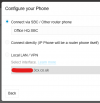
1752502327809.png
 
The handset that I used to test it from another location was from an on prem 3cx system just configured as a standard phone, I wiped it and then provisioned it to the problematic server thus eliminating the network and handsets that have the original problem as I know the network in this other location is already set up for 3cx,

The screenshot you attached is correct what I saw and I selected connect directly (IP Phone will be a router phone itself) ... I also tested it through the old generic phone method to see if that made any diff and again same result.
 
Just to be thorough..

you re provisioned the borrowed phone as a router phone successfully? to the same extension? At the same network that you're having problems with?
 
The borrowed phone I provisioned at another location (call it Site B) , this provisioned to the problematic 3cx fine but then after provisioning would not register ...

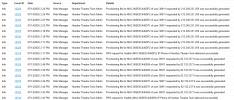
All I see in the logs as they are restricted in SMB is the following:

1752503255815.png

the 213 address is site B , the 82 address is the companies actual premises
 
Humber Theatre is just down the road from me lol.

Have you tried restarting the pbx?
 
Lol another Hull lad eh ? small world !

Another limitation of the SMB version it seems , I cant do a restart from the admin panel ....
 
Aye,

I think you can do it from the customer.3cx.com portal IIRC

Also, how many phones have been provisioned on the 3CX whether they're registered or not? I think theres a limit of 3.
 
Aye,

I think you can do it from the customer.3cx.com portal IIRC

Also, how many phones have been provisioned on the 3CX whether they're registered or not? I think theres a limit of 3.
No such option,

They did actually have more than 3 phones but I cleaned this down yesterday as the person who uses this system had a "play" in the admin panel; so it needed some cleaning up lol

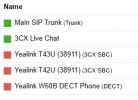
3 phones , 2 of which are SBC's and 1 is a DECT done through STUN although looking at it I think that one is in the same boat and that is at another location where there is just basic home internet.

1752504137785.png
I really want to get the PBX restarted but with no support and no control to do this myself then I am stuck really.
 
Are no phones working then? I didnt think STUN was an option on SMB.
 
I got it working , cant remember how but it was working for a period of time. I suspect it stopped working around the same time as the other phones. Nothing network has changed , mobile phone clients and web clients work fine ... just very odd and something I have never seen in the 50+ 3cx installs I have done for my work (although we don't use SMB)
 
just looking , seems similair :


Members Online Now

Forum statistics

Threads
111,831
Messages
589,277
Members
164,660
Latest member
RJenkinsROCK