UDM-PRO Firewall Problem with 3cx Debian

Status
Not open for further replies.

jst2

Free User
Joined
Jun 21, 2019
Messages
36
Reaction score
6
This used to work fine, but suddenly it stopped working when I needed to change the 3cx IP doing a backup, reinstall and restore.
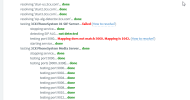
1667951253981.png


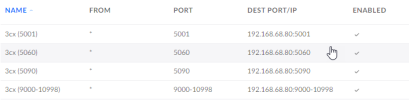
I have setup port forwarding on the UDM-PRO as shown below.
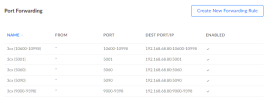

1667951296476.png

The rules for port 5060 and 5090 are the same. Yet, 5090 is working and 5060 isn't.

What am I missing? Any help is appreciated. I have also posted this on Unifi Community.
 
The configuration information you provided doesn't give quite enough information. Can you please check/confirm that UDP and TCP forwarding for port 5060 is enabled.

Also, you have 2 separate forwarding rules for the RTP ports and there should only be one that covers all UDP ports from 9000 to 10999.

If you haven't already seen it, read this page for the full router and firewall configuration required by 3CX.
 
This most probable indicates that port 5060 is not opened for both TCP and UDP. You may also check the list of the required ports and protocols below:
https://www.3cx.com/docs/ports/
 
@Marconi and @TheodorosG_3CX Thank you for getting back to me!

I have now adjusted my RTP rule and included details for my 5060 TCP/UDP rule as shown below. Unfortunately, the problem is still present. I would like to add that these rules worked until I had to change the IP (192.168.68.80 is the new IP). Any other suggestions?

1668019331677.png

1668019346822.png
 
OK, your 3CX Port 5060 rule is correct which means that the problem is somewhere else on your system. The other things you can check are:
  1. Network Settings: Is the selected network card interface showing the correct IP address? (It's worth going to this page and click on the OK button anway just to make sure that the settings are applied correctly)
  2. Network Settings: Is the option Automatically Bind to IPv6 Adapters enables? Turn it off if it's on (and restart the SIP Server service as advised).
  3. Is there another device on your network with the same IP address (192.168.68.80) as your 3CX server?
  4. Is the UDM-Pro fully up-to-date (firmware and software)?
  5. Have you check the other Routing & Firewall rules on the UDM-Pro? Make sure that there aren't any static routes or firewall rules interfering with prot forwarding.
Sorry for all of the questions, but network issues can be a pain to resolve at times.
 
  • Like
Reactions: N_G
  1. Network Settings: Is the selected network card interface showing the correct IP address? (It's worth going to this page and click on the OK button anway just to make sure that the settings are applied correctly)
  2. Network Settings: Is the option Automatically Bind to IPv6 Adapters enables? Turn it off if it's on (and restart the SIP Server service as advised).
  3. Is there another device on your network with the same IP address (192.168.68.80) as your 3CX server?
  4. Is the UDM-Pro fully up-to-date (firmware and software)?
  5. Have you check the other Routing & Firewall rules on the UDM-Pro? Make sure that there aren't any static routes or firewall rules interfering with prot forwarding.
@Marconi Thank you for your great feedback!

On 1. and 2.
It shows my local an external IP correctly. Automatically bind to IPv6 Adapters was turned on and so I turned it off. Also restarted the SIP Server service.

On 3.
No, the IP is available exclusively for 3cx.

On 4.
Yes, it is fully updated (UDM-PRO - 1.12.30).

On 5.
There are currently no static routes and no other firewall rules seems to overlap with the 3cx port rules.


The only apparent change I can see is that I have changed the 3cx network from DHCP to static during the re-install.

Any other suggestions?
 
  • Like
Reactions: N_G
Good news!

The firewall problem went away after rebooting the UDM-PRO.

Afterwards, I couldn't make any calls, but I fixed that by re-provisioning the phones.

Thank you for all the feedback! Especially @Marconi 's comment about network settings steered my own thought process in the right direction. :)
 
I'm glad you've got it all sorted.
 
Status
Not open for further replies.

Forum statistics

Threads
111,974
Messages
590,081
Members
164,899
Latest member
mazet