- Joined
- Mar 8, 2023
- Messages
- 4
- Reaction score
- 1
Hello All, I'm pretty new to 3CX and just getting it set up,
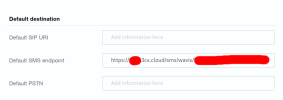
I've registered an SMS-compatible number with Wavix. I've set up sender IDs and the DID is showing "Inbound SMS: Supported".
I've set up 3cx, Created a trunk for this number, enabled SMS and entered my Wavix API Key. I've added this trunk to a Ring queue and assigned a user to it.
Calling this number successfully routes to the user. If I log in as this user and go to chat, I can create a new SMS chat and send an SMS successfully. The SMS shows up as being from the numerical sender ID as expected.
However: When I send an SMS to this number, I can view the SMS in the Wavix SMS logs. I never see this SMS in 3CX. If I reply to the SMS chat sent from 3CX, the SMS also does not show up in 3CX anywhere. This reply message does show in the Wavix Logs.
Am I missing something obvious? Is there anything I should be checking?
I've registered an SMS-compatible number with Wavix. I've set up sender IDs and the DID is showing "Inbound SMS: Supported".
I've set up 3cx, Created a trunk for this number, enabled SMS and entered my Wavix API Key. I've added this trunk to a Ring queue and assigned a user to it.
Calling this number successfully routes to the user. If I log in as this user and go to chat, I can create a new SMS chat and send an SMS successfully. The SMS shows up as being from the numerical sender ID as expected.
However: When I send an SMS to this number, I can view the SMS in the Wavix SMS logs. I never see this SMS in 3CX. If I reply to the SMS chat sent from 3CX, the SMS also does not show up in 3CX anywhere. This reply message does show in the Wavix Logs.
Am I missing something obvious? Is there anything I should be checking?