


- Joined
- Jun 17, 2025
- Messages
- 1
- Reaction score
- 0
Hi All,
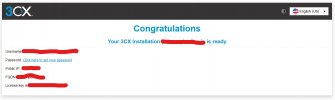
Spent a week on this now. See below, I can access the portal to upload the new license file and everything goes smooth. It tells me that the installation is successful but then I can't access the portal when I click on "Click here to set your password". VM is running in Windows 10 Hyper-V and DNS resolves to my public broadband IP internally and externally. After the below screenshot, I can't access the portal on internal or even external network using IP or FQDN. What is changing after I get the successful message below?
Spent a week on this now. See below, I can access the portal to upload the new license file and everything goes smooth. It tells me that the installation is successful but then I can't access the portal when I click on "Click here to set your password". VM is running in Windows 10 Hyper-V and DNS resolves to my public broadband IP internally and externally. After the below screenshot, I can't access the portal on internal or even external network using IP or FQDN. What is changing after I get the successful message below?


