- Joined
- Dec 23, 2024
- Messages
- 128
- Reaction score
- 11
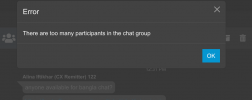
We are currently facing an issue with the 3CX group. When we try to add a new member, we encounter the following error:
To resolve this, we attempted to remove former team members from the group to make space, but unfortunately, we receive the same error when trying to remove existing members.
It appears that the group has reached its participant limit, and the system is not allowing any modifications (neither additions nor removals).
We kindly request your assistance in resolving this issue and helping us remove the former team members from the group
Please let us know if any additional information is needed.
Thank you in advance for your support.
"Too many participants"
To resolve this, we attempted to remove former team members from the group to make space, but unfortunately, we receive the same error when trying to remove existing members.
It appears that the group has reached its participant limit, and the system is not allowing any modifications (neither additions nor removals).
We kindly request your assistance in resolving this issue and helping us remove the former team members from the group
Please let us know if any additional information is needed.
Thank you in advance for your support.