Solved Unable to add Twilio trunk with auto-setup

Status
Not open for further replies.

notkelsey

SMB User
Joined
Mar 21, 2025
Messages
4
Reaction score
1
When trying to add a Twilio trunk, I make it to the screen that asks for Name and Limit to. When I click next, "Admin email required" appears at the top of the page in red and I can't proceed past that point. I currently have one user set up as the owner and that account has an email address. I don't see anywhere else to add an admin email address. Can anyone point me in the right direction?
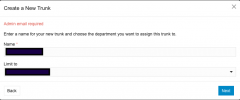
Screenshot 2025-03-21 at 9.34.50 AM.png
 
Hi @notkelsey

That is most probably an error coming from Twilio. Go to your Twilio account and check if your admin user has an email associated with it.
 
Every user has an email. The only place I found to add an additional email was under billing for notifications so I added an address there as well. I had an existing Twilio account that I use with a self hosted Enterprise version of 3CX. I created another Twilio account that is tied to the same organization to use for this project. I tried my original account and received the same Admin Email Required message. I created a third Twilio account, not affiliated with the existing accounts, and have received the same message.
 
Hi Kesley,

Can you please try again now and let us know if it's working?
 
It is working now. Thanks!
 
  • Like
Reactions: YiannisH_3CX
Glad we were able to assist.
 
Status
Not open for further replies.

Members Online Now

No members online now.

Forum statistics

Threads
111,831
Messages
589,277
Members
164,660
Latest member
RJenkinsROCK