Solved Unable to Assign New Main Trunk Number

Status
Not open for further replies.

MaxL

Customer
Joined
Sep 21, 2021
Messages
50
Reaction score
12
I am attempting to assigned a new "Main Trunk Number" to one of our SIP trunks. When I attempt to assign the new DID, the error "DID number is already in use" appears and won't let me save the changes. I confirmed there is no Inbound/Outbound rules and there is no other DIDs assigned to the extension I am attempting to route calls to. Any suggestions?
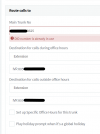
tempsnip.png
 
Hi @MaxL

I am guessing that you are trying to assign a DID already in the trunk as your main trunk number. IF that is the case then you will need to delete the DID from the your list of DIDs in the trunk and click OK to save the changes.
Then go back into the trunk and change the main trunk number to the new number. Click OK to save the changes.

Optionally if you need to re-add the previous main trunk number in the list of DIDs you can do so by adding it as a new DID in the trunk.
 
Looks like that did it. Thanks.
 
  • Like
Reactions: YiannisH_3CX
Glad I could assist.
 
Status
Not open for further replies.

Latest Posts

Forum statistics

Threads
112,324
Messages
591,897
Members
165,475
Latest member
lastshadow