- Joined
- Mar 29, 2023
- Messages
- 26
- Reaction score
- 2
I'm using a 3CX hosted instance of Version 20.0 Update 3 (Build 806 Release).
Steps I took.
1 - Added the phone to the extension using the Connect Directly option.
2 - Plugged the phone in (fresh out of the box). It booted up and almost immediately showed the users name on the display. However, it would not actually register and allow calls to be made.
3 - I checked the firmware and noticed that it was outdated, so I upgraded it using the file available at https://www.3cx.com/docs/phone-firmwares/ . The upgrade was successful, and the phone rebooted, but there was no change in behaviour.
4 - I factory reset the phone, expecting it to re-provision via RPS, but it did not.
5 - After the factory reset, it does have this in the phone's config.
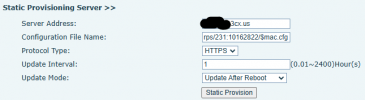
That is the correct extension number and URL for the server, but the formatting is completely different compared to another phone that is working.
6 - I tried updating the info in those boxes to match the formatting from another working phone, and substituting the MAC of the other phones config.
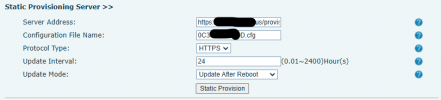
Still no luck.
Looking for suggestions.
Steps I took.
1 - Added the phone to the extension using the Connect Directly option.
2 - Plugged the phone in (fresh out of the box). It booted up and almost immediately showed the users name on the display. However, it would not actually register and allow calls to be made.
3 - I checked the firmware and noticed that it was outdated, so I upgraded it using the file available at https://www.3cx.com/docs/phone-firmwares/ . The upgrade was successful, and the phone rebooted, but there was no change in behaviour.
4 - I factory reset the phone, expecting it to re-provision via RPS, but it did not.
5 - After the factory reset, it does have this in the phone's config.
That is the correct extension number and URL for the server, but the formatting is completely different compared to another phone that is working.
6 - I tried updating the info in those boxes to match the formatting from another working phone, and substituting the MAC of the other phones config.
Still no luck.
Looking for suggestions.