Unable to Find Recording of Call from External Number to External Number

Sajjad.Khurshid

Customer
Joined
Dec 23, 2024
Messages
128
Reaction score
11
Hello Team,


We are facing an issue in our 3CX system where we are unable to locate or find the recording of a specific call. The scenario involves a call made from one external number to another external number (i.e., external to external call).


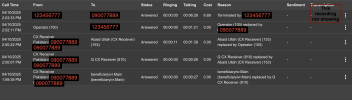
Please find the attached call scenario for reference.


I would like to understand:


  1. Why is the call not visible in the call recordings section?
  2. How can we retrieve or access this particular recording if it's available?
  3. Does 3CX support call recordings for external to external calls routed through the PBX?

Any insights or guidance on how to resolve this would be greatly appreciated.
1745424599960.png
 
Hi, call recordings are made on user level and not set by DIDs or the SIP Trunk. So if you have a DID that is routed to an external number without using any internal user, then that call is not recorded by default.

You may use this workaround, create a dummy extension, set in the mobile field the external number, then in the forwarding rules for the Available status enable the RMS (Ring Mobile Simultaneously) after that enable the call recording in the extension and apply all the changes.

Then for the DID instead of routing it directly to the external number, route it to the dummy extension and you will get the call recording for that external to external call.

Have a good day!
 
  • Like
Reactions: Evolute IT
Hi, call recordings are made on user level and not set by DIDs or the SIP Trunk. So if you have a DID that is routed to an external number without using any internal user, then that call is not recorded by default.

You may use this workaround, create a dummy extension, set in the mobile field the external number, then in the forwarding rules for the Available status enable the RMS (Ring Mobile Simultaneously) after that enable the call recording in the extension and apply all the changes.

Then for the DID instead of routing it directly to the external number, route it to the dummy extension and you will get the call recording for that external to external call.

Have a good day!
Thanks for sharing the details.


However, if you check the call log I shared, you'll notice that the current issue occurs when a call is received from an external number to an internal extension, and then that call is transferred to another external number.


In this scenario—when the call is bridged from one external number to another via an internal extension—we're unable to locate the call recording. Could you please advise where the recording is stored in such a case, or if it's being recorded at all?


Looking forward to your guidance.
 
if the user has enabled the recording and the call was established with that user, then you will get the recording file of that part of the call, if the user didnt answer the call and it just forwarded to an external number then there is not any recording of that part of the call.

As I said, the recording will exist on user level, so extension must has the recording enabled and any call that he answers then it will be recorded.
 
  • Like
Reactions: Evolute IT
if the user has enabled the recording and the call was established with that user, then you will get the recording file of that part of the call, if the user didnt answer the call and it just forwarded to an external number then there is not any recording of that part of the call.

As I said, the recording will exist on user level, so extension must has the recording enabled and any call that he answers then it will be recorded.
Thank you for the clarification. In our case, the recording was enabled for both users in question—extensions 100 and 153—and we do have parts of their call recordings available.


However, the issue is with the specific 6 minute 26 second segment where extension 100 connected two external numbers with each other. That part of the call is missing from the recordings. Could you please help us understand why this portion wasn’t captured, even though recording was enabled on the extension?
 
Thank you for the clarification. In our case, the recording was enabled for both users in question—extensions 100 and 153—and we do have parts of their call recordings available.


However, the issue is with the specific 6 minute 26 second segment where extension 100 connected two external numbers with each other. That part of the call is missing from the recordings. Could you please help us understand why this portion wasn’t captured, even though recording was enabled on the extension?
Dear, as I said, the ext 100 transferred the call to an external number, when transferred the ext is not part of the call anymore, that part of the call will not be recorded because there is not any user extension that is still connected between those two external numbers, if that was an audio conference then it's another story because the extension 100 has enabled the recording.

I hope you can understand it.
 
To put it plain and simply, if the call is not on an extension, you wont get the recording.

So an external caller talking with another external caller will NOT be recorded.

The only exception to this is if you forward to an extension, and they have ring my mobile enabled. The calls to that mobile phone WILL be recorded.

Otherwise, any other external parties will not be recorded.
 
  • Like
Reactions: Evolute IT
To put it plain and simply, if the call is not on an extension, you wont get the recording.

So an external caller talking with another external caller will NOT be recorded.

The only exception to this is if you forward to an extension, and they have ring my mobile enabled. The calls to that mobile phone WILL be recorded.

Otherwise, any other external parties will not be recorded.
Got it, thanks for the clarification.


Just to confirm—if the external number keeps changing (for example, in the case of a receptionist forwarding calls to different mobile numbers), how would the receptionist access that extension and update the number each time? Is there a recommended method or best practice for handling such scenarios?
 
You can do this through a call script, using the CFD. Call the script and have it pull the current mobile number, and then set a new one.
 
  • Like
Reactions: Sajjad.Khurshid

Latest Posts

Forum statistics

Threads
111,963
Messages
589,998
Members
164,868
Latest member
swegner