Solved Unable to get incoming SMS - Voxtelesys

Status
Not open for further replies.

BEAR.TECH

Silver Partner
Advanced Certified
Joined
Oct 25, 2019
Messages
22
Reaction score
5
Signed up for Voxtelesys today and went through setup. Setup allowed for outgoing SMS to be delivered to a mobile device but not vice versa. Voxtelesys confirms in their backend they are seeing the incoming hit their system - just doesn't pass through to 3CX. I have incoming rules to go directly to my extension. I have whitelisted their IP's just in case that was the issue.

Possible reasons to look into? TIA.
 
Have you ensured that the DID number is configured in the PBX in E164 format?
 
  • Like
Reactions: YiannisH_3CX
Also make sure your webhook is correct in Voxtelesys portal.
 
  • Like
Reactions: TheodorosG_3CX
Thanks for replies folks. Yes have tried with +1 and without, and webhook is correct (copy pasted).
 
In the event log, are you seeing any error related with the SMS?
 
Nothing in event log, unfortunately.
 
If you don't see anything in the event log this might also indicate that the SMS never reach the PBX.
As a first step, in case there is any previous open chat from the same number that you make the test, please ensure that this is closed. If the issue is still there check also in the provider portal whether the SMS are delivered.
 
Also check your routing again. Did you do the routing to the extension via management console or Webclient? Do you have an Inbound rule in place or you are using the main trunk number destination to route the SMS to your extension?
 
Thanks for the replies, gents. Confirmed that it is hitting Voxtelesys and they can see the contents of the message, just not hitting PBX. Inbound rule is set from management console to go directly to my extension.
 
Hi @BEAR.TECH,
We do see incoming messages coming to your number into our network, but it looks like there is either a firewall issue or cert issue on your webhook/IP as we do not see the 3CX responding.

Your IP looks local, do you have your firewall open for the HTTPS request?
Nathan is going to respond shortly with some more information on the intermediate certs.
 
Hi @BEAR.TECH ,

We took a look into this. You are using a custom FQDN and wildcard cert from GoDaddy.

You can check your FQDN (with port 5001) here: https://www.geocerts.com/ssl-checker or https://ssltools.godaddy.com/views/certChecker

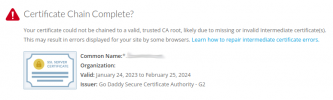
Are you able upload the complete/full cert so our backend can confirm it as a valid certificate?

You may need to install an Intermediate/chain certificate to link it to a trusted root certificate.

Screenshot from 2023-07-24 10-49-22.png

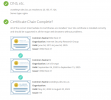
Example:

Screenshot from 2023-07-24 10-44-37.png

Some articles that may help:

https://www.godaddy.com/help/install-my-ssl-certificate-16623

https://www.godaddy.com/help/nginx-install-a-certificate-6722

https://www.godaddy.com/help/nginx-on-centos-7-install-a-certificate-27192
 
I opened 443 to 3cx.pstn.voxtelesys.net (23.155.18.55) with no change. The cert deal I'm going to have to do a little more research on and get back - currently not sure how to proceed with that as I show the cert is valid.
 
OK I fixed this easier than I thought. Incoming SMS now works. Geniuses in here!!
 
Glad to see the issue has been resolved.
Thank you Kevin and Nathan for the assist.
 
Status
Not open for further replies.

Forum statistics

Threads
112,065
Messages
590,578
Members
165,019
Latest member
rsaldin@advancedbrainspin