Solved Unable to get Router Phone to reporovision

Status
Not open for further replies.

healthy

Silver Partner
Basic Certified
Joined
Oct 26, 2012
Messages
148
Reaction score
13
We have had a site with a router phone (Fanvil X7C-V2) and 4 phones working for 6+ months. Today the entire site is down, the router phone is visible via IP, I can log into it, but it's not registering with the cloud 3CX hosted environment. I can ping the URL, and can access the web interface. Site's about a 2 hr. drive, would prefer to fix remotely, but we've tried everything we can remotely and I figured I would remote re-provision but that seems to do nothing. When I try to open the provisioning URL, it 404s out.

Any ideas before I start my drive? Thanks!
 
Hi,

1. Firstly try to have someone reboot the phones (power off / power on).

2. If this does not solve the issue, then look at the management console, and click on event log.
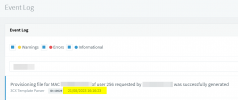
You will notice that once the phones come online, they will request their config files (check timestamps).
This confirms that provisioning is possible at the very least from the HTTPS port of the PBX.
1692626242966.png

3. Since they are router phones, check the SIP trunks section to confirm that the SBCs have gone green. If not then the phones may not be able to reach the tunnel port of the PBX

To conclude, if neither the HTTPS not Tunnel port are reachable, the phones will remain down until whatever is preventing them from either side is resolved (commonly internet access, firewall, DNS issues)
 
Thank you JohnS_3CX - I am able to see the phones getting provisioning successfully, and I can reach the 3CX console from the site (we have remote access to PCs onsite) but the phone itself appears not to. I tried reprovisioning and a reboot and now the phone is not coming up. Think I'll do a full factory reset and see where that takes me. Thanks again for your speedy response!
 
Did the SBC become green in the SIP Trunks page at least? I hope the SBC was not deleted by mistake or anything. You should find it there with the extension name and number if all is ok.

Before you factory reset, edit the extension in the MC and simply press OK (to refresh the RPS entry).
Following this, a factory reset should cause it to automatically reprovision again.
 
Turns out that factory resetting, forgetting the router phone and re-provisioning was necessary to get things back in order.
Thanks for your help!
 
Status
Not open for further replies.

Members Online Now

Forum statistics

Threads
111,834
Messages
589,287
Members
164,664
Latest member
dominik.pepel