Unable to make inbound calls

Status
Not open for further replies.

roshansimon

Free User
Joined
Jan 19, 2020
Messages
58
Reaction score
3
Hi

This is a new setup. Firewall checker passed for full clone NAT. SIP ALG is DISABLED. I have an public static IP for pfsense, nd public static IP for 3cx.
Followed the documentation for SIP trunk (as provided by the provider, but I'm unable to make inbound and outbound calls.

I checked the SIP provider's activity logs, and unable to see the call.
When I contacted the SIP provider, he says the call is goto the pfsense public IP, not 3cx.
If I set the network on the 3cx to dynamic, inbound calls work. How to fix this?

Second issue I'm having there is a delay of 1-2 seconds in audio.
 
Thanks @aws2p.

  • 3CX Version, Profession :16.0.493
  • Server OS, Windows 10 Pro
  • Is the 3CX Server Hosted and where? It is a local server
  • IP Phone Make/Model/Firmware Yealink T46S
  • Provisioning Method: Local
  • Trunk Provider or Gateway Make/Model : Ring Office
  • Has the Firewall Checker passed: YES
  • Are custom Phone Templates being used: NO
  • Network setup: Pfsense router/firewall behind ISP router . ISP router is in bridged mode, with 2 static Public IPs: PFSense and 3CX. Catalyst switch with VLANs behind the Pfsense. Phones and computers connected to the switch.
    I created IP Alias, Port Forwarding, Outbound rules on the PfSense. Let me know if you want any additional info that will aid in resolving the problem
  • Phone firmware : 66.84.0.95
 
Do you use VLAN dedicated to VOIP?
did you follow 3CX doc for PFsense settings with 3CX ?
https://www.3cx.com/docs/pfsense-firewall/
Is your SIP provider a 3CX supported one ? have you used 3CX template to create the Trunk ?
 
Do you use VLAN dedicated to VOIP?Yes
did you follow 3CX doc for PFsense settings with 3CX ? Yes
https://www.3cx.com/docs/pfsense-firewall/
Is your SIP provider a 3CX supported one ? Yes it is
have you used 3CX template to create the Trunk ? No... I missed that one... Let me complete that , and see if it fixes. Thanks aws2p
 
Stupid question , did you create almost one inbound rule and one outbound rule ?
Are the phones provisionned and registred green on 3CX side?
Are you able to call between phones internally?
 
Yes... I did . That's why calling works, only if I change 3CX network from static to DHCP. But I'm afraid it may be using the PFsense public IP, instead of 3CX.
If I assign static Public IP for 3CX box, firewall checker tests pass - All of them. Wondering whether the firewall checker is flawed.

Im just going to unpack other phones and test internal (extension-to-extension) calling.
 
Extension to Extension calling works when the static IP is configured also.
So I'm having trouble with inbound and outbound calling when on static IP.
No issues with calling on dynamic IP.
 
Yes... I did . That's why calling works, only if I change 3CX network from static to DHCP. But I'm afraid it may be using the PFsense public IP, instead of 3CX.
If I assign static Public IP for 3CX box, firewall checker tests pass - All of them. Wondering whether the firewall checker is flawed.

Im just going to unpack other phones and test internal (extension-to-extension) calling.
On your sip trunk, uncheck the auto discovery and use 5060 to test your inbound call. reboot your 3cx before running the test.
 
Thanks for the update... But auto discovery was always off.
 
Thanks for the update... But auto discovery was always off.
did you set the port to 5060? or it came from the template? Does your trunk have a private IP or public IP?
 
It is 5060.

Network setup:
Pfsense router/firewall behind ISP router . ISP router is in bridged mode, with 2 static Public IPs: PFSense and 3CX. Catalyst switch with VLANs behind the Pfsense. Phones and computers connected to the switch.
I created IP Alias, Port Forwarding, Outbound rules on the PfSense. Let me know if you want any additional info that will aid in resolving the problem
 
It is 5060.

Network setup:
Pfsense router/firewall behind ISP router . ISP router is in bridged mode, with 2 static Public IPs: PFSense and 3CX. Catalyst switch with VLANs behind the Pfsense. Phones and computers connected to the switch.
I created IP Alias, Port Forwarding, Outbound rules on the PfSense. Let me know if you want any additional info that will aid in resolving the problem
so, What i have understood is you can make call but you cannot receive calls. if you talk your mobile phone and call to a DID of Trunk, what msg do you get?

Check also you inbound nat rules in your pfsense firewall. should have same rules as outbound nat
 
Sorry... The problem I'm having is if I configure a public IP (3cx) on the 3cx , firewall checker passes all tests. SIP trunk also registers successfully.
However, I cannot place outbound or inbound calls. SIP trunk helpdesk tells me that the call is going to the public IP for the pfsense.

However, if I leave the network as dynamic on 3cx, calls are going thru successfully. I checked and all the calls are going thru public IP for Pfsense.

So this might be something on the PFsense. Is there a good document for NAT for PFsense - 3CX when you are dealing with multiple public static IPs? I have a strong feeling it is due to NAT.
 

Attachments

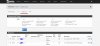
  • VirtualIP.JPG
    VirtualIP.JPG
    35.3 KB · Views: 5
  • Port preservation.JPG
    Port preservation.JPG
    61.5 KB · Views: 6
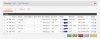
  • Port-Forwarding.JPG
    Port-Forwarding.JPG
    53.4 KB · Views: 6
Sorry... The problem I'm having is if I configure a public IP (3cx) on the 3cx , firewall checker passes all tests. SIP trunk also registers successfully.
However, I cannot place outbound or inbound calls. SIP trunk helpdesk tells me that the call is going to the public IP for the pfsense.

However, if I leave the network as dynamic on 3cx, calls are going thru successfully. I checked and all the calls are going thru public IP for Pfsense.

So this might be something on the PFsense. Is there a good document for NAT for PFsense - 3CX when you are dealing with multiple public static IPs? I have a strong feeling it is due to NAT.
Did you create a DID rule for inbound call and an outboud rule for outgoing calls?
 
Yes.. I did. That's why inbound and outbound calling works on dynamic IP(3cx).
i am confusing with dynamic and public ip. Your ISP is a Public Static IP or Dynamic? when you change from public ip to so called dynamic IP, do you want to say your Private local network IP?
 
Allow me to explain, kindly..

When I set 3cx to dynamic, 3cx picks the public static IP for the bridged PFSENSE (ISP router is bridged to PFSENSE). I want 3cx to NAT thru its respective public IP.
 
i am confusing with dynamic and public ip. Your ISP is a Public Static IP or Dynamic? when you change from public ip to so called dynamic IP, do you want to say your Private local network IP?
Its a nat related which is not being translate as it should. make sure you forward the 3CX Static IP to your public IP and 3cx Port.

Make sure to add the IP of your SIP Trunk in your whitelist
 
The public IP for the pfsense and 3cx are in the same subnet, on the end of the ISP.
 
Status
Not open for further replies.

Latest Posts

Forum statistics

Threads
112,367
Messages
592,135
Members
165,538
Latest member
3K8iMGWviZ